• After 15+ years, we've made a big change: Android Forums is now Early Bird Club. Learn more here.

Root [KERNEL] Plague Overclock Kernel for LG Esteem MS910 - UPDATED!

ok finally got my esteem backup, new rom and kernel.. i never knew what was the point overclocking that high because it really just kill your battery the only time i go pass 1.5ghz is when im playing a game and don't want any lag which don't even happen when im under 1.5ghz. 2.0+ is just really pushing your phone to limit where you never know might just shutdown permanently stay safe

i was thinking about adding the update kernel but no point i dont even use HDMI for the phone i have netflix on the ps3 and games to play on the ps3 (MW3):D;)
 
oh mine dont even handle it lol. I can set 2.1, but then just opening the app drawer freezes n it reboots, 2.2 it does it soon as its set. lol

I'm gonna try undervolting it some on the 2 new settings n if its handles it, run a benchmark n see if the scores increase or decrease.
If it was ok with you I would like to start playing your rom/kernel and I was wondering if I just needed to go to your github page and just get the repositories? I have a dual boot netbook with windows 7 and crunchbang x86. I just installed ubuntu 10.4 on to my external hard drive and got all the dev tools.
 
ok finally got my esteem backup, new rom and kernel.. i never knew what was the point overclocking that high because it really just kill your battery the only time i go pass 1.5ghz is when im playing a game and don't want any lag which don't even happen when im under 1.5ghz. 2.0+ is just really pushing your phone to limit where you never know might just shutdown permanently stay safe

i was thinking about adding the update kernel but no point i dont even use HDMI for the phone i have netflix on the ps3 and games to play on the ps3 (MW3):D;)
just casue it can go to 2.2 doesnt mean ya have to set it that high ;)
If it was ok with you I would like to start playing your rom/kernel and I was wondering if I just needed to go to your github page and just get the repositories? I have a dual boot netbook with windows 7 and crunchbang x86. I just installed ubuntu 10.4 on to my external hard drive and got all the dev tools.
yea the src is on my github. I even have scripts to build the kernel, modules, and install the madules to a specified dir. Just need to edit the paths the scripts and the name of your defconfig if you rename or use another one.
 
just casue it can go to 2.2 doesnt mean ya have to set it that high ;)

yea the src is on my github. I even have scripts to build the kernel, modules, and install the madules to a specified dir. Just need to edit the paths the scripts and the name of your defconfig if you rename or use another one.

Sorry posting this two times. I didn't realize my first one went through. Thanks again
 
Thanks PG and dam phone runs stable at 2.1ghz when i got to 2.2ghz it worked and like 5 min later it rebooted so am staying at 2.1ghz and maybe later try 2.2ghz again
 
I tried to set it at 2.2 to see if it can handle and now my phone is in a vicious reboot cycle i cant get into set cpu to turn it back down if my phone wont stop rebooting. I cant even unlock it. It reboots after finishing scanning sd card.
 
ScreenShot-6.png
ScreenShot-5.png

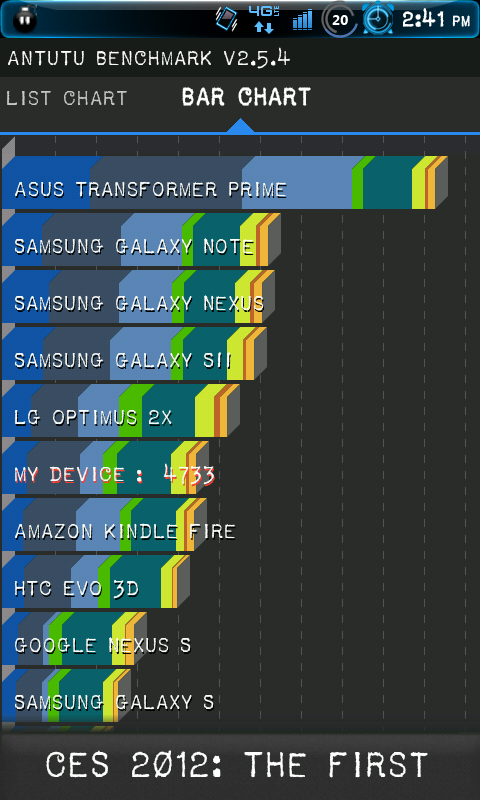
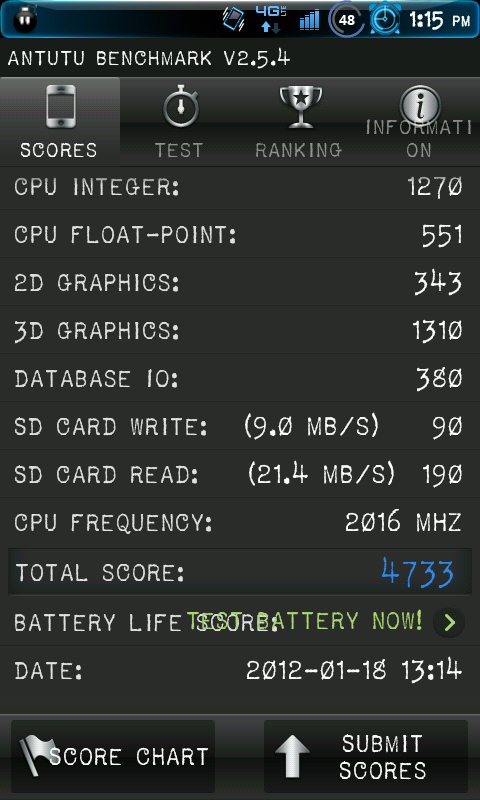
this is wat I'm getting real nice!!!!!
 
I tried to set it at 2.2 to see if it can handle and now my phone is in a vicious reboot cycle i cant get into set cpu to turn it back down if my phone wont stop rebooting. I cant even unlock it. It reboots after finishing scanning sd card.

You got two options.

1. Be real fast and change the clock speed as soon as you boot up before superuser kicks in.

Or

2. Put a lower clocked kernel like 1.8ghz into the SD card then boot into cwr and flash it. Then you go back to cwr and flash the one you had.

Rememeber DONT SET it; "ON BOOT" if that particular speed is not stable.
 
You got two options.

1. Be real fast and change the clock speed as soon as you boot up before superuser kicks in.

Or

2. Put a lower clocked kernel like 1.8ghz into the SD card then boot into cwr and flash it. Then you go back to cwr and flash the one you had.

Rememeber DONT SET it; "ON BOOT" if that particular speed is not stable.

Thanks for the advice but i panicked and wiped everything and reinstalled the rom before you posted your suggestion but thanks anyway.
 
I tried to set it at 2.2 to see if it can handle and now my phone is in a vicious reboot cycle i cant get into set cpu to turn it back down if my phone wont stop rebooting. I cant even unlock it. It reboots after finishing scanning sd card.

Reboot into recovery and wipe data.

Never set it at boot until at least a day of running it
 
with the 2.2 kernel im running it at

1804 its hitting 4015

my min is 245

i wanted to know is this a good high and low for good balance performance? so far no reboots..and this is with a esteem bought from day one on the 28th.. what do you guys suggest for very slightly unchanged battery usage like a 1-6 % difference from the stock rom?
 
Hey don't get me wrong but all this extreme OC of a 1ghz processor can't come recommended for too long...somethings got to give, and as nice as this phone is I wouldn't risk the high speeds for any length of time...PG and others have done an outstanding job getting Esteem Development to this point but is anyone working on a version of a kernel that might include Zero RAM or LMK tweaks? maybe some improved TCP settings, and are there any zip-align or init.d scripts included. I ask because I cant seem to find the github source page. I love the performance of OC but ultimately stability and good battery life make the best choice for me on a daily driven phone.
 
Back
Top Bottom