• After 15+ years, we've made a big change: Android Forums is now Early Bird Club. Learn more here.

Root location and clock icons

h4x0rj3ff

Chemist
i want to remove the clock icon and the location icon from the status bar. now i know ill use the same tut (just about) for the carrier text to decomplie with apk tool. buy my question is whrere are they? i would think in systemui.apk but i dont know. and how exactly do i remove them just delete the pngs? or do i have to replace them with a 1x1 pixel png or something like that? any help would be greatly apriciated. im on number 2 2.4 btw

 
i want to remove the clock icon and the location icon from the status bar. now i know ill use the same tut (just about) for the carrier text to decomplie with apk tool. buy my question is whrere are they? i would think in systemui.apk but i dont know. and how exactly do i remove them just delete the pngs? or do i have to replace them with a 1x1 pixel png or something like that? any help would be greatly apriciated. im on number 2 2.4 btw

Are you talking about the images in the status bar? Like the actual clock on the right?

Can you post a screen of what you mean exactly?
 
no sorry i ment the alarm clock icon and the location icon (the crosshairs)

So you just want to make them clear? Unseen?

I wanna say they are in SystemUI.

Use Paint.Net and open the image and just select all and delete. It will leave a clear image while retaining the size and whatnot. That's what I do.
 
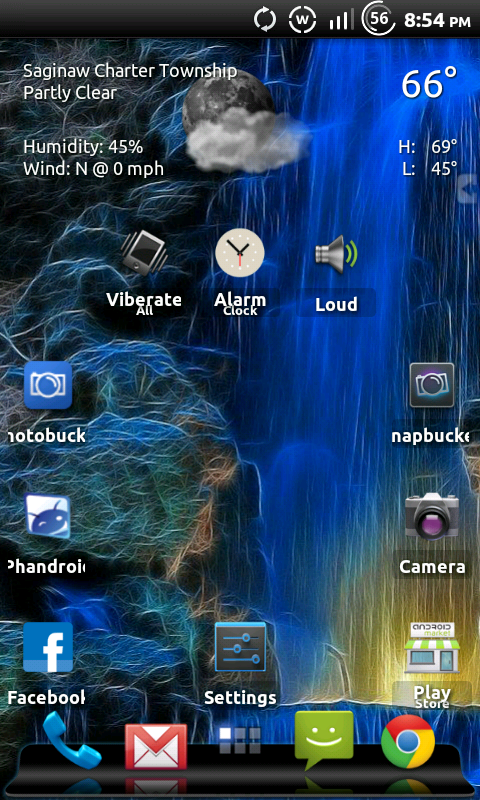
screenshot-1347218748421.png
 
So you just want to make them clear? Unseen?

I wanna say they are in SystemUI.

Use Paint.Net and open the image and just select all and delete. It will leave a clear image while retaining the size and whatnot. That's what I do.

so that wont make it so there not there but just change the pngs to clear? will my other icons be seperated by the clear icons or will the just go over top of the clear icons? if that makes sense.
 
so that wont make it so there not there but just change the pngs to clear? will my other icons be seperated by the clear icons or will the just go over top of the clear icons? if that makes sense.

Im pretty sure there will still be a space there if you were to turn it on. Im not sure though.

You can go into the status bar xml and take them out all together but im not sure if it will flash properly.
 
Im pretty sure there will still be a space there if you were to turn it on. Im not sure though.

You can go into the status bar xml and take them out all together but im not sure if it will flash properly.


Wasn't there a tut on reorganizing those icons? If so you could just move those clear pngs to the far left do they don't interfere with anything
 
i must have missed the tut on reordering the icons. ill have to check it out. im assuming its in ATR? or even better do you have the link? i found the clock icon its in both framework-res.apk and systemui.apk and the location icon is in framework-res.apk... now do i have to change them EVERYWHERE? there like all over the place. lol. i mean in the mdpi and hdpi drawable folders? and if there anywhere else in there? im learning all this stuff but apparently im a slow learner.
 
i must have missed the tut on reordering the icons. ill have to check it out. im assuming its in ATR? or even better do you have the link? i found the clock icon its in both framework-res.apk and systemui.apk and the location icon is in framework-res.apk... now do i have to change them EVERYWHERE? there like all over the place. lol. i mean in the mdpi and hdpi drawable folders? and if there anywhere else in there? im learning all this stuff but apparently im a slow learner.


Our phones are hdpi devices, so you don't have to change mdpi or ldpi
http://androidforums.com/esteem-all-things-root/531259-video-tutorial-rearrange-icons-your-notification-bar.html
 
if i was to change the png size to 1x1 pixel and flash would it work? this seems like the easiest way to go about doing things but i know it might need to be a specific size to work properly.
 
if i was to change the png size to 1x1 pixel and flash would it work? this seems like the easiest way to go about doing things but i know it might need to be a specific size to work properly.


I'm not sure, when I dabbled in theming I kept icons the same size to avoid irregularities, you can try it but there's a chance it'll just get stretched out
 
well im installing sp3 on my laptop now because apparently i dont have it... i need it to use paint.net which looks like a decent program. im gonna try to change it to 1x1 and see what happens and i will report back.

another question is do i still need to erase i think it was the resource.rmsc or whatever it is in the root of the apk like i had to do with the carrier text?
 
halfway there and it was easier then i thought. all i did was opened systemui.apk in 7zip and went and deleted the alarm clock icon png. then i opened up framework-res.apk and deleted the gps privacy (location) icon. now to rearrange the icons!

screenshot-1347235714588.png
 
Back
Top Bottom