

Fuzzy13
Extreme Android User
Came across this the other day and I've been using this camera in place of the stock 4.2.2 camera on my Nexus and I must say that this camera should have been the STOCK camera.
Mainly in part due to the ease of use and there's no "auto focus" bug.
Check it out. Info taken from source. Install Motorola’s Awesome Camera App On Your Android Device [How-To] | Cult of Android
"With Android 4.2, Google completely revamped the camera experience with a brand new interface and features like Photosphere. While the new UI may seem like a welcome change, it is poorly laid out which can make selecting the intended option cumbersome. The lack of some downright basic options like scenes and timer mode does not help the matter, either. Worse, on the Nexus devices, the camera app has an auto-focus bug that can often lead to blurry photos. While Motorola phones are not particularly known for their camera performance, the camera application on their handsets is perfect for most, with just the right amount of settings. Here is how you can get the Motorola camera app on your Android 4.0+ handset.
Read more at Install Motorola’s Awesome Camera App On Your Android Device [How-To] | Cult of Android
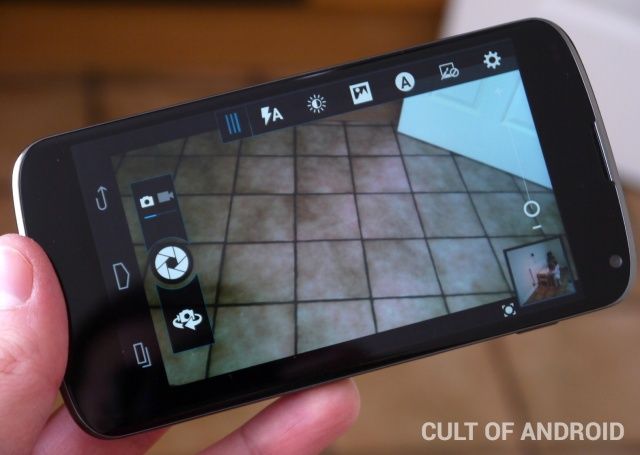
The installation process is pretty simple, and just requires you to download and install this APK file on your handset. Keep in mind that you need to make sure that you have enabled the option to install apps from Unknown Sources from Settings -> Security.
Unlike the stock camera app on the Nexus 4 and other Nexus devices, the Motorola camera app features a timer mode, the ability to assign a custom action to a volume key, some basic filters, and the option to select a pre-defined scene. There are quite a few camera apps available from third party developers on the Play Store, but they all have either tons of advanced features that confuse the user, or have wannabe Instagram-like filters that not everyone wants.
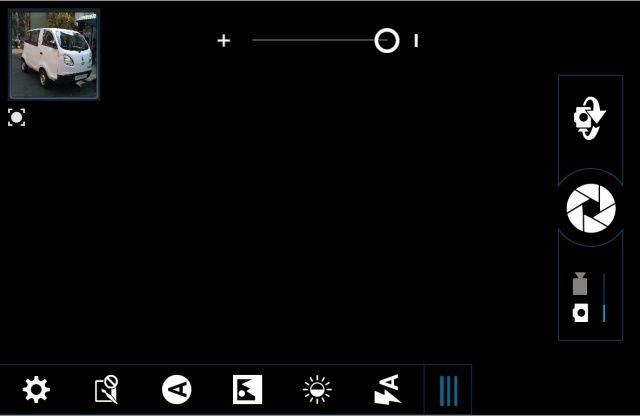
"The APK has been tested on a Nexus 4 running Android 4.2.2 and a Galaxy S3 running Android 4.1.2, and has worked flawlessly on both the devices. If you find after installing that your flash does not trigger while clicking pictures, just restart your device and this should fix it."
DOWNLOAD
https://www.dropbox.com/s/bvvxa2bq8f7tqtg/MotCamera_2.0.147.apk
VIDEO CAMERA COMPARISON
Okay here is a video comparison between the 4.2 camera and the Motorola camera. Video starts off with the Stock 4.2.2 camera and transitions back and forth from the Motorola camera. Clip ends with the stock 4.2.2 camera.
Was very surprised at the difference. I personally think the 4.2.2 camera is MUCH better.
[Nexus 4] Stock 4.2 Camera Vs. Motorola Apk Camera (App) - [Collective Soul "December" Cover] - YouTube
Figured I would share with you guys and let you check it out. Some of you may have already seen this and already been using it. For the others though, enjoy.
Mainly in part due to the ease of use and there's no "auto focus" bug.
Check it out. Info taken from source. Install Motorola’s Awesome Camera App On Your Android Device [How-To] | Cult of Android
"With Android 4.2, Google completely revamped the camera experience with a brand new interface and features like Photosphere. While the new UI may seem like a welcome change, it is poorly laid out which can make selecting the intended option cumbersome. The lack of some downright basic options like scenes and timer mode does not help the matter, either. Worse, on the Nexus devices, the camera app has an auto-focus bug that can often lead to blurry photos. While Motorola phones are not particularly known for their camera performance, the camera application on their handsets is perfect for most, with just the right amount of settings. Here is how you can get the Motorola camera app on your Android 4.0+ handset.
Read more at Install Motorola’s Awesome Camera App On Your Android Device [How-To] | Cult of Android
The installation process is pretty simple, and just requires you to download and install this APK file on your handset. Keep in mind that you need to make sure that you have enabled the option to install apps from Unknown Sources from Settings -> Security.
Unlike the stock camera app on the Nexus 4 and other Nexus devices, the Motorola camera app features a timer mode, the ability to assign a custom action to a volume key, some basic filters, and the option to select a pre-defined scene. There are quite a few camera apps available from third party developers on the Play Store, but they all have either tons of advanced features that confuse the user, or have wannabe Instagram-like filters that not everyone wants.
"The APK has been tested on a Nexus 4 running Android 4.2.2 and a Galaxy S3 running Android 4.1.2, and has worked flawlessly on both the devices. If you find after installing that your flash does not trigger while clicking pictures, just restart your device and this should fix it."
DOWNLOAD
https://www.dropbox.com/s/bvvxa2bq8f7tqtg/MotCamera_2.0.147.apk
VIDEO CAMERA COMPARISON
Okay here is a video comparison between the 4.2 camera and the Motorola camera. Video starts off with the Stock 4.2.2 camera and transitions back and forth from the Motorola camera. Clip ends with the stock 4.2.2 camera.
Was very surprised at the difference. I personally think the 4.2.2 camera is MUCH better.
[Nexus 4] Stock 4.2 Camera Vs. Motorola Apk Camera (App) - [Collective Soul "December" Cover] - YouTube
Figured I would share with you guys and let you check it out. Some of you may have already seen this and already been using it. For the others though, enjoy.

 And I can add it to the OP.


 ...
...