
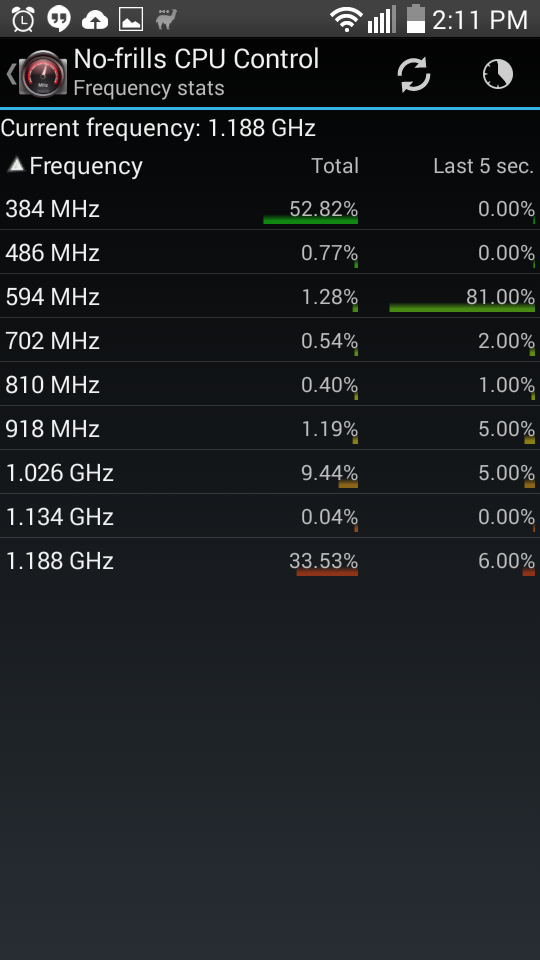
Strange... crashes started happening again for a few days now. At first, I thought it was a user error in using the No-frills CPU Control" (in fact there was one in the sense, I didn't realize that the settings are not permanent unless the "Apply on boot" option is checked), but I have confirmed more than once that the settings are applied (as shown by the same app under "Current" column) and yet it is crashing after a few hours. What else could be going wrong in my case? I really had it running without crashes for a few weeks after I applied the CPU change.
Install the app
How to install the app on iOS
Follow along with the video below to see how to install our site as a web app on your home screen.
Note: This feature may not be available in some browsers.
-
After 15+ years, we've made a big change: Android Forums is now Early Bird Club. Learn more here.
You are using an out of date browser. It may not display this or other websites correctly.
You should upgrade or use an alternative browser.
You should upgrade or use an alternative browser.
Root [MetroPCS] [ROM] KitKat 4.4.2 NEW BETA 4
- Thread starter hroark13
- Start date
-
- Tags
- lg optimus f6
Sorry for the spam, but this is really bothering me with a couple of crashes in a day so thought of taking another look. I just confirmed that the frequency does stay at the minimum 594MHz after applying the change using No-Frills CPU Control as can be seen from the below screenshot. The stats show about 50% at 384 MHz because the setting got reset when it last crashed, but after I applied back the setting, it seemed to stay above 594MHz as seen in the "Last 5 sec.". It is really mysterious in the sense, the crashes were gone for a few days in between and I was so happy that we fixed the root cause, but that same fix is no longer working though nothing significant happened on the phone. Any chance that a new version of the ROM would be released with a proper fix built-in?
Attachments

Masterchief87
Android Expert
No there is not. The developer who built this ROM has been moved on for nearly a year and the lg f6 is old and outdated. There hasn't been any kind of development for the f6 in a solid couple of months.Sorry for the spam, but this is really bothering me with a couple of crashes in a day so thought of taking another look. I just confirmed that the frequency does stay at the minimum 594MHz after applying the change using No-Frills CPU Control as can be seen from the below screenshot. The stats show about 50% at 384 MHz because the setting got reset when it last crashed, but after I applied back the setting, it seemed to stay above 594MHz as seen in the "Last 5 sec.". It is really mysterious in the sense, the crashes were gone for a few days in between and I was so happy that we fixed the root cause, but that same fix is no longer working though nothing significant happened on the phone. Any chance that a new version of the ROM would be released with a proper fix built-in?
View attachment 90545
Thanks for the response. I guess it is time for me to look for an alternative cheap phoneNo there is not. The developer who built this ROM has been moved on for nearly a year and the lg f6 is old and outdated. There hasn't been any kind of development for the f6 in a solid couple of months.

lucasmun09
Member
Can someone confirm that this works on T-Mobile d500? Thanks!
Yes, it does, but as mentioned a couple posts above yours, the rom has not been actively developed for nearly a year. You would be better off trying the Carbon ROM...it's more developed and more near completion. You can use it as a daily driver - just not sure it will ever get completely finished.
lucasmun09
Member
Carbon ROM got it. Anyways, TWRP recovery is the way to go right? It seems like my F6 can't mount the /data for some reason. Does anybody have a fix or knows how to fix it?
Jareddanderson04
Lurker
Hey bud. First off I want to say thank you , this is a super clean build. I have stressed it, pretty hard with minimal issues.its almost flawless. I have a few questions for you if I may. I'm on mpcs ,and using twrp. Can I update the version of twrp? And every time I reboot the phone it goes back to default lockscreen wall paper, is there a way I can adjust this.I have to say that is my only issue I've seen. So again thank you for all your effort that went into this.

mocaonlive
Newbie
It's a great job, everything works perfectly. Only wallpaper can not be changed because it is built with google now launcher.
mocaonlive
Newbie
I could install everything on my phone MS500 without any problems, ROM, SuperSU binaries, etc. Everything working perfectly, play stored with all my applications. I think that will be the perfect ROM for this device, but with some minor corrections... Thank
mocaonlive
Newbie
Something happened with the battery, the battery's full charge and disconnect the charger before going to bed, as at 23:15 hours. Then I wake up at 06:30 and see the phone off and zero on drums.
The battery is drained without using my phone, certainly if it was connected to wifi but no active downloads as I still had my google account.
The battery is drained without using my phone, certainly if it was connected to wifi but no active downloads as I still had my google account.
A few weeks back I posted about unresolved kernel panics, which got worse to the point of seeing it multiple times a day. Interestingly, the problem seems to be all gone now and I have a theory on how. Actually, one day after a Crash, all apps were lost, whether they came with the system or installed later on. Only a small set of apps were accessible such as the dialer (but no contacts). I tried to restore a prior backup, but that didn't make a difference. I then reflashed the ROM, cleaned up cache and dalvik-cache and this got me into a state where the phone wouldn't even get to the launcher (stuck in upgrading). Frustrated, I connected it to my laptop and examined the logcat and discovered an error that said that the path /data/obb was not a directory and it was repeating. It in deed is not an directory but a soft link, as I moved the contents to external drive and created a link. After I restored this as a directory and restarted phone, it was able to regenerate all the dalvik-cache files and was able to start the launcher. I decided to leave the obb directory as is and so far not a single crash has recurred. This makes me wonder if some kernel component has a bug that crashed the system if this path turned out to be a link instead of a directory. Anyone else has seen an issue with making this path a link? I wish this happened a couple of days sooner, as I ended up buying an LG G2 (for the same cost as I originally paid for F6, which is amazing!). Now that F6 is good, I will keep it around as a backup.
NascarBoy119
Newbie
This seems to be a good ROM so far. However, I do have a couple of questions. For one, the wallpaper on the lock-screen keeps changing itself. Is there any way to resolve that? Secondly, is there a way to get rid of that extremely classy BootAnimation. Changing the bootanimation.zip gets rid of the image, although I'm still treated to that lovely wizzing sound..
Try the steps from here:This seems to be a good ROM so far. However, I do have a couple of questions. For one, the wallpaper on the lock-screen keeps changing itself. Is there any way to resolve that? Secondly, is there a way to get rid of that extremely classy BootAnimation. Changing the bootanimation.zip gets rid of the image, although I'm still treated to that lovely wizzing sound..
1. Using your file manager browse to system > sounds > poweron
2. Rename the file PowerOn.mp3 to PowerOn.bak
NascarBoy119
Newbie
Great, so I was able to get rid of the Boot Animation/Sound. However, has anyone came up with a fix for the lock-screen wallpaper? It reverts back to the default wallpaper on reboot.Try the steps from here:
1. Using your file manager browse to system > sounds > poweron
2. Rename the file PowerOn.mp3 to PowerOn.bak