
• After 15+ years, we've made a big change: Android Forums is now Early Bird Club. Learn more here.

My Android Tablet Won't turn on

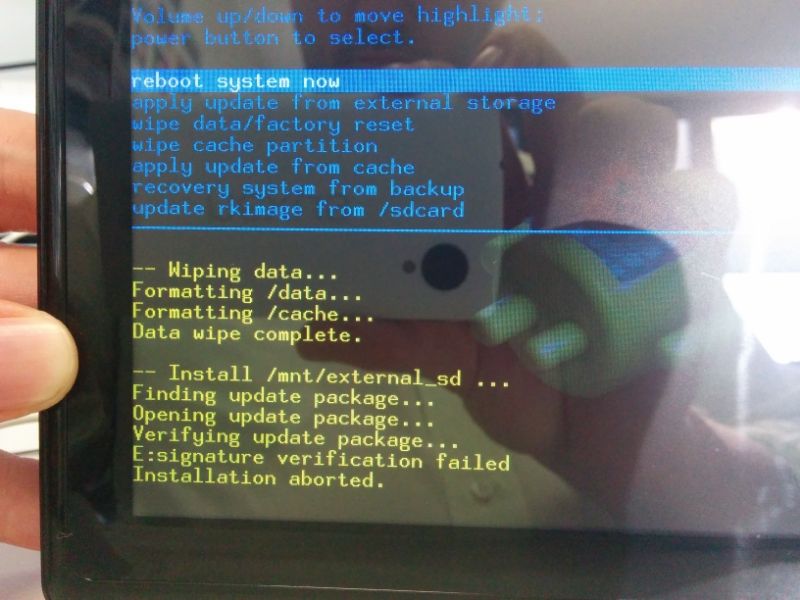
Ok so I've tried the reset button again and same story. I go into the system recovery and just a note I should have mentioned before that the update you found brainz actually loads fine when selecting the option update rkimage from /sdcard but when selecting the option apple update from external storage which I would have thought would be the correct option I get the error message E :signature verification failed.

Anyway here's a picture to explain.
 
No I don't get that option unfortunately. When clicking on update from external storage it just gets straight into it and tries to load the zip.
 
OK we can do things but first did you wipe data and cache before you start. Next is don't select that the zip you have on the SD card is not that . update from the card
Try the one that say apply update from external storage .

What happens
 
Hey Brainz not sure what you mean by update from the card and don't select the zip. I just select the option to update from sd/card and it finds the zip on there automatically.

On another note I seem to have bricked it at the moment. I can't get the screen to show anything at all. I've seen other people have that same problem and they have to just let the battery run out so I guess I'll have to wait until tomorrow now before I can give it a go.

Thanks for staying with me to get this sorted. I am determined to beat this one.
 
Ok so I am back and I have the screen back on. Here's a couple screenshots to show everything that I go through.

When I first boot and then open the system recovery console I get this weird error message saying "E :Can't open /mnt/external_sd/rksdfw.tag" But then I do the following:

Firstly I clear the cache, secondly I wipe all user data. After that I select update from external storage and select the .zip file. Now I've repackaged it from the original .rar file so I am wondering if the error I am getting about verification is that I may have lost that verification along the way in the repackage process.


How about re pack and rename to update and let it flash as a update.zip
Put on SD card and try to flash as the first selection if it don't work try the last one that say rkimage
 
I don't know its a way to get the signature verify turned off its checked somewhere maybe try to use the exposed buttons to see if it turns it off cause . something is tricky maybe the image is another zip to flash inside the zip I gave you
 
Can I ask what happens if u select the second to the last one that say update from recovery system from backup
 
I don't know its a way to get the signature verify turned off its checked somewhere maybe try to use the exposed buttons to see if it turns it off cause . something is tricky maybe the image is another zip to flash inside the zip I gave you

I only have three external buttons. Up, down and power each of which just moves the selection bar and selects it.

As for the image inside of the zip there isn't a second layer of zip. The weird part is that the company that hosted that file only uploaded it as a rar which Android obviously doesn't read so I think the issue may lay with the way they initially packaged that file.

I also tried saving just the raw .img file to the SD card but the system doesn't see that either.
 
Ok Brainz, so I followed the instructions on the ADF forums to a tee. I get two possible outcomes when completing those steps. #1 either is just shuts off and doesn't power back on for sometime. #2 it reboots right back into recovery mode.


Yes you are to wait it takes 5-10 min to download . when it powers back on just leave for the 5-10 min if it just stay on just wipe cache and data
 
Hello,

I dont seem to be able to download the factory image from public.tempoaustralia.com
My computer just doesnt connect to it at all
 
OK problem solved . take the download that is on your PC/laptop and put on a SD card and put SD card with the loaded info back into tablet and now reboot tablet and flash image from SD card . .
 
Hi , my Android tablet won't turn on
as in when i pressed the Power Button nothing happens
its full charged so the problem is definitely isnt the battery
i think it started a few hours ago
i tried to turn on my tablet but it wont
it kept on going to recovery mode
there was only an android avatar lying down with a red triangle on top of it.
there wasn't any options just the avatar
i turned my tablet off and on again
but it still booted there
after a few minutes i found that the volume up button was stuck
making my tablet go on recovery mode.
after i freed it
i turned my tablet off then when i tried to power it on
it wont start up
what happened? and what will i do ?

~thank you


my tablet is
made by Onix
Model number : TB512-16G
Hi
I've got the same tablets from aldi. I bought3 for my ddisable child. Last week the first one broke so I tried to turn on the second tablet (new) it won't turn on so I try the 3rd tablet ,to my dismay its not working too. I wrote to intempo Australia ,they reply ,sorry its out of warranty. So i have to face the consequences for buying a few for them to make money and they can't do anything about it. Its my daughter's Christmas present. As a single mum I can't afford to buy her another one. This really puts me off . I will have to tell my friends to be careful about this.
 
Back
Top Bottom
