
Install the app
How to install the app on iOS
Follow along with the video below to see how to install our site as a web app on your home screen.
Note: This feature may not be available in some browsers.
-
After 15+ years, we've made a big change: Android Forums is now Early Bird Club. Learn more here.
You are using an out of date browser. It may not display this or other websites correctly.
You should upgrade or use an alternative browser.
You should upgrade or use an alternative browser.
Help My Epic 4G Gripe thread
- Thread starter kooldino
- Start date
-
- Tags
- samsung epic 4g

droid newb
Android Enthusiast
Is there a way to make it so the display lights up when I receive a text message?
There is a way to do that in handcent (if that's what you're using) but I can't remember where it is because I don't use handcent anymore. If you're using the stock text app then you need the free SMSPopup to do that.
Your contacts problem was kind of your fault in letting sprint put them on your phone since they could only put them into the phone's contact list. You should've just let google do the syncing, and the sales rep who did it was probably not the brightest to steer you in that direction.
I don't see what other option we had. The contacts existed on my phone, and about 1/3d of them were synched to the cloud.
I'd just backup some stuff I needed and hard reset. Start from scratch with a clean slate. Then google will be your only contacts. You'll load up facebook and probably sync no problem for photos and all. Just choose existing contacts all you'll have everyone on fb in your contact list.
I don't really like the sound of that. You're telling me there's no way to set google contacts as the master and have the phone obey that?
Multitasking is what it is. No way to differentiate active from recent, but does it really matter.
It does really matter to me. I tend to leave things open as a reminder that I still need to do something in that app. For instance, I'll keep a to-do list open all day until I complete the tasks, at which point I'll close the app.
I did find one app that will show you open apps when you press the home button (and allow you to switch to them), but it would mean replacing LauncherPro, which I'm not ready to do.
You'll miss some of the polish aand slickness of webOS, but you'll soon appreciate the functionality and customization aspects of android. I still wish I could swipe away msgs and emails, but oh well.
True story.

dbpaddler
Android Expert
Don't have time to multi quote...
If you were coming from a Pre, why weren't all your contacts in the cloud to begin with? None of them should have been associated with just your Palm profile. Kind of defeats the purpose of going to webOS. I know I fought it tooth and nail for a while. If all of your contacts are in google and the ones on the phone transferred by sprint are doubles, they are most likely joined to your google contacts and you're probably seeing double info in each entry.
You can unjoin all the doubles and the delete the phone ones or you can go into contacts -> settings -> display options -> phone and then uncheck everything. Then they won't display (yet they'll still reside in memory).
And backing up and factory resetting is not a daunting task. Backing up and restoring is actually quite easy, and if you were the home brew type, you'll get used to it when you root and start flashing roms. I'm usually up and running after a reset in less than ten minutes. Besides, it's so much easier to start off on a good note when you start on a clean note. Though it sounds like contacts is your only real issue now that facebook is syncing properly.
And your todo list....you really need to abandon the card mentality and embrace widgets. Pop a todo list widget on a home screen and it is always there with a simple swipe to whatever homescreen you have it on. I highly recommend Jorte, but if you are using a certain ToDo program you can check out PureCal. It is a phenom agenda widget that can make use of quite a few to do apps. You can scroll within the widget if you're using launcher pro. And you can have a true agenda view on a widget, something you can't do in webOS, especially in 2.0 unless that half baked agenda app is working in it again.
You'll come to understand that list type things you would keep a card open can simply become a widget.
Jorte Example:

that's actually the jorte app, but you can set up widgets of all sorts whether it's a calendar, agenda or todo's.
Pure Cal Examples:
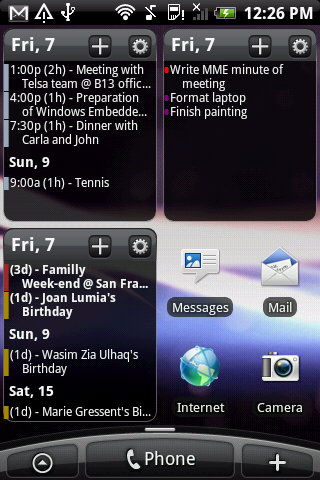
And you can make those widgets be any size. And if you pay for launcher pro you can choose, say 5x5 grids on the home screen and resize widgets to your liking to fit info as you see fit. My main home screen is attached.
If you were coming from a Pre, why weren't all your contacts in the cloud to begin with? None of them should have been associated with just your Palm profile. Kind of defeats the purpose of going to webOS. I know I fought it tooth and nail for a while. If all of your contacts are in google and the ones on the phone transferred by sprint are doubles, they are most likely joined to your google contacts and you're probably seeing double info in each entry.
You can unjoin all the doubles and the delete the phone ones or you can go into contacts -> settings -> display options -> phone and then uncheck everything. Then they won't display (yet they'll still reside in memory).
And backing up and factory resetting is not a daunting task. Backing up and restoring is actually quite easy, and if you were the home brew type, you'll get used to it when you root and start flashing roms. I'm usually up and running after a reset in less than ten minutes. Besides, it's so much easier to start off on a good note when you start on a clean note. Though it sounds like contacts is your only real issue now that facebook is syncing properly.
And your todo list....you really need to abandon the card mentality and embrace widgets. Pop a todo list widget on a home screen and it is always there with a simple swipe to whatever homescreen you have it on. I highly recommend Jorte, but if you are using a certain ToDo program you can check out PureCal. It is a phenom agenda widget that can make use of quite a few to do apps. You can scroll within the widget if you're using launcher pro. And you can have a true agenda view on a widget, something you can't do in webOS, especially in 2.0 unless that half baked agenda app is working in it again.
You'll come to understand that list type things you would keep a card open can simply become a widget.
Jorte Example:
that's actually the jorte app, but you can set up widgets of all sorts whether it's a calendar, agenda or todo's.
Pure Cal Examples:
And you can make those widgets be any size. And if you pay for launcher pro you can choose, say 5x5 grids on the home screen and resize widgets to your liking to fit info as you see fit. My main home screen is attached.
Attachments

Don't have time to multi quote...
If you were coming from a Pre, why weren't all your contacts in the cloud to begin with?
As mentioned in my earlier post, they SHOULD have been, but apparently it did a poor job of synching.
If all of your contacts are in google and the ones on the phone transferred by sprint are doubles, they are most likely joined to your google contacts and you're probably seeing double info in each entry.
You can unjoin all the doubles and the delete the phone ones or you can go into contacts -> settings -> display options -> phone and then uncheck everything. Then they won't display (yet they'll still reside in memory).
There has to be an app that can pull this off.
I'm trying one called "Contact Analyzer 2". Hopefully I don't regret this.
And backing up and factory resetting is not a daunting task. Backing up and restoring is actually quite easy, and if you were the home brew type, you'll get used to it when you root and start flashing roms. I'm usually up and running after a reset in less than ten minutes. Besides, it's so much easier to start off on a good note when you start on a clean note. Though it sounds like contacts is your only real issue now that facebook is syncing properly.
Yeah, I'd like to leave that as a last resort.
And your todo list....you really need to abandon the card mentality and embrace widgets. Pop a todo list widget on a home screen and it is always there with a simple swipe to whatever homescreen you have it on. I highly recommend Jorte, but if you are using a certain ToDo program you can check out PureCal. It is a phenom agenda widget that can make use of quite a few to do apps. You can scroll within the widget if you're using launcher pro. And you can have a true agenda view on a widget, something you can't do in webOS, especially in 2.0 unless that half baked agenda app is working in it again.
I'll try to find some widgets that will satisfy my needs. I'll still miss the cards though.
You'll come to understand that list type things you would keep a card open can simply become a widget.
Jorte Example:
that's actually the jorte app, but you can set up widgets of all sorts whether it's a calendar, agenda or todo's.
Pure Cal Examples:
And you can make those widgets be any size. And if you pay for launcher pro you can choose, say 5x5 grids on the home screen and resize widgets to your liking to fit info as you see fit. My main home screen is attached.
Sweet, thanks.
Ok, I *think* I sorted out my duplicate contacts issue.
Here's what I did.
I'm not 100% sure, but it appears as if everything worked with this method.
Here's what I did.
- Used an app called GO Contacts to backup my contacts to my SD card.
- Exported all of my contacts from gmail to a csv file
- Disabled synching of contacts in the settings menu.
- Used the stock contact application to do a mass delete of ALL of my contacts.
- Re-enabled synchning in my settings menu for gmail and forced a synch.
- Ran SyncMyPix to ensure that I had the latest pics for my contacts.
- Checked my contacts on the phone against the contacts on gmail.
I'm not 100% sure, but it appears as if everything worked with this method.
dbpaddler
Android Expert
If it worked for you...great. I would've just gave the gmail contacts a once over online to make sure everything was there. Do the contacts wipe on the phone and resync. But nothing wrong with the belt and suspenders method when you're unsure of the outcome. Hopefully you're up and running smooth now and can start to play.
New gripe:
There are many times I'm using an app and would like to have the ability to see my notification bar.
For instance, if I am in the photos app and choose to share a photo via facebook, I may want to enable wifi to do so. Currently, I have to click home, mess with my menu, and go back into the app. I'd like to just be able to pull down the menu and enable wifi right there.
There are many times I'm using an app and would like to have the ability to see my notification bar.
For instance, if I am in the photos app and choose to share a photo via facebook, I may want to enable wifi to do so. Currently, I have to click home, mess with my menu, and go back into the app. I'd like to just be able to pull down the menu and enable wifi right there.
dbpaddler
Android Expert
There really isn't one. It's all how the app is developed. In some cases like xScope browser, you can swipe down once for the url bar and a second time to get the notification bar. Other browsers don't work that way. There is no rhyme or reason across the board. Just like cut/copy/paste isn't uniform across all apps. There's no real standard for some things. But then again, that's why there are a bunch of browsers and a bunch of gallery apps. It's not hard for someone to develop an app better than stock (knock against the. Apps, not the developing).