
Install the app
How to install the app on iOS
Follow along with the video below to see how to install our site as a web app on your home screen.
Note: This feature may not be available in some browsers.
-
After 15+ years, we've made a big change: Android Forums is now Early Bird Club. Learn more here.
You are using an out of date browser. It may not display this or other websites correctly.
You should upgrade or use an alternative browser.
You should upgrade or use an alternative browser.
N1+LauncherPro=Pure happiness
- Thread starter Mostly Harmless
- Start date
-
- Tags
- nexus one
Mostly Harmless
Android Expert
Just updated, and I now have landscape view for the launcher on my N1. Not sure if this was there before, but I don't remember having it yesterday... Haven't checked on the any of the other settings yet though.
Just downloaded the update and it now does landscape!

Roze
Hiding behind a mystery
Sweet! On the Dev's page and he (is it wrong of me to assume it's a he?) said that he's going to work on the shortcut dock customization next...so that'll be the next update (sometimes next week)Just updated, and I now have landscape view for the launcher on my N1. Not sure if this was there before, but I don't remember having it yesterday... Haven't checked on the any of the other settings yet though.
New option: If you press the 'home' button...it takes you to the default home screen.
Man...just found an annoyance XD I set it up so that when I press the home button...it takes me to the default home screen but I didn't realize that the default home screen is the first screen (far right)...which I have as empty >_>;
Change the default screening settings...
Roze
Hiding behind a mystery
Change the default screening settings...
Thanks! I was wondering why I would be asked 2x what number of screens I wanted XD I thought number of screens and default screen were the same

Good thing you replied back...else I'd have messaged the dev on this 'over sight' XD

Talderon
Android Expert
My post on XDA:
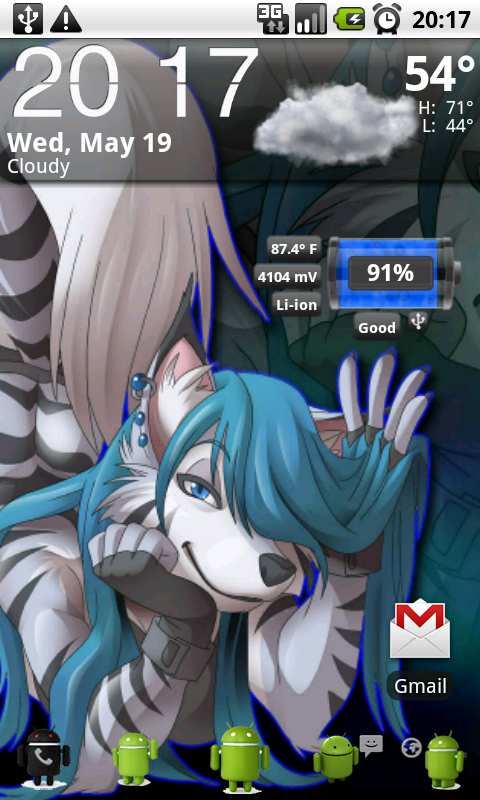
I got me the little Androids for my icons...
xda-developers - View Single Post - (THEME) Themed Launcherpro
Themed versions work on Rooted and Non-Rooted devices. Just download the Themed APK's, put on SD and install with explorer.
Ok, so I have been holding out with HelixLauncher2 because I needed (or thought I did) custom icons on the dock bar.
Out of the 4 icons that are there by default, there is only one that I feel is redundant: The Contacts one.
When I need to go into Contacts, I just hit the Phone link and hit the Contacts tab. (I see no reason to have 2 icons when one will get you where you want to be).
I would rather have it traded out for the GMail icon.
Either way, and long story short, I pulled the trigger and downloaded one of the Themed ones (I love the little Androids at the bottom of the screen) and I have to say, WOW, talk about IMPRESSED. This thing is fast, stable and unbelievable! I.LOVE.IT!!!
Call me a convert, this launcher is great and one to keep!
I got me the little Androids for my icons...
xda-developers - View Single Post - (THEME) Themed Launcherpro
Themed versions work on Rooted and Non-Rooted devices. Just download the Themed APK's, put on SD and install with explorer.
Roze
Hiding behind a mystery
I cant believe anyone that has 500+ posts on any phone site is not already signed up at xda. Bite the bullet, xda is a must. Gotta admit I been hating it since that stupid show came out. My nick used to be available everywhere everytime, now I cant get it anywhere.
Well, I just creep/read the XDA forums for info that are on the public threads. And yes, I know, will make an account soon, never really had a reason to before, lol.

My post on XDA:
I got me the little Androids for my icons...
xda-developers - View Single Post - (THEME) Themed Launcherpro
Themed versions work on Rooted and Non-Rooted devices. Just download the Themed APK's, put on SD and install with explorer.
Doesn't seem to want to install from Astro. Do I have to uninstall the original Launcher? Don't want to have to set out my phone again if I don't have to.
EDIT:
Sorted. Uninstalled and re-installed from SD card. It's a pain to have to set up all seven screens again though...
Thanks,
Martin,
Talderon
Android Expert
I think what amazes me the most is how much smoother my phone runs overall with this launcher. I noticed that HelixLauncher2 would lag at times and I was always in my Task Killer to kill things off to smooth things out, but this launcher, I have yet to do that.
I think the only real request I would have is to either make the launch bar icons able to be customized, or replace contacts with GMail...
I think the only real request I would have is to either make the launch bar icons able to be customized, or replace contacts with GMail...
I've been using Launcherpro for a few days now. I've also followed some advice (on this forum somewhere) and stopped using a task killer all together and let the phone settle down and take care of it's own memory usage.
After a few days, my Nexus One is running better than ever before. And no force close issues which could be attributed to killed tasks that weren't finished doing whatever it was they were doing - in my opinion.
After a few days, my Nexus One is running better than ever before. And no force close issues which could be attributed to killed tasks that weren't finished doing whatever it was they were doing - in my opinion.
Roze
Hiding behind a mystery
I think what amazes me the most is how much smoother my phone runs overall with this launcher. I noticed that HelixLauncher2 would lag at times and I was always in my Task Killer to kill things off to smooth things out, but this launcher, I have yet to do that.
I think the only real request I would have is to either make the launch bar icons able to be customized, or replace contacts with GMail...
Do you notice a very long delay/lag when you put an application short cut onto the home screen? Everything is fast/smooth except for this feature :/ It takes 7-11 seconds for the window to pop up when I click on it. Quite annoying when I'm changing the layout of my apps on the homescreen
Talderon
Android Expert
Do you notice a very long delay/lag when you put an application short cut onto the home screen? Everything is fast/smooth except for this feature :/ It takes 7-11 seconds for the window to pop up when I click on it. Quite annoying when I'm changing the layout of my apps on the homescreen
No, I don't see this at all. I set up my icons without any issues.
Roze
Hiding behind a mystery
No, I don't see this at all. I set up my icons without any issues.
Damn :/ I have 70 apps...I don't think that's the issue though

Mostly Harmless
Android Expert
Just in case anyone was wondering, the newest update allows for you to customize the 4 icons on the bottom of the screen. I now have my set to phone...Gmail...Handcent....and Dolphin Browser.

ManMythLegend
Well-Known Member
Lovin launcher pro so far.
Helix issues were abound. Just flat out didnt like it.
Launcher pro is faster , now customize bottom launchers , and pinch screens like Sense UI.
My only beef is better cut is incompatible. I dont know anyway to edit app names or icons.
Helix issues were abound. Just flat out didnt like it.
Launcher pro is faster , now customize bottom launchers , and pinch screens like Sense UI.
My only beef is better cut is incompatible. I dont know anyway to edit app names or icons.

SBERG
Member
I like this app. 7 homescreens is great to have. Really like having landscape homescreens and app roledex. That made it good for what i wanted. But again very nice app. Glad i installed.
"edit" Been messing around with this a little more and figured out some of the stuff it does now. Really like it alot now...lol
"edit" Been messing around with this a little more and figured out some of the stuff it does now. Really like it alot now...lol


Fabolous
Superuser
I'm going to put a plug in for ADW Launcher. It is available in the Market now.
With the right configuration, it is just as fast (if not faster) than LauncherPro, and there are many more options. 2 shortcut buttons, a pull down dock with 6 more shortcuts. Same Sense UI type previews, as well as the option to hide the notification bar, text under shortcuts on the homescreen, etc.
You guys should give it a try
With the right configuration, it is just as fast (if not faster) than LauncherPro, and there are many more options. 2 shortcut buttons, a pull down dock with 6 more shortcuts. Same Sense UI type previews, as well as the option to hide the notification bar, text under shortcuts on the homescreen, etc.
You guys should give it a try
negreenfield
Well-Known Member
Yeah, I've switched from LauncherPro to this as well. Love the pull down dock feature, to me that's the best part. I like all the things you can tweak as well. The only drawback is while you can make it faster it's not quite as smooth as LauncherProI'm going to put a plug in for ADW Launcher. It is available in the Market now.
With the right configuration, it is just as fast (if not faster) than LauncherPro, and there are many more options. 2 shortcut buttons, a pull down dock with 6 more shortcuts. Same Sense UI type previews, as well as the option to hide the notification bar, text under shortcuts on the homescreen, etc.
You guys should give it a try