
I need help on how to install an SD Card for my LG Motion. I just got the phone and I'm not that great with the smart phones yet. I found the slot that the SIMS card is in however, do I just buy a SD card and throw it in? OR does it need to be formatted etc... If someone could give me a walk through of some sort it would be greatly appreciated. Thanks.
Install the app
How to install the app on iOS
Follow along with the video below to see how to install our site as a web app on your home screen.
Note: This feature may not be available in some browsers.
-
After 15+ years, we've made a big change: Android Forums is now Early Bird Club. Learn more here.
You are using an out of date browser. It may not display this or other websites correctly.
You should upgrade or use an alternative browser.
You should upgrade or use an alternative browser.
Need help on installing an SD card...
- Thread starter Rawkfist
- Start date
-
- Tags
- lg motion 4g
SiempreTuna
Android Expert
Normally they come pre-formatted, but if it doesn't, the phone will prompt you to format it when you put it in.

PHP87
Android Enthusiast
I'm pretty sure it's plug and play. Just be sure to buy a quality Micro SD Card like a Kingston or a SanDisk brand Micro SD card, and a Class 4 or above.
I have an old Micro SD card that is probably a Class 2 and I get excellent read/write speeds, so you should be fine with a Class 4 card, even for HD video.
If it needs to be formatted, you can plug your LG Motion into your PC via the USB cable, go into "My Computer", double click on the icon for your LG Motion and right-click on the SD Card icon to bring up the context menu. Select "Format" and let your PC format the card. It shouldn't take more than a minute, but I don't think you will have to do any of that.
You should be able to find a quality brand 32GB Micro SD card on newegg dot com for around $25.00, shipping included.
Read the feedback from buyers as well and stick with a quality, name brand.
Saving a few bucks for an off-brand card isn't worth it, especially if you lose a lot of valuable vids.
Be sure to go into your "Settings" > "Storage" and "Unmount SD Card" before you remove it from your phone.
If you have a lot of video, you can buy more than one card and put different movies on them, or just move old content off of the card and onto your PC and put new content onto the SD card via Drag and Drop.
These cards have fast read/write speed, so the process of adding/removing content from the card will be fast.
I have an old Micro SD card that is probably a Class 2 and I get excellent read/write speeds, so you should be fine with a Class 4 card, even for HD video.
If it needs to be formatted, you can plug your LG Motion into your PC via the USB cable, go into "My Computer", double click on the icon for your LG Motion and right-click on the SD Card icon to bring up the context menu. Select "Format" and let your PC format the card. It shouldn't take more than a minute, but I don't think you will have to do any of that.
You should be able to find a quality brand 32GB Micro SD card on newegg dot com for around $25.00, shipping included.
Read the feedback from buyers as well and stick with a quality, name brand.
Saving a few bucks for an off-brand card isn't worth it, especially if you lose a lot of valuable vids.
Be sure to go into your "Settings" > "Storage" and "Unmount SD Card" before you remove it from your phone.
If you have a lot of video, you can buy more than one card and put different movies on them, or just move old content off of the card and onto your PC and put new content onto the SD card via Drag and Drop.
These cards have fast read/write speed, so the process of adding/removing content from the card will be fast.
PHP87
Android Enthusiast
So the Sims card that is in the phone is gonna come out and I wont need that one anymore? THen just install the new one in that same slot, right?
No, you need the SIM card for the phone to communicate with the Metro 4G network as it contains info like your phone number and other vital communication info.
Leave that one alone as it is much different than a Micro SD card.
The SIM card holds info such as your phone number and what type of communication is supported, while the Micro SD card stores Music, Video, Apps, Contact info, etc... so if you buy another phone, you can put the Micro SD card in your new phone and have all of your apps, contacts, music, vids, etc...
Just be sure to save or move your music, vids, apps, contacts to your Micro SD card.
It's a good habit to save those things to the Micro SD Card and not the internal storage on the phone.
Keep in mind if you save your vital info, apps, pics, video, etc... to your Micro SD card and format the card at a later date, you will lose that info, so be careful not to format/erase your Micro SD card after you have written info you want to keep to it.
If at some point you buy a new phone, they will also give you a new SIM Card that they will program.
Leave the SIM Card alone.
The SIM Card will likely have "Metro PCS" and some numbers imprinted on it, while a Micro SD card will have a name like SanDisk or Kingston or Samsung on it, along with the capacity, such as 32GB
The SIM Card is located under the battery, near the top of the battery while the Micro SD card is also located under the battery it is located on the left side and slides out from a slot on the left side of the phone once the battery has been removed.
SIM Cards look something like this:

Micro SD Cards look something like this:


sammyz
LG Whiz Kid

twogbsd
Android Expert
Micro SIM cards look like this:
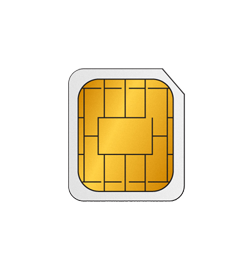
+1

SwoRNLeaDejZ
Android Expert
Should also be noted, the SD card slot is opposite the micro USB input on the phone