• After 15+ years, we've made a big change: Android Forums is now Early Bird Club. Learn more here.

need help!

i resently rooted my samsung galaxy s2 2.3.6 and after i did i lost the ability to use wifi, i then tried to un root it and now my phone is a paperweight that saysfirmware upgrade encountered an issue. please select recovery made in kies and try again, i went to at&t store and they couldnt do anything and if i cant get my phone fixed im going to have to pay a 200$ insurance fee, please if anyone can tell me what to do im in desperate need of help, im curently trying to install the root again because the orignal system wont download
 
yes i have already fixed my phone i just rerooted it, but i still cant get on wifi, is there any root to fix this or a sure way to unroot it because i dont want to mess my phone up again
 
If you rooted it while on 2.3.6, it's a known issue that it takes out wifi. You'll either have to flash back to a stock kernel or flash a custom ICS rom, either of which will work. Personally I'd go with the custom rom at this point. Anything else would be going backwards.

I wouldn't worry about further phone bricking. You've pretty much seen the worst and overcame it. If you'd like help with any of that, just ask and we can walk you through it.
 
If you rooted it while on 2.3.6, it's a known issue that it takes out wifi. You'll either have to flash back to a stock kernel or flash a custom ICS rom, either of which will work. Personally I'd go with the custom rom at this point. Anything else would be going backwards.

I wouldn't worry about further phone bricking. You've pretty much seen the worst and overcame it. If you'd like help with any of that, just ask and we can walk you through it.

Rooting 2.3.6 (T989) created no wifi issues for me.
 
could you walk me through flashing a custom ics rom?

Sure. I am going to be in and out today. So i hope you're not in a hurry. I just got done cutting the grass and need a shower. My wife wants me to go shopping with her and we have symphony tickets for this evening, but I can get you there pretty quickly.

First thing you need to do is decide which rom you want. The one I'd recommend is ShoStock2, only because it includes kernel, modem and ICS all in one package. You can download it here, since you are already rooted.

SHOStock ICS ROM for AT&T Galaxy S2 SGH-i777! | Galaxy S2 Root
 
after i download the rom im guessing i just need to connect my phone to my pc,put my phone into odin mode,open odin on my pc,click pda, pick the rom i just downloaded an hit start,if i got anything wrong please correct me
 
after i download the rom im guessing i just need to connect my phone to my pc,put my phone into odin mode,open odin on my pc,click pda, pick the rom i just downloaded an hit start,if i got anything wrong please correct me

You just copy the zip file to the root of your phone's sd partition. Then you use CWM to flash it.
 
cwm=clockworkmod lol im dumb, i still cant the root file on my phone and for some reason i dont have clockwork mod on my phone, or i judt dont know how to use it
 
what is cwm? and where would i find the root of your phone's sd partition?sry im super noob lol

CWM is clockworkMod Recovery. When you rooted your phone ....um ... maybe you better tell me how you rooted your phone first. Did you use odin with the Zedomax kernel?

The root of your sd partition ... okay. When you plug in your phone and mount it as storage, If you have an SD card inserted in the phone you will see two locations pop up on your PC as removable drives. One is internal and one is external. You will want to open the internal one and copy the ShoStock2 file there. Make sure it isn't copied into a folder.
 
Okay, I think we're no having a meeting of minds here.

Do not install the file you downloaded.

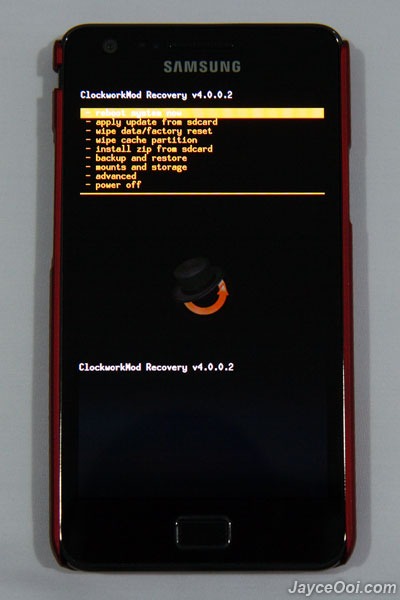
If you rooted using the Zedomax kernel, you should already have clockworkmod. To test it, shut off your phone. Then press the vol. up, vol. down and power all at the same time and hold them. Your screen will flash a couple of times but don't let go until you see this screen:

SGS2-ClockworkMod-Recovery-Mode.jpg


Don't do anything with it. Just reboot your phone. On the i777 you use the home key to select and the vol up/dn to highlight. Make sure reboot your phone is hilighted and press the home button.
 
ive got zedomax kernel,cwm,and the custom ics rom zip. that you recomended downloaded to my phones internal memory,i just need to know how to flash it now, sorry if it was a little confusing i kept asking questions then figuring them out before you wrote back,i apologize
 
If you have the zedomax kernel installed already and the ShoStock2 zip file copied to yuor phone, then here we go ....

COPY ALL YOUR IMPORTANT DATA TO A SAFE PLACE -- WHAT YOU ARE ABOUT TO DO IS GOING TO WIPE YOUR PHONE!

With your phone charged at least above 80% (full would be better) and unplugged from USB and/or the charger, press and hold the vol. up, vol. down and power button until you boot into CWM.

lunatic59-albums-stuff-picture6182-cwm5.jpg


Step 1. Back up your phone. Use the vol. up/down buttons to highlight Backup and restore. Press home to select. Choose backup and perform a backup to save your phone in this state should something happen during flashing. This takes a while and may appear to stall several places during the backup. Let it run and be patient. When it's done, use the back key to return to the main CWM menu (above).

Step 2. Select wipe data/factory reset. This will remove your personal data and put the phone in a clean state. It is important to do this when flashing any rom. When that option is highlighted, press home to selct. You'll have to scoll again to the confirmation and press home again. This operation is pretty quick. When done, press the back button as many times as necessary to get to the main CWM screen.

Step 3. Clear the cache. Some say this is optional for roms, but because ShoStock includes a new kernel too, I always do this. Same method ... highlight wipe cache partition. Press home to select. Scroll to confirmation and press home again to wipe. Then back to the main CWM screen.

Step 4. Install ZIP from SD card. Highlight and press home to select. Scroll to the ShoStock zip file which will be pretty far down if you have a lot of folders on your sd card. when you have that highlighted, press home to select and again confirm as before. Now you are installing the rom. This takes a while as it flashes a new modem, new kernel and then installs the rom. Let it run and be patient. When it is done, go back to the main CWM screen and reboot. The first time it boots it sits on the splash screen a while while it builds the files, so again, be patient.

Congrats, you are on ICS :D
 
Back
Top Bottom