
I'm not sure what could/would have caused this, but every time I restart my phone it has 4G turned on by default. It had never done this in the past and just started after I restored a nandroid backup. I don't recall that being the case when I made that nandroid about a month ago. It is the only nandroid that I have that will be worth anything since I'm on a new recovery and I have updated my radios. Is there something I can do so that it doesn't default this way? I use 4G on occasion, but I'm not always in a 4G spot and I could see my battery getting killed if I didn't notice it was on.
Install the app
How to install the app on iOS
Follow along with the video below to see how to install our site as a web app on your home screen.
Note: This feature may not be available in some browsers.
-
After 15+ years, we've made a big change: Android Forums is now Early Bird Club. Learn more here.
You are using an out of date browser. It may not display this or other websites correctly.
You should upgrade or use an alternative browser.
You should upgrade or use an alternative browser.
Root Phone defaults to 4G after reboot...
- Thread starter bvbull200
- Start date
-
- Tags
- htc evo 4g

Drew5150
Android Expert
does this nandroid backup from a month ago require older radios?
4g will do this sometimes on a bad install. it try's to turn on and then disconnects and repeats. thus never really turning off so when your phone reboots 4g comes back on.
you could try and get it to connect in a known good 4g area and then turn it off. once completely off reboot and see if it comes back on.
or wipe again and try to reinstall the nandroid backup.
4g will do this sometimes on a bad install. it try's to turn on and then disconnects and repeats. thus never really turning off so when your phone reboots 4g comes back on.
you could try and get it to connect in a known good 4g area and then turn it off. once completely off reboot and see if it comes back on.
or wipe again and try to reinstall the nandroid backup.
does this nandroid backup from a month ago require older radios?
4g will do this sometimes on a bad install. it try's to turn on and then disconnects and repeats. thus never really turning off so when your phone reboots 4g comes back on.
you could try and get it to connect in a known good 4g area and then turn it off. once completely off reboot and see if it comes back on.
or wipe again and try to reinstall the nandroid backup.
1. The nandroid required the newer radios that I have installed. It is from right after I got Myn's RLS5 working well.
2. I did not know that.
3. Each time I have rebooted it has connected to a good 4G spot (my bedroom
 ) and I have turned it off, only to reboot and it be on again.
4. Sounds like my next option, I suppose.
It has to be something in the apps/data that I restore through Titanium. I have wiped everything and reflashed Myn's RLS5. In it's most basic form, I don't seem to have the problem. When I reflash a font pack and reboot, I don't have the problem. When I do any batch restores with Titanium, I run in to the issue. I have tried apps with data, missing apps with data, all apps and all system data, and none of them seem to be void of the issue.
I suppose I could go one app at a time and see if that does anything, but that will be a lot of trouble shooting. I'm hoping there is something in the startup that I can easily adjust and get this working right.
I suppose I could go one app at a time and see if that does anything, but that will be a lot of trouble shooting. I'm hoping there is something in the startup that I can easily adjust and get this working right.
Drew5150
Android Expert
have you tried to run the batch as missing apps only, NO data?
I do this and then reboot. after the reboot I open up titanium again, don't open up batch. just scroll through your list and only restore DATA for certain apps that you need, ie bookmarks and wifi access points. usually just the green apps and maybe e few apps that you know you want data for, like pandora for log in info. then I reboot again, usually I have no issues.
I usually never restore contacts or email accounts, I seem to always have issues when restoring these things.
I do this and then reboot. after the reboot I open up titanium again, don't open up batch. just scroll through your list and only restore DATA for certain apps that you need, ie bookmarks and wifi access points. usually just the green apps and maybe e few apps that you know you want data for, like pandora for log in info. then I reboot again, usually I have no issues.
I usually never restore contacts or email accounts, I seem to always have issues when restoring these things.
Okay, I think I may have fixed it. I wiped everything and began restoring apps a few at a time with Titanium. If it was an app that had data that I wanted to restore, I would do app + data, if it wasn't important, I did just the app. For instance, Angry Birds, I did app + data to restore any progress I made. For Music Mod, I just did the app. Every 5 or so apps, I would reboot, verify that it didn't default to 4G, then make a nandroid. I did this three times, then decided to do a batch restore on the apps only, not system data. I got all of my apps back, with their data, and it still reboots to 3G instead of 4G. I don't have a problem going back and doing any system data, since that is just home screens, brightness settings, screen timeout, etc. I will get all of that straight, then make one final nandroid with Wimax keys, then go back and get rid of the others.
I'm guessing SOMETHING in my system data got changed and was changing the startup procedure for my phone. Does that sound feasible? I will keep an eye on it to see if it comes back, but I think I'm good, now.
I'm guessing SOMETHING in my system data got changed and was changing the startup procedure for my phone. Does that sound feasible? I will keep an eye on it to see if it comes back, but I think I'm good, now.

Tempusfugit
Android Enthusiast
^ i am pretty sure the issue went away on mine when I quit restoring data
I've never used TiB(well I did make backups, right after rooting, before flashing, but never tried to restore because I read your and akazabam's posts saying there are sometimes problems)
So, flashed myn's and the radio updates that are on the same download page. My 4g has randomly been turning on. I think myn's isn't set up perfectly for 4g to tell you the truth... My guess is the 4g notification toggle is having the same problem, oh EVERY 4g widget ever has had.
Fix I haven't tried, but sounds promising
akazabam said:[MOD][PORT][4G toggle] Notification Menu Power Control Widgets for Sense - 3.70 OTA - xda-developers
You basically need to add a file named widget.txt to /system/customize/. The thread explains how to format it. You have your choice of 13 different widgets, up to 6 at a time.
So basically remove the 4g widget from the notifications bar...
I've never used TiB(well I did make backups, right after rooting, before flashing, but never tried to restore because I read your and akazabam's posts saying there are sometimes problems)
So, flashed myn's and the radio updates that are on the same download page. My 4g has randomly been turning on. I think myn's isn't set up perfectly for 4g to tell you the truth... My guess is the 4g notification toggle is having the same problem, oh EVERY 4g widget ever has had.
Fix I haven't tried, but sounds promising
So basically remove the 4g widget from the notifications bar...
4g toggle widgets can cause problems. Usually it's the issue where 4g turns on briefly, then back off, causing the radio to not shut off all the way. Had it caused this problem, removing the 4g widget from the notification pull down window would be a good place to start. A lot of people forget about that.
^ for ages (or months) I had no issues with TB...but now all sorts of issues. Can't explain it. I am nearly at a point where I am going to do things old school...list em out and re-download
It kind of makes sense depending on how you use it. I had random issues with it as well. Certain tasker profiles would randomly either work or not work after restoring it in titanium backup. I determined it can not be restored that way (or at least data can't). I'm sure the same goes for other apps as well, especially when they affect system-wide functions. When you tell an app to remember data, you have no way of knowing what it picked up from your previous setup. Presumably, if you restore apps only, and no app data whatsoever, it will be fine. At that point, all you're doing is installing the apks the way you'd get them from the market, just without having to download them again. Titanium backup really should come with all kind of disclaimers.
EDIT: My point was basically that everything can seem fine, but it only takes installing one new app and restoring it along with it's data to make things go crazy.
My point was basically that everything can seem fine, but it only takes installing one new app and restoring it along with it's data to make things go crazy.
That seems to be what happened to me. I did TONS of batch restores with all apps and all system data in the past, with absolutely no issues. Something happened this most recent time and that damn 4G kept booting right up with my phone. It honestly wasn't the biggest problem ever, but I don't use 4G all the time, even though I'm in a strong area, and didn't feel that I needed to be looking for that toggle every time I rebooted my phone.

frenchy714
Android Expert
I'm not sure what could/would have caused this, but every time I restart my phone it has 4G turned on by default. It had never done this in the past and just started after I restored a nandroid backup. I don't recall that being the case when I made that nandroid about a month ago. It is the only nandroid that I have that will be worth anything since I'm on a new recovery and I have updated my radios. Is there something I can do so that it doesn't default this way? I use 4G on occasion, but I'm not always in a 4G spot and I could see my battery getting killed if I didn't notice it was on.
Funny you should start this thread around the same time this very same thing starts happening to me
 . I started uninstalling some unneeded apps and it stopped. Weird.
Funny you should start this thread around the same time this very same thing starts happening to me
So for you it just randomly started happening? Mine was after restoring a nandroid, but I think that I had restored some other apps/data as well. It sure would be nice to be able to pin down exactly which app or what bad data causes it to happen. I'm just glad I/we got it fixed.
frenchy714
Android Expert
So for you it just randomly started happening? Mine was after restoring a nandroid, but I think that I had restored some other apps/data as well. It sure would be nice to be able to pin down exactly which app or what bad data causes it to happen. I'm just glad I/we got it fixed.
You know what......Now that I think about it, it WAS after I restored a nandroid.

mecampo
Well-Known Member
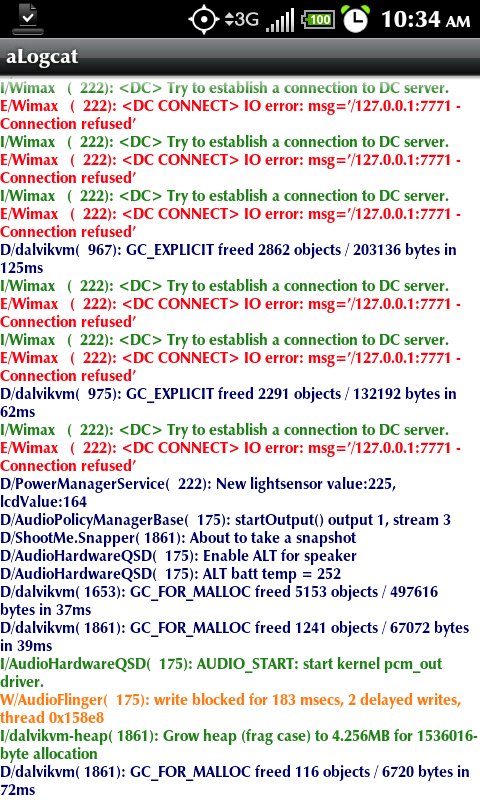
keep in mind that currently (at least on my phone) log cat shows regardless of what method you turned it on and then off...it's still running/ scanning
the only true solution is a reboot. hot restart doesn't even fix it.
whaaaat
 , then that means its always on with my evo since it's on as default upon reboot/restart
I rebooted mine after a few days and 4G started up on its own again. I'm not going to go through EVERYTHING that I did just to get it to stop doing that. I have no idea what may have been restored or installed to cause it to happen.
I will look at LogCat, though I've never heard of or tried that app before. Hopefully the info makes sense to me.
I will look at LogCat, though I've never heard of or tried that app before. Hopefully the info makes sense to me.
mecampo
Well-Known Member
Well...dload logcat and check out the logs
i see logcat recorder, logcat for mobile manager, logcat widget ... sorry im confused which is which
pls advise
thanks
mecampo
Well-Known Member
Well...dload logcat and check out the logs
oopos sorry thought i was hanged the first time and submit it again