• After 15+ years, we've made a big change: Android Forums is now Early Bird Club. Learn more here.

Help Phone doesn't show up on computer

Reggjo can you plese send me a private message telling me how to gey my laptop to run off my cell phones internet. Or if you have yahoo aol or msn messenger or even facebook so you can talk to me and walk me step at a time. please
 
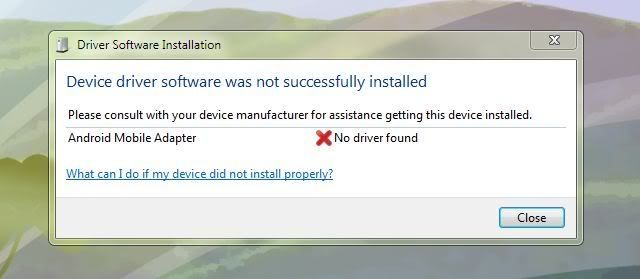
I removed the drivers from windows then plugged the droid back in and this is what I get after windows tried to install new drivers.
Capture-2.jpg


dude I had this issue when i was installing cm7... Thanks to nuttmeg for this by the way... but I went out and got a card reader (make sure it can read micro sd without adapter).... powered off my phone, removed the sd card, put it in the card reader and plugged it into my computer...

The Sd card shows up as "removable disk G:" (windows 7) and I just drag and drop what i need into there....

Then when I'm done I just right-click and select "eject", and pop the sd card back into my phone.... but put it back in before you turn it back on...

Thats been working just fine for me and the card reader only cost me like 5 bucks....
 
dude I had this issue when i was installing cm7... Thanks to nuttmeg for this by the way... but I went out and got a card reader (make sure it can read micro sd without adapter).... powered off my phone, removed the sd card, put it in the card reader and plugged it into my computer...

The Sd card shows up as "removable disk G:" (windows 7) and I just drag and drop what i need into there....

Then when I'm done I just right-click and select "eject", and pop the sd card back into my phone.... but put it back in before you turn it back on...

Thats been working just fine for me and the card reader only cost me like 5 bucks....

how to fix that is downloadthis and extract it to desktop ASCEND USB DRIVERS.rar and open folder once extracted and click pc opions and uninstall the drivers, than re install the drivers abd plug you phone back in and pull down the notification bar on the phone and tap usb mode, and it will work without you having to remove the card from the phone.
 
the problem the original poster was having is identical to the one I'm having now after installing CM7. My computer recognizes the SD card just fine and I can transfer files to it from my laptop when it is plugged in via USB. But what I CANNOT do is run PC Tools and have it recognize my phone as a USB device. It used to be when I had my phone plugged into my laptop via USB, I would get an E drive that would be the internal memory of the phone and a F drive which was the SD card. Well, now I get just get the SD card as F. If I take out the SD card, I'll get an E but, like the poster, it thinks it's a CD Rom drive and prompts me for "media". I've uninstalled, reinstalled, plugged and unplugged the phone into my computer and it still tells me that the "android mobile adapter" driver is missing and it obviously isn't in that .rar file because I've pointed right to the extracted folder on my desktop and it tells me that there is no compatible driver for my device in it. I don't know if this is an issue strictly pertaining to Windows 7 or not, but I don't have another operating system to test it on. I REALLY miss having a program like PC Tools that I can use to compose text messages from my computer instead of using this awful phone keyboard -- so much so, that I'm debating flashing back to the stock ROM. What I need is an Android Mobile Adapter driver for Windows 7 (not sure if it has to be specific to a Huawei Ascend M860 or not though).

 
I don't know if you guys are still on the original topic but on my phone if usb debugging is turned on my computer doesn't recognise the phone but if I turn it off everything works perfect.
 
Back
Top Bottom