• After 15+ years, we've made a big change: Android Forums is now Early Bird Club. Learn more here.

Post Your LG Volt Screenshot...

I get what you're saying, but I've got Chronus w/dashlight extension, Kobo widget, and WiFi Tether widget and still have 305MB free, do the widgets are only using 45MB.

I tried chronus, it was lighter by about half a MB or so, but I hated that you couldn't collapse the notifications. I liked kk for its customizability.

 
I tried chronus, it was lighter by about half a MB or so, but I hated that you couldn't collapse the notifications. I liked kk for its customizability.
Notifications? Which widget were you using? I'm using the flex widget.
 
I meant the little thing on the side that tells me like the temperature and and if I have any texts or my alarm.
5yte2e9a.jpg
Idon't have any action going on in hangouts and I don't have an alarm set, but do you see how it tells me the temperature on the side? And on the lock screen if I put my knock code thing down it expands and gives me a little more detail.
 
ICS dark flavored. Ya I still need to do the stock V4. Just haven't had time with school, work, and kids.
 

Attachments

  • uploadfromtaptalk1412583371338.jpg
    uploadfromtaptalk1412583371338.jpg
    41.5 KB · Views: 140
  • uploadfromtaptalk1412583389709.jpg
    uploadfromtaptalk1412583389709.jpg
    68 KB · Views: 143
  • uploadfromtaptalk1412583402811.jpg
    uploadfromtaptalk1412583402811.jpg
    57.9 KB · Views: 168
  • uploadfromtaptalk1412583423346.jpg
    uploadfromtaptalk1412583423346.jpg
    53.5 KB · Views: 126
  • uploadfromtaptalk1412583435025.jpg
    uploadfromtaptalk1412583435025.jpg
    45.6 KB · Views: 153
I meant the little thing on the side that tells me like the temperature and and if I have any texts or my alarm.
Idon't have any action going on in hangouts and I don't have an alarm set, but do you see how it tells me the temperature on the side? And on the lock screen if I put my knock code thing down it expands and gives me a little more detail.
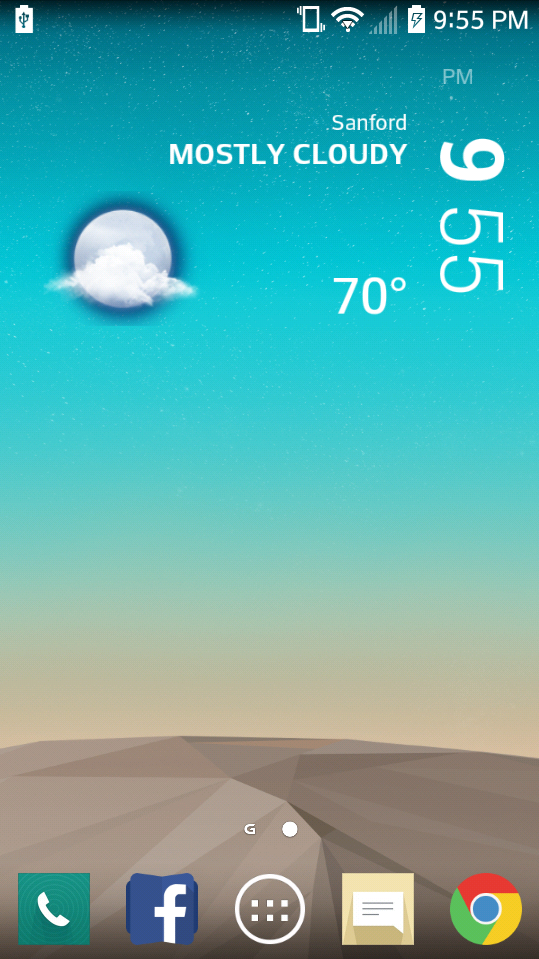
Ah... Pretty sure that can be turned off. I don't use that widget... Here's what mine looks like. Lockscreen is the same, minus Dashlight. No notifications of anything. Tapping the weather summary opens a full forecast window, even on the lockscreen without unlocking.
1412604230864.jpg
 
My volt atm
 

Attachments

  • uploadfromtaptalk1413776275431.jpg
    uploadfromtaptalk1413776275431.jpg
    19.7 KB · Views: 143
  • uploadfromtaptalk1413776296366.jpg
    uploadfromtaptalk1413776296366.jpg
    45.3 KB · Views: 134
  • uploadfromtaptalk1413776431070.jpg
    uploadfromtaptalk1413776431070.jpg
    34.1 KB · Views: 123
How do you install the G3 Launcher on the Volt and do you have to be rooted? Thanks

Therer isnt a huge difference in the launcher itself other than the grid size and icon size and no labels on the icons in the dock....

Here is the link to the apk file on my google drive! https://drive.google.com/file/d/0Bypl1wIYKKPpQWt4UGVNM2RiOGc/view?usp=sharing.. No root neccessary and it just installs as an update. If you dont like it you can go into settings/apps and uninstall updates on the home launcher and it reverts you back to the stock factory launcher.
 
Doing something new and BTW this game is free on the Amazon app store for free yall:D:D
 

Attachments

  • 1416428991254.jpg
    1416428991254.jpg
    73.1 KB · Views: 131
here is mine . I just upgraded the stock home launcher with the lg g3 launcher. It is 5x5 grid size and small home icons with no labels.

How much memory does that use, does it let you hide apps in the drawer and hide the page indicator/remove homescreens, and how do you install it?
 
How much memory does that use, does it let you hide apps in the drawer and hide the page indicator/remove homescreens, and how do you install it?

I put the link to download the apk installer in this thread above. I dont think you can remove the page indicator in the settings you may need to use the g3 tweaksbox and xpoosed framework to do that. after installing the apk (which installs as a update to the stock launcher) it is 28.44 mb . It doesnt seem to use any more ram memory it is just as responsive as the stock launcher. you can remove homescreens and add them just as you can with the stock launcher. It pretty much just gives you 5x5 homescreen and the icons are lowered and no labels on them. For me this just aids my need for simplicity. Adds more screen real estate as well. As you see there is no more dock seperator ...View attachment 59607
 
I have been messing around with xposed and a mod called g3 tweaksbox and another called g2 tweaksbox. With both of them I modded the stock g3 launcher to look closer to android l.I also installed the lg g3 keyboard and found a android l white theme for it! Also a Android L lockscreen.

Screenshot_2014-11-28-19-00-24.png
Screenshot_2014-11-28-19-00-41.png
Screenshot_2014-11-28-19-00-53.png
Screenshot_2014-11-28-19-01-01.png
 

Attachments

  • Screenshot_2014-11-28-19-02-15.png
    Screenshot_2014-11-28-19-02-15.png
    535.4 KB · Views: 183
  • Screenshot_2014-11-28-19-08-34.png
    Screenshot_2014-11-28-19-08-34.png
    258 KB · Views: 143
New wallpapers :)
 

Attachments

  • 1418400980215.jpg
    1418400980215.jpg
    40.8 KB · Views: 130
  • 1418400995269.jpg
    1418400995269.jpg
    34.3 KB · Views: 116
;)

OMGGG! Where did you get that fine Background!;)
Man dude, I had to do some digging. I got wallpapers for days, but I was able to find it in the stash. Here you go

I got some better ones that that though
 

Attachments

  • uploadfromtaptalk1422582558944.jpg
    uploadfromtaptalk1422582558944.jpg
    344.5 KB · Views: 130
Man dude, I had to do some digging. I got wallpapers for days, but I was able to find it in the stash. Here you go

I got some better ones that that though

Thanks for digging that one up...gonna put on my LG....Is there a wallpaper share thread here?
 
Back
Top Bottom