
Install the app
How to install the app on iOS
Follow along with the video below to see how to install our site as a web app on your home screen.
Note: This feature may not be available in some browsers.
-
After 15+ years, we've made a big change: Android Forums is now Early Bird Club. Learn more here.
You are using an out of date browser. It may not display this or other websites correctly.
You should upgrade or use an alternative browser.
You should upgrade or use an alternative browser.
Post your SGS2 homescreens!
- Thread starter 1080p
- Start date
-
- Tags
- samsung galaxy s2


What's that icon in the dock second from right?
Guess that's the Miren Browser

steslatt
Android Expert
What's that icon in the dock second from right?
Miren browser, it came with miui rom when I had my desire and I liked it so I kept it when I got the sgs2. I really dont like stock browser


Just getting started with mine

To answer Miths000's question, I believe skimminstones has paid a visit to the Ultimate Online Theme Kitchen (UOT) and swapped out both his notification and battery icon sets. I don't know which notification set is shown but the battery icons look like the UOT set with a colour mod. It's rather smart!
What is that widget that summarized missed calls, emails, sms
thanks
thanks
Ok... I searched. I even found a thread where a user commented that this thread doesn't exist yet. So...
Post your home screens, other screens... show off your widgets, themes, etc!
I'll start... (Yes I am showing off)


steslatt
Android Expert
JimmyTheSaint
Well-Known Member
oops, the site is requiring me to resize my screenshots. Will fix it later.


Using launcherpro for my launcher, tried a few others and kept coming back to it.
Wallpaper is one of the native ones with launcherpro
Homescreen, with widgets and regularly used programs, battery widget is batterylife

Utility screen with a few other commonly used tools

Winamp lockscreen

Wallpaper is one of the native ones with launcherpro
Homescreen, with widgets and regularly used programs, battery widget is batterylife
Utility screen with a few other commonly used tools
Winamp lockscreen
What is that widget that summarized missed calls, emails, sms
thanks
It's called "Missed it" I believe, and is in the marketplace!


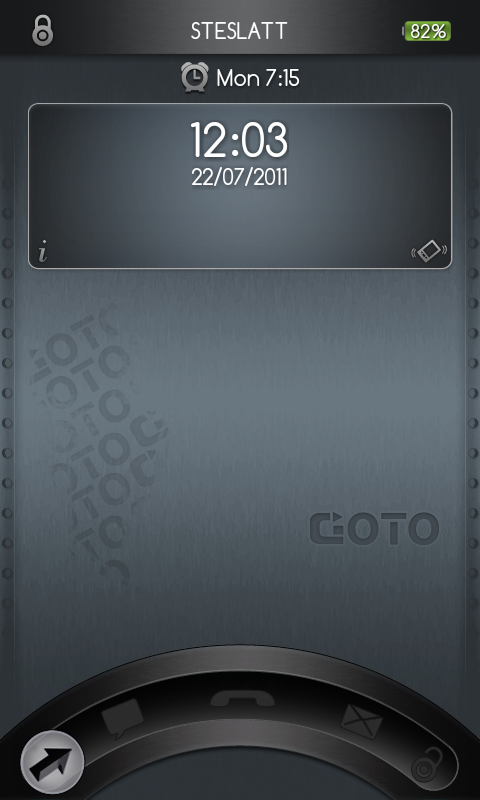
skimminstones
Android Enthusiast
No im just using the lightening custom rom and those are the icons it comes with in the notification bar.To answer Miths000's question, I believe skimminstones has paid a visit to the Ultimate Online Theme Kitchen (UOT) and swapped out both his notification and battery icon sets. I don't know which notification set is shown but the battery icons look like the UOT set with a colour mod. It's rather smart!


Here's what mine has looked like the last couple of days.
I use WidgetLocker for the lock screen - the "Tool Mode" and "Long press..." text doesn't appear on the actual lock screen, but since I couldn't take a screenshot there, I grapped one from the customization screen instead.
For the home screens I'm using GoLauncher.

LOVE this!! Can please let us know what you are using? Details! Where is the wallpaper from? Thank you!
You are using SGS2 right? Where did you get the music widget from? Thanks!Here's what mine has looked like the last couple of days.
I use WidgetLocker for the lock screen - the "Tool Mode" and "Long press..." text doesn't appear on the actual lock screen, but since I couldn't take a screenshot there, I grapped one from the customization screen instead.
For the home screens I'm using GoLauncher.

Shotgun84
Extreme Android User
Lockscreen

Home Screen
Go Launcher using cyanogen theme wallpaper and app/dock icons from black glass theme.

Notification Bar
Using Villainrom 2.3 tweaks

App Draw
Ultimate blue theme with sphere icon effect

I have to ask. How you are posting big pictures? I keep getting told that the files are too big
Home Screen
Go Launcher using cyanogen theme wallpaper and app/dock icons from black glass theme.
Notification Bar
Using Villainrom 2.3 tweaks
App Draw
Ultimate blue theme with sphere icon effect
I have to ask. How you are posting big pictures? I keep getting told that the files are too big
skimminstones
Android Enthusiast
mine were uploaded to photobucket and post the link here inbetween [ img] [ /img] tags
My first experiment is this black one using GO Launcher with blackglass theme and Minimalistic Text widgets:

But, after a brainwave I worked out how to create transparent icons over text embedded in the wallpaper (greate a custom icon using a transparent gif!) I came up with the BSG one (although I can't take credit for the BSG wallpaper itself - I just added the Phone/Contact/Message/Camera text)

- Wallpaper edited on PC with photoshop and Battlestar font (from dafont.com)
- GO Launcher EX interface with blackglass icon theme (not found a better icon theme for this wallpaper - any suggestions?)
- clock/battery/weather widgets are from Simi
- inspiration from you lot on Android Forums!
It's a shame Go Launcher does not let you backup/restore multiple themes - don't really want to lose the BSG one when I do another
No Widget Locker lock screen - they look pretty but since I protect my phone using a pattern, widget locker just adds an extra screen before I get to what I want - can't see the point in that unless I am missing something?
But, after a brainwave I worked out how to create transparent icons over text embedded in the wallpaper (greate a custom icon using a transparent gif!) I came up with the BSG one (although I can't take credit for the BSG wallpaper itself - I just added the Phone/Contact/Message/Camera text)
- Wallpaper edited on PC with photoshop and Battlestar font (from dafont.com)
- GO Launcher EX interface with blackglass icon theme (not found a better icon theme for this wallpaper - any suggestions?)
- clock/battery/weather widgets are from Simi
- inspiration from you lot on Android Forums!
It's a shame Go Launcher does not let you backup/restore multiple themes - don't really want to lose the BSG one when I do another
No Widget Locker lock screen - they look pretty but since I protect my phone using a pattern, widget locker just adds an extra screen before I get to what I want - can't see the point in that unless I am missing something?
D
Deleted User
Guest
@Ales - for icons, i use and enjoy dark metal theme, very nice
D
Deleted User
Guest
anyone have that rain drop wallpaper? been looking for it everywhere!
get picspeed HD wallpapers from the market, it's somewhere under abstract i think