Install the app
How to install the app on iOS
Follow along with the video below to see how to install our site as a web app on your home screen.
Note: This feature may not be available in some browsers.
-
After 15+ years, we've made a big change: Android Forums is now Early Bird Club. Learn more here.
You are using an out of date browser. It may not display this or other websites correctly.
You should upgrade or use an alternative browser.
You should upgrade or use an alternative browser.
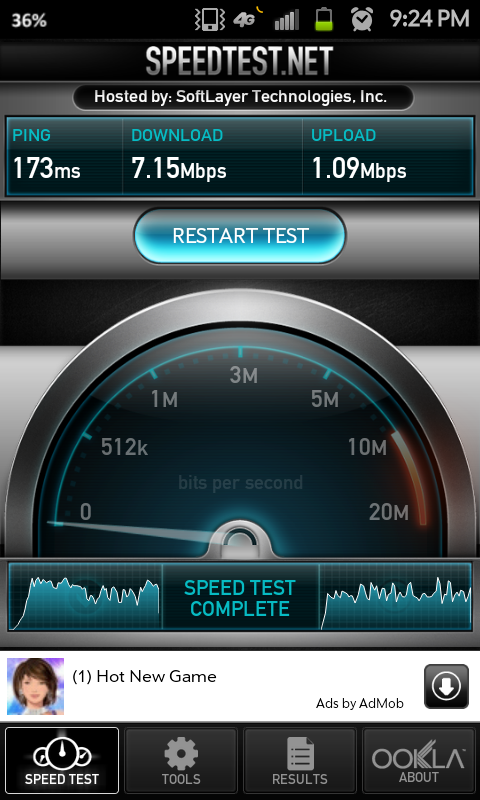
POST YOUR SPEED TESTS HERE
- Thread starter Mr. Ed
- Start date
NYC HSPA+ stock Skyrocket:

Wow, I didn't think NYC was that good . I am located 15 minutes from NYC in jersey and have not seen over 1.5 down on my skyrocket.
ALL SUCKED..
manager came over and had a new htc.... his sucked as well.. he said att was working on the network to switch to lte in WEST PALM BEACH.. was to be completed last week....
Said they do not even give him new times for completion but indicated he sees these upload and download problems every time att switches to a new network technology/speed...
suggested we wait a few weeks to see if things resolve..
BUT ALL PHONES in the store experienced the same speed problems.. so it was/is network issues at least in the Palm Beaches...
YMMV
manager came over and had a new htc.... his sucked as well.. he said att was working on the network to switch to lte in WEST PALM BEACH.. was to be completed last week....
Said they do not even give him new times for completion but indicated he sees these upload and download problems every time att switches to a new network technology/speed...
suggested we wait a few weeks to see if things resolve..
BUT ALL PHONES in the store experienced the same speed problems.. so it was/is network issues at least in the Palm Beaches...
YMMV
Has anyone that is in a LTE marker played around with their APN yet? Right now i dont have LTE in my area, so to get any sort of connection I had to change my APN to the AT&T HSPA+/phone, which is working flawlessly and im getting betweeb 3000 and 8500 down.
Did you get MMS to work? Can you PM me the APN settings you used?
92hatchattack
Well-Known Member
no, mms is not working .. been on the phone with att now for 2 hours.. they are ALL ****ing morons...
for name i put "AT&T HSPA+"
for apn put "phone"
everything else is left blank.
for name i put "AT&T HSPA+"
for apn put "phone"
everything else is left blank.

craZhorse
Newbie
Ya'll can test to see if this works..Create a new APN
Name: ATT US HSDPA (case sensitive)
APN: phone
Proxy: <not set>
Port: <not set>
Username: <not set>
Password: <not set>
Server: <not set>
MMSC: <not set>
MMS proxy: <not set>
MCC: 310
MNC:410
Authentication type: <not set>
APN type: default,supl,agps,fota,dun
APN protocol IPv4
Name: ATT US HSDPA (case sensitive)
APN: phone
Proxy: <not set>
Port: <not set>
Username: <not set>
Password: <not set>
Server: <not set>
MMSC: <not set>
MMS proxy: <not set>
MCC: 310
MNC:410
Authentication type: <not set>
APN type: default,supl,agps,fota,dun
APN protocol IPv4
Ya'll can test to see if this works..Create a new APN
Name: ATT US HSDPA (case sensitive)
APN: phone
Proxy: <not set>
Port: <not set>
Username: <not set>
Password: <not set>
Server: <not set>
MMSC: <not set>
MMS proxy: <not set>
MCC: 310
MNC:410
Authentication type: <not set>
APN type: default,supl,agps,fota,dun
APN protocol IPv4
It works but MMS & Visual Voicemail don't work. I know you can make an additional APN for MMS to work but it's too bulky switching back and forth.
I was just reading the XDA forums (also looking to see if anyone has a good fix).
Someone from NYC was reporting that the "pta" APN seemed to be working correctly now (11/15).
I'm playing with my phone in the DC area, and "pta" does appear to be working, although I can't test it on LTE until tomorrow AM. But webpages are loading without a hang at the end like they had been.
Maybe AT&T is actually fixing things? But thats probably too much wishful thinking.
Someone from NYC was reporting that the "pta" APN seemed to be working correctly now (11/15).
I'm playing with my phone in the DC area, and "pta" does appear to be working, although I can't test it on LTE until tomorrow AM. But webpages are loading without a hang at the end like they had been.
Maybe AT&T is actually fixing things? But thats probably too much wishful thinking.
92hatchattack
Well-Known Member
I was just reading the XDA forums (also looking to see if anyone has a good fix).
Someone from NYC was reporting that the "pta" APN seemed to be working correctly now (11/15).
I'm playing with my phone in the DC area, and "pta" does appear to be working, although I can't test it on LTE until tomorrow AM. But webpages are loading without a hang at the end like they had been.
Maybe AT&T is actually fixing things? But thats probably too much wishful thinking.
As of this moment mine is working as well! Lets all hope that maybe there has been a fix issues and that this is not just a small stroke of luck. God knows I bitched about it enough on the phone today to them.
I was just reading the XDA forums (also looking to see if anyone has a good fix).
Someone from NYC was reporting that the "pta" APN seemed to be working correctly now (11/15).
I'm playing with my phone in the DC area, and "pta" does appear to be working, although I can't test it on LTE until tomorrow AM. But webpages are loading without a hang at the end like they had been.
Maybe AT&T is actually fixing things? But thats probably too much wishful thinking.
i hope this is true. Ive been in South Dakota the last few days and the phone is working great here. It will suck to get back home to baltimore on friday and go back to having a useless device.
92hatchattack
Well-Known Member
5:30 am and PTA still working great at the moment.
92hatchattack
Well-Known Member
As of 11pm last night my stock apn has been working 100% It's as if someone at at&t just forgot to throw the switch and now everything is ok.
As of 11pm last night my stock apn has been working 100% It's as if someone at at&t just forgot to throw the switch and now everything is ok.
Seems to be the same here. And, although I saw an occasional slight hang on a few web pages (but no where near what was happening before..), the stock/pta APN seems to be working up to par. I even did a speedtest while crossing a bridge from VA into DC (nice and open area!), and it was not bad...22.76Mbps down/12.83Mbps up. I've had better results before, but it seems to be working much more consistently now.
In my mind I have this image of someone at AT&T going, "Why is this switch in the off position? Its supposed to be on!" Click.


Mr. Ed
Extreme Android User
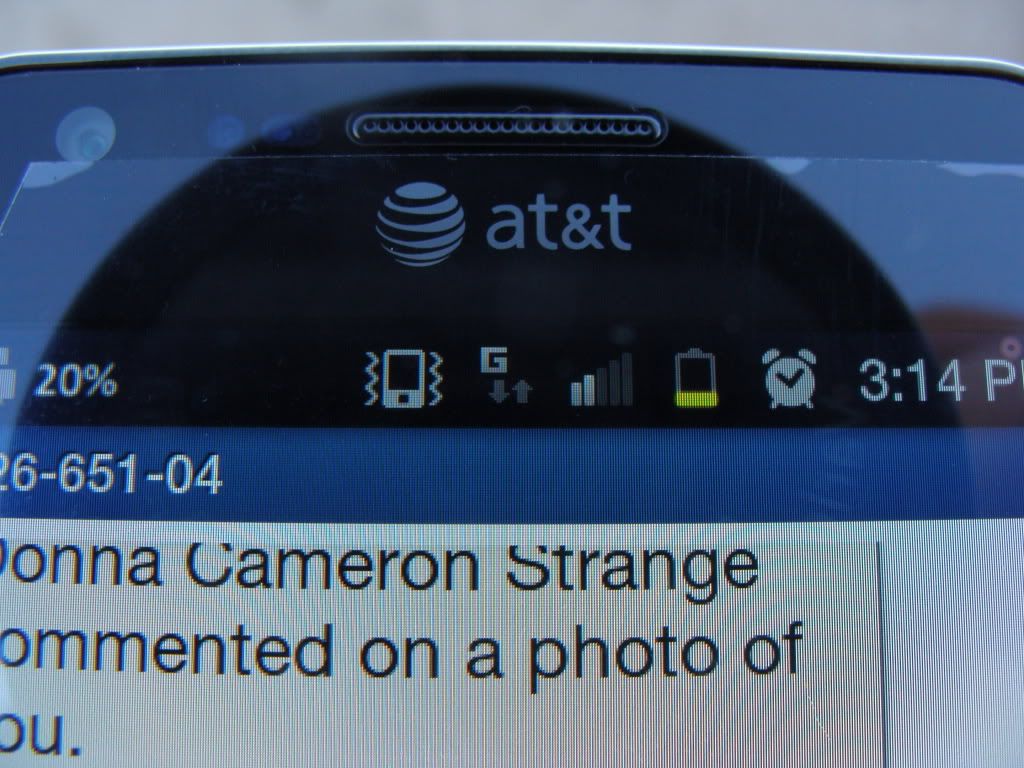
No no no....display
My phone displayed in our travels
"G"
"E"
"4g"
"4glte"
It did it again!!!!

Simba501
Android Enthusiast
It did it again!!!!
It's switching available networks. Everywhere doesn't have 3G, so there you'll likely see E (edge), which is 2G. G is a step under that, I think it stands for GPRS. There could be random times where you'll see it momentarily switch to and from these networks, which are likely random incidences of being connected to different towers (e.g., you may not be able to connect to 4G while in a basement, so it'll switch to 3G). Traveling though, you'll see the type of network available in that area.

milan03
Android Enthusiast
Just have never seen g before...,all the others yes.....but never g haha
That's GPRS.