• After 15+ years, we've made a big change: Android Forums is now Early Bird Club. Learn more here.

Problem with Samsung Kies

Hello, I am using win7 and whenever I run samsung kies I get the same error message
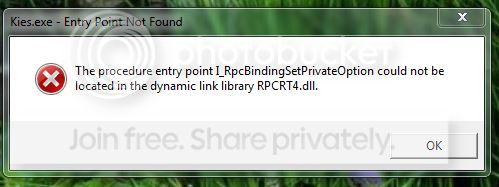
Capture_zpsf02c7b39.jpg


I have tried re-installing the programme but it makes no difference, I have run the system file checker from the command prompt and it says there are no problems.
Can anybody help me sort this rather annoying problem?

Thanks for reading :D

 
I have been googling and skype is named a lot to interfere with kies. Maybe thats the problem? You could try updating skype?

I didn't find anything else. So if someone has a better idea?
 
Sounds like dll is corrupted or maybe only having problem with priviledges. Have you tried to install kies with admin priviledge? or open it as an admin?

"run as administrator" (click the right button on a mouse)

Kies is a pain in the *ss!
 
Kies gets my 3Bs award e.g Big Bloated and Buggy.What operations do you need it for? There are some better alternatives to Kies using just PC inbuilt systems and free apps.
 
Kies gets my 3Bs award e.g Big Bloated and Buggy.What operations do you need it for? There are some better alternatives to Kies using just PC inbuilt systems and free apps.

If you're not in the US or tied to a major carrier, you get updates to your phone via Kies. Also it has the ability to restore data from an iTunes backup of your iPhone into a Galaxy phone.

Anyway, the only fix I can think of for the OP is a clean redownload and install of Kies.
 
Op. Do you just want to update the phone with official firmware?
Kies is the customer software for this type of thing.
Odin is what samsung repair centers use and is much better.
If you want to upgrade firmware, let us know and we can help :thumbup:
 
Kies is the spawn of the devil, on one of his worst-ever days. :(

RPCRT4.dll is a Windows system library, so the first thing to do is ensure that your OS is patched up-to-date.

Then uninstall Kies, reboot the PC, and redownload Kies (to ensure no corruption) from Samsung's web site.

Reinstall Kies, reboot the PC again then try connecting your handset.
 
Back
Top Bottom