
Install the app
How to install the app on iOS
Follow along with the video below to see how to install our site as a web app on your home screen.
Note: This feature may not be available in some browsers.
-
After 15+ years, we've made a big change: Android Forums is now Early Bird Club. Learn more here.
You are using an out of date browser. It may not display this or other websites correctly.
You should upgrade or use an alternative browser.
You should upgrade or use an alternative browser.
Root [ROM]Leaked Stock 2.2 with Sense [EVERYTHING WORKS!!]
- Thread starter gbenj
- Start date
-
- Tags
- htc droid incredible


contagous
Android Expert
So now the screen orientates no matter which way you flip the phone.....thank you forthat...was it baked in the rom or was it a htc fix?
Its a Foryo thing, so Google Android Fix


Homan13PSU
Android Enthusiast
God I'm an idiot. I forgot you had to wait UNTIL you got the red exclamation point screen before you pressed power and up. OTA update installed; I'll re-root tonight when I get home...and flash the 2.2 ROM.
So excited!
So excited!

tdperry
Well-Known Member
FYI, swype doesn't work. I think you need to use the skinned version
The BETA of Swype that I have is now working on it. Had a few problems (and sometimes had to restart the phone or go back to the original input method and then select swype again).
Overall I like it. MUCH faster than the original version of OS.
tdperry
Well-Known Member
Ok take it easy. I never ran the test. But the way the phone runs. It will always run better without sense.
Well, the way you made your earlier post was as if you had ran it and that was what you normally got, ergo that was "standard".
I just ran it and got 1116 and that was with MSN Talk running. Killed MSN Talk and it jumped to 1273.

civicsisedan
Android Expert
What if you had already rooted first then Froyo'ed. First off is there a way to unroot and still be able to install updates from SD, Second is there a way to install this from Froyo?
Your questions dont make sense.
Is your first question asking what happens if you dont unroot and install leaked OTA with radio update first and just flash Froyo. It will still be stable just wont have camcorder/camera and may have other bugs like wifi and gps.
And why would you want to unroot to install updates from SD? You can just go into Recovery and apply them through Clockwork...
And Second is there a way to install this from Froyo? makes no sense to me...
greatchief1
Newbie
The BETA of Swype that I have is now working on it. Had a few problems (and sometimes had to restart the phone or go back to the original input method and then select swype again).
Overall I like it. MUCH faster than the original version of OS.
I was having the same problems getting swype to work and could not find a fix (tried different custom skins ect..) Finally, I uninstall all versions of swype and tried reinstalling using the official Swype Installer apk, logged in and re-downloaded the app from swype.com server, authenticated and it worked!
So if you are having problems this will work, assuming you were able to signup for the official beta swype from Swype.com website when it was open.
tdperry
Well-Known Member
I've been using this since last night (about 9PM - 2AM) and then from about 7AM-8AM, lol.. And I have not had a single issue so far! This thing is FAST, and PSX4Droid even runs games that it didn't before I updated to 2.2
Most of the issues that are occuring are caused by user error or people trying to flash a custom ROM for the first time that don't know what to do.. Thinking I may have to write up a really basic how-to guide..
One issue I am having occur is that I have multiple gmail accounts. The first one syncs fine, all the others have to have a manual sync done on them. Hopefully it is either a setting I've missed (doubtful) or this is a bug that gets fixed in the official release.
So now the screen orientates no matter which way you flip the phone.....thank you for
FINALLY!!!! This was my biggest pet peeve I had on Android. Why make it sit on the charge cable if i want it propped up on its side to watch movies?
Homan13PSU
Android Enthusiast
Froyo is installed! No issues, now the playing around begins to see how it compares.
greatchief1
Newbie
FINALLY!!!! This was my biggest pet peeve I had on Android. Why make it sit on the charge cable if i want it propped up on its side to watch movies?
Unfortunitly, watching videos/ Mp4 movies through the stock player still does not adjust the orientation correctly.
 Unless I am missing something??
wiretap
Android Enthusiast
Does the countdown stop? If so, I had that problem before on the stock ROM. I haven't tried it with this new ROM yet. But the workaround was to click the link, and then DON'T touch the screen until the countdown finishes or else it will stop/freeze.Does anyone know if the android browser can download from media fire. Im at work and can't get the files to download.

telmore007
Newbie
Trying to root android to 2.2 but when I update radio, it says complete and when I reboot it is still 1.00.03.04.06 But I now have the droid animation logo not the verizon logo at start up. I have htc incredible. Why is it not updating..?
Does the countdown stop? If so, I had that problem before on the stock ROM. I haven't tried it with this new ROM yet. But the workaround was to click the link, and then DON'T touch the screen until the countdown finishes or else it will stop/freeze.
I don't even get the countdown. as soon as the page loads the download link is available. When i click it nothing happens. After reading what you said about the timer I tried waiting 1 minute then clicking the link. Nothing happens.
Unfortunitly, watching videos/ Mp4 movies through the stock player still does not adjust the orientation correctly.
The Act 1 video player will flip any direction you flip the phone. No idea if it worked in the past but it works now. Makes the app worth it imo.

Skorpios1027
Frell me dead
I was having the same problems getting swype to work and could not find a fix (tried different custom skins ect..) Finally, I uninstall all versions of swype and tried reinstalling using the official Swype Installer apk, logged in and re-downloaded the app from swype.com server, authenticated and it worked!
So if you are having problems this will work, assuming you were able to signup for the official beta swype from Swype.com website when it was open.
I've done this 4 times already. Each time it will work for a while, then quit. I've since discovered that switching to the stock keyboard, then back to swpye will bring it back.
greatchief1
Newbie
The Act 1 video player will flip any direction you flip the phone. No idea if it worked in the past but it works now. Makes the app worth it imo.
I just tried the free version and does not auto rotate for me? Other programs auto rotate except video. I checked display settings and "auto rotate" is checked. I wonder if the paid version of Act 1 has this functionality enabled.
Skorpios1027
Frell me dead
I'm having trouble now installing/updating aps from the market. Everything fails with not enough space to install this application. Anyone else have this problem?
**EDIT** Solved the issue - when I reinstalled 2.2, I had set the e-mail app to download all my email and no limit to the size. Took about an hour to go through and delete the stuff I'd already read and deleted before. Didn't think about it but all those deleted e-mails ended up in the trash folder. Cleared out the trash and now I'm back in business.
**EDIT** Solved the issue - when I reinstalled 2.2, I had set the e-mail app to download all my email and no limit to the size. Took about an hour to go through and delete the stuff I'd already read and deleted before. Didn't think about it but all those deleted e-mails ended up in the trash folder. Cleared out the trash and now I'm back in business.
Homan13PSU
Android Enthusiast
Thought I'd post up my Quadrant score running the leaked OTA. Currently I'm just running Sense with I will probably do for the next week or so just to get an idea of performance before switching back to LauncherPro.
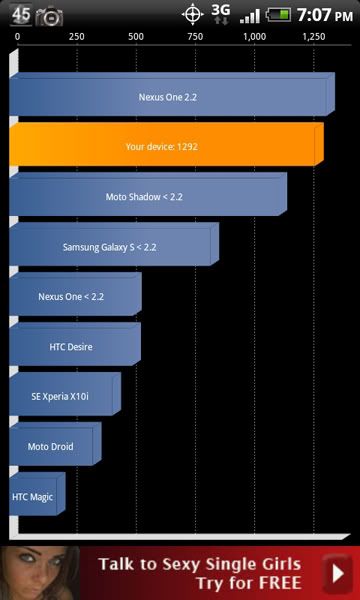
anyone else getting worse battery life than on stock sense? before i can get through the day and maybe on occation the battery gauge would turn orange. Now i'm barely making it through the day without it giving me the low batter warning in red. I did the battery data reset, i turned off all animations, bt, etc.
Trying to root android to 2.2 but when I update radio, it says complete and when I reboot it is still 1.00.03.04.06 But I now have the droid animation logo not the verizon logo at start up. I have htc incredible. Why is it not updating..?
I rooted using unrevoked and as advised during the process did make a nandroid backup. Have not flashed any roms and my radio is also 1.00.03.04.06. still 2.1 update 1 rom. Now to move forward with the leaked stock 2.2 with sense. I'm unclear what to do when it says unroot and take the radio update first. Can someone step me thru...I do have Rom manager installed too. Sounds alot like just doing this and working with fixes will be reversible if for some reason the ota up to froyo is ultimately adviseable.
thanks