peteralfonso
Newbie
Please 
I am a college student trying to make ends meet.
Help me live out my dreams to do this in the future.
Follow me on twitter to keep up to date: twitter.com/peteralfonso (not used for support!)
View the Changelog
ROM Download Links: 6/28/10
-FRF83V03.zip (stats)
*All Froyo kernels are supported as long as they are using the "anyrom.zip" format by Koush*
*This ROM is overclocked to 800Mhz by default, not every Droid will be able to handle this clock speed!
Your Droid may not boot up or may have random shutdowns or reboots!*
*No wipe necessary if coming from other FRF57 Froyo ROMs, but if you run into any problems at all then wipe data & cache*
OPTIONAL Scripts: (credit to Pete)
*Note: If you install anything not in my OP you will get permission denied errors!*
All the scripts (since V0.1) now have error checking and reporting!
Type the name of any script to print its info
-ads [-s] [-b]
-amazon [-rm] [-cp]
-apps2sd [-a] [-i] [-e]
-browser [-rm] [-cp]
-calc [-rm] [-cp]
-carhome [-rm] [-cp]
-cpuinfo
-ctp [-rm] [-cp]
-droidboot
-email [-rm] [-cp]
-fixperm
-genie [-rm] [-cp]
-godmode
-lwp [-rm] [-cp]
-mms [-rm] [-cp]
-office [-rm] [-cp]
-shutdown [-r] [-rr]
-sound [-e] [-d]
-spareparts [-rm] [-cp]
-switchboot
-switchclocks
-switchemail
-switchlwp
-switchmms
-switchmusic
-sys [-rw] [-ro]
-tips [-rm] [-cp]
-toolkit [-rm] [-cp]
-usb [-e] [-d]
-zipalign_apks
To use "switch" scripts:
1. Download desired file
2. Place on sdcard
3. Run script
Features:
-Android 2.2 FROYO Base (credit to Google)
-Fully Zipaligned System (credit to Pete)
-Fully Deodexed System (credit to Google)
-Automatic OverClocking to highest slot *makes SetCPU optional* (credit to Pete)
-Full sysctl support using sysctl.conf (credit to Pete)
-Clean Shutdown/Startup (from CyanogenMod)
-Custom Static Wallpapers (thanks Prash, Google, & HTC)
-Setup Wizard bypassed by default (credit to Pete)
-Tons of tweaks to increase performance & battery life (credit to Pete)
-Google DNS for a faster & safer online experience (credit to Pete)
-ADB Shell runs as root by default *no need to type in su* (credit to Pete)
-Chrome To Phone App (credit to Google)
-Supports Adobe Flash Player
-Milestone Video Player App (credit to Pete)
-Native Sound Recorder App (credit to Pete)
-Spare Parts App (modded by Pete)
-Neural Network Live Wallpaper with Google Colors (credit to Pete)
-Huge Library of System Audio (credit to Pete) *All 2.0, 2.1, & 2.2 Sounds*
-Longer Duration Between Wifi Scans Tweak *Battery Saver* (credit to Pete)
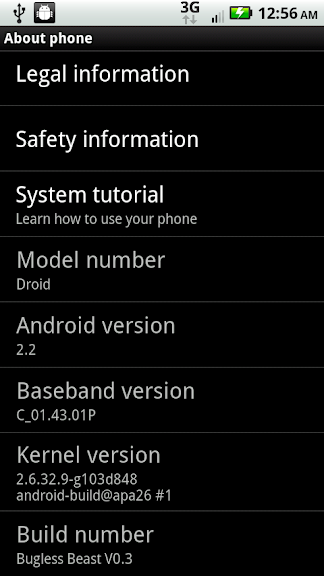
-Version Information In Settings > About Phone (credit to Pete)
-SuperUser App V2.1 w/ new UI (credit to ChainsDD)
-Ads blocked by default in apps & browser *No need to use AdFree* (credit to Pete)
-Camera Sounds Silenced by default *shutter & video recording* (credit to Pete)
-Nearly 100MB free at boot (credit to Pete)
-Over 50MB of free memory at all times *No need to use task killers* (credit to Pete)
-Busybox & Toolbox commands installed at boot (thanks Koush)
-Scripts ready to run after ROM Installation (credit to Pete)
-Backup/Delete Apps Using Astro & godmode
-Percentage in Battery Icon (images by Xeudoxus)
-Less CPU Intensive LWPs (idea by ChevyNo1 & ReverendYo)
-Transparent Notification Window Patch by Xeudoxus
-Moto X Bootanimation & Ringtones (credit to Pete)
-Bugless Beast Toolkit App (developed by Mr.Blippy)
HotKeys: (created by Pete)
-Recovery (hold power & x button)
-Shutdown (hold power & s button)
-Reboot (hold power & r button)
-Testing Menu (hold left alt & menu button)
Tools & Utilites:
-Flash Image
-Busybox V1.16.1 (I also fixed it's wget command)
-Bash Shell
-Zipalign
-Toolbox
Removed:
-Visual Voicemail (download from the Market)
-Facebook (download from the Market)
-Voice (download from the Market)
-Goggles (download from the Market)
-Twitter (download from the Market)
-30 Broken .jpg wallpapers that were left in Launcher2.apk
Theme:
-Modified Stock Theme (credit to Pete)
-Transparent Notification Window
-Removed Google Logo from search widget
-Removed Google Logo from maps
-Removed Weather Channel logo from News & Weather app
-Removed background from Launcher buttons
Please remember where you saw all these options first!
Special thanks to TimCostello and CPR for file hosting
I am a college student trying to make ends meet.
Help me live out my dreams to do this in the future.
Follow me on twitter to keep up to date: twitter.com/peteralfonso (not used for support!)
View the Changelog
ROM Download Links: 6/28/10
-FRF83V03.zip (stats)
*All Froyo kernels are supported as long as they are using the "anyrom.zip" format by Koush*
*This ROM is overclocked to 800Mhz by default, not every Droid will be able to handle this clock speed!
Your Droid may not boot up or may have random shutdowns or reboots!*
*No wipe necessary if coming from other FRF57 Froyo ROMs, but if you run into any problems at all then wipe data & cache*
OPTIONAL Scripts: (credit to Pete)
*Note: If you install anything not in my OP you will get permission denied errors!*
All the scripts (since V0.1) now have error checking and reporting!
Type the name of any script to print its info
-ads [-s] [-b]
-amazon [-rm] [-cp]
-apps2sd [-a] [-i] [-e]
-browser [-rm] [-cp]
-calc [-rm] [-cp]
-carhome [-rm] [-cp]
-cpuinfo
-ctp [-rm] [-cp]
-droidboot
-email [-rm] [-cp]
-fixperm
-genie [-rm] [-cp]
-godmode
-lwp [-rm] [-cp]
-mms [-rm] [-cp]
-office [-rm] [-cp]
-shutdown [-r] [-rr]
-sound [-e] [-d]
-spareparts [-rm] [-cp]
-switchboot
-switchclocks
-switchemail
-switchlwp
-switchmms
-switchmusic
-sys [-rw] [-ro]
-tips [-rm] [-cp]
-toolkit [-rm] [-cp]
-usb [-e] [-d]
-zipalign_apks
To use "switch" scripts:
1. Download desired file
2. Place on sdcard
3. Run script
Features:
-Android 2.2 FROYO Base (credit to Google)
-Fully Zipaligned System (credit to Pete)
-Fully Deodexed System (credit to Google)
-Automatic OverClocking to highest slot *makes SetCPU optional* (credit to Pete)
-Full sysctl support using sysctl.conf (credit to Pete)
-Clean Shutdown/Startup (from CyanogenMod)
-Custom Static Wallpapers (thanks Prash, Google, & HTC)
-Setup Wizard bypassed by default (credit to Pete)
-Tons of tweaks to increase performance & battery life (credit to Pete)
-Google DNS for a faster & safer online experience (credit to Pete)
-ADB Shell runs as root by default *no need to type in su* (credit to Pete)
-Chrome To Phone App (credit to Google)
-Supports Adobe Flash Player
-Milestone Video Player App (credit to Pete)
-Native Sound Recorder App (credit to Pete)
-Spare Parts App (modded by Pete)
-Neural Network Live Wallpaper with Google Colors (credit to Pete)
-Huge Library of System Audio (credit to Pete) *All 2.0, 2.1, & 2.2 Sounds*
-Longer Duration Between Wifi Scans Tweak *Battery Saver* (credit to Pete)
-Version Information In Settings > About Phone (credit to Pete)
-SuperUser App V2.1 w/ new UI (credit to ChainsDD)
-Ads blocked by default in apps & browser *No need to use AdFree* (credit to Pete)
-Camera Sounds Silenced by default *shutter & video recording* (credit to Pete)
-Nearly 100MB free at boot (credit to Pete)
-Over 50MB of free memory at all times *No need to use task killers* (credit to Pete)
-Busybox & Toolbox commands installed at boot (thanks Koush)
-Scripts ready to run after ROM Installation (credit to Pete)
-Backup/Delete Apps Using Astro & godmode
-Percentage in Battery Icon (images by Xeudoxus)
-Less CPU Intensive LWPs (idea by ChevyNo1 & ReverendYo)
-Transparent Notification Window Patch by Xeudoxus
-Moto X Bootanimation & Ringtones (credit to Pete)
-Bugless Beast Toolkit App (developed by Mr.Blippy)
HotKeys: (created by Pete)
-Recovery (hold power & x button)
-Shutdown (hold power & s button)
-Reboot (hold power & r button)
-Testing Menu (hold left alt & menu button)
Tools & Utilites:
-Flash Image
-Busybox V1.16.1 (I also fixed it's wget command)
-Bash Shell
-Zipalign
-Toolbox
Removed:
-Visual Voicemail (download from the Market)
-Facebook (download from the Market)
-Voice (download from the Market)
-Goggles (download from the Market)
-Twitter (download from the Market)
-30 Broken .jpg wallpapers that were left in Launcher2.apk
Theme:
-Modified Stock Theme (credit to Pete)
-Transparent Notification Window
-Removed Google Logo from search widget
-Removed Google Logo from maps
-Removed Weather Channel logo from News & Weather app
-Removed background from Launcher buttons
Please remember where you saw all these options first!
Special thanks to TimCostello and CPR for file hosting