
Install the app
How to install the app on iOS
Follow along with the video below to see how to install our site as a web app on your home screen.
Note: This feature may not be available in some browsers.
-
After 15+ years, we've made a big change: Android Forums is now Early Bird Club. Learn more here.
You are using an out of date browser. It may not display this or other websites correctly.
You should upgrade or use an alternative browser.
You should upgrade or use an alternative browser.
Root [ROM][WIP] CyanogenMod 7 | Android 2.3.5 | Last Version: CM7-Triumph-09182011 (discontinued)
- Thread starter isaacj87
- Start date
-
- Tags
- motorola triumph
jacksonvega
Newbie
had the same problem on tickerguys i updated the recoverey with the link in tickerguys thread now it works everytime

isaacj87
Android Expert
had the same problem on tickerguys i updated the recoverey with the link in tickerguys thread now it works everytime
That's strange. I'm not having any issues with the new recovery. However, I did notice it flashes much quicker.
FWIW, you can just use the old version from my first post.
isaacj87
Android Expert
So this morning i tried using quadrant and i hit a 4392, so yeah, your my hero issac thanks haha she runs silky smooth.
Wow, that's incredible. Later I'll add some new governors for you guys to play with. I also have a new build with the WIFI lockup fix coming up. I'm still experimenting, but I'll let you guys know.
has anyone had a chance to run this new build on any other benchmark programs like linpack or antutu? just asking because i'd like to know what scores people are hitting with those. on just the umph kernel i pulled a 4000 with antutu, so i'd love to see maybe 5-6k with this build...
edit: so i guess it stands to say that the only benchmark that is showing a vast improvement is quadrant? because like i said i pulled a 4000 on antutu with stock rom and only umph kernel installed OC'd to 1.9 ghz on the performance governor.
anyone know about linpack and if there's any improvement on that benchmark?
edit: so i guess it stands to say that the only benchmark that is showing a vast improvement is quadrant? because like i said i pulled a 4000 on antutu with stock rom and only umph kernel installed OC'd to 1.9 ghz on the performance governor.
anyone know about linpack and if there's any improvement on that benchmark?
isaacj87
Android Expert
has anyone had a chance to run this new build on any other benchmark programs like linpack or antutu? just asking because i'd like to know what scores people are hitting with those. on just the umph kernel i pulled a 4000 with antutu, so i'd love to see maybe 5-6k with this build...
I tried Antutu and got similar results. I think I got 4017.
one other thing for people who are noobs and are just installing CM7 for the first time.... in isaac's install instructions it says
at least i'm pretty sure that's what isaac meant in his install instructions.
- Repeat the same steps and flash GAPPS package
at least i'm pretty sure that's what isaac meant in his install instructions.
isaacj87
Android Expert
one other thing for people who are noobs and are just installing CM7 for the first time.... in isaac's install instructions it says
do not actually repeat all the steps as you will do a factory reset again after flashing CM7 to your phone and you will most likely "brick" or screw something up miserably. after your done flashing CM7 to your phone just go back and flash the gapps file to the phone without doing a cache/data/dalvik cache wipe. this will flash the google apps to the phone as CM7 is not "allowed" to have them included.....
- Repeat the same steps and flash GAPPS package
at least i'm pretty sure that's what isaac meant in his install instructions.
Thanks for the heads up, I'll make the instructions more "noob" friendly.
np man i just don't want people blaming you for their incompetence on how to flash this to their phone. again thanks for the amazing work you and tickerguy have put into this!!!! cheers for developers like you guys!Thanks for the heads up, I'll make the instructions more "noob" friendly.
jedelman27
Lurker
can tickers version flash with the new cwm
Isaac: I loaded your CWM 4.0.1.5 and I can't get it to work for some reason. The screen shows the correct version, but when I go to any of the menu items I just get the clockwork hat logo.
I did try to flash it through 4.0.1.4 before I realized I was supposed to use the other method. Did that screw something up? The MD5 sum is correct, btw.
I did try to flash it through 4.0.1.4 before I realized I was supposed to use the other method. Did that screw something up? The MD5 sum is correct, btw.
Isaac: I loaded your CWM 4.0.1.5 and I can't get it to work for some reason. The screen shows the correct version, but when I go to any of the menu items I just get the clockwork hat logo.
I did try to flash it through 4.0.1.4 before I realized I was supposed to use the other method. Did that screw something up? The MD5 sum is correct, btw.
I didn't read the instructions either, lol. Menu is select, back button is back, and the volume keys for up and down.
go into your running apps and force close all random apps that are running in the background that aren't being used by you... not any of the system apps though, just the ones you installed that you aren't using, and then run antutu or quadrant again....With all my apps and stuff installed I get a 3400 ocd at 1900. Just curious how did you all get your scores so high?
edit: also make sure your governor for setcpu or whatever you are using is set to performance, that way there will be no lag for the cpu and it will run consistently at 1900 without any drop in frequency.
I didn't read the instructions either, lol. Menu is select, back button is back, and the volume keys for up and down.
Completely missed that. Thanks.

JollyRoger87
Android Enthusiast
Hey Isaac is there a way to verify Ext4? I'm trying to run a script and it tells me it cannot find the filesystem superblock.
isaacj87
Android Expert
Hey Isaac is there a way to verify Ext4? I'm trying to run a script and it tells me it cannot find the filesystem superblock.
Post the script so I can see it. Check mount:
Code:
# mount
rootfs on / type rootfs (ro,relatime)
tmpfs on /dev type tmpfs (rw,relatime,mode=755)
devpts on /dev/pts type devpts (rw,relatime,mode=600)
proc on /proc type proc (rw,relatime)
sysfs on /sys type sysfs (rw,relatime)
none on /acct type cgroup (rw,relatime,cpuacct)
tmpfs on /mnt/asec type tmpfs (rw,relatime,mode=755,gid=1000)
tmpfs on /mnt/obb type tmpfs (rw,relatime,mode=755,gid=1000)
none on /dev/cpuctl type cgroup (rw,relatime,cpu)
[B]/dev/block/mmcblk0p7 on /system type ext4 (ro,relatime,barrier=1,data=ordered)
/dev/block/mmcblk0p8 on /data type ext4 (rw,nosuid,nodev,noatime,barrier=1,data=ordered,noauto_da_alloc)
/dev/block/mmcblk0p11 on /cache type ext4 (rw,nosuid,nodev,noatime,barrier=1,data=ordered)[/B]
/dev/block/vold/179:33 on /mnt/sdcard type vfat (rw,dirsync,nosuid,nodev,noexec,relatime,uid=1000,gid=1015,fmask=0602,dmask=0602,allow_utime=0020,codepage=cp437,iocharset=iso8859-1,shortname=mixed,utf8,errors=remount-ro)
/dev/block/vold/179:33 on /mnt/secure/asec type vfat (rw,dirsync,nosuid,nodev,noexec,relatime,uid=1000,gid=1015,fmask=0602,dmask=0602,allow_utime=0020,codepage=cp437,iocharset=iso8859-1,shortname=mixed,utf8,errors=remount-ro)
tmpfs on /mnt/sdcard/.android_secure type tmpfs (ro,relatime,size=0k,mode=000)
Code:
<6>[    2.500518] EXT4-fs (mmcblk0p7): INFO: recovery required on readonly filesystem
<6>[    2.500518] EXT4-fs (mmcblk0p7): write access will be enabled during recovery
<6>[    2.520721] EXT4-fs (mmcblk0p7): recovery complete
<6>[    2.524414] EXT4-fs (mmcblk0p7): mounted filesystem with ordered data mode
cat /proc/filesystems:
Code:
# cat /proc/filesystems
nodev    sysfs
nodev    rootfs
nodev    bdev
nodev    proc
nodev    cgroup
nodev    tmpfs
nodev    debugfs
nodev    sockfs
nodev    pipefs
nodev    anon_inodefs
nodev    rpc_pipefs
nodev    inotifyfs
nodev    devpts
    ext3
    ext2
[B]    ext4[/B]
nodev    ramfs
    vfat
nodev    nfs
nodev    fuse
    fuseblk
nodev    fusectl
    yaffs
    yaffs2
rp076
Lurker
OK quick question..I'm trying to flash this on my sons triumph. I've read n followed all directions. Installed recovery v.4.0.1.4 like the day before u posted the new one. Wiped the big 3( data, cache, & dalvik), mount & storage to format system, installed cm7 zip, then installed gapps, then reboot system. When it reboots, all it does is sit at the M logo. I even waiter for about 20 & nothing. Is the old recovery conflicting with anything? I've tried twice & have the same problem. Any help would greatly be appreciated... 
JollyRoger87
Android Enthusiast
OK quick question..I'm trying to flash this on my sons triumph. I've read n followed all directions. Installed recovery v.4.0.1.4 like the day before u posted the new one. Wiped the big 3( data, cache, & dalvik), mount & storage to format system, installed cm7 zip, then installed gapps, then reboot system. When it reboots, all it does is sit at the M logo. I even waiter for about 20 & nothing. Is the old recovery conflicting with anything? I've tried twice & have the same problem. Any help would greatly be appreciated...
Load up the new one and try isaac says it's needed
JollyRoger87
Android Enthusiast
Code:
tune2fs -o journal_data_writeback /block/path/to/system
tune2fs -O ^has_journal /block/path/to/system
tune2fs -o journal_data_writeback /block/path/to/cache
tune2fs -O ^has_journal /block/path/to/cache
tune2fs -o journal_data_writeback /block/path/to/data
tune2fs -O ^has_journal /block/path/to/data
Code:
busybox mount -o remount,noatime,noauto_da_alloc,nosuid,nodev,nodiratime,barrier=0,nobh /system
busybox mount -o remount,noatime,noauto_da_alloc,nosuid,nodev,nodiratime,barrier=0,nobh /data
busybox mount -o remount,noatime,noauto_da_alloc,nosuid,nodev,nodiratime,barrier=0,nobh /cache
Apologies for the double
rp076
Lurker
Load up the new one and try isaac says it's needed
Thanks...my laptops temporarily down(ugh), but will dedinately give it a shot when I can

ya check out the top post from tickerguy on his thread here http://androidforums.com/triumph-al...-tickerguy-edition-kernel-mine-9-18-a-13.htmlOK quick question..I'm trying to flash this on my sons triumph. I've read n followed all directions. Installed recovery v.4.0.1.4 like the day before u posted the new one. Wiped the big 3( data, cache, & dalvik), mount & storage to format system, installed cm7 zip, then installed gapps, then reboot system. When it reboots, all it does is sit at the M logo. I even waiter for about 20 & nothing. Is the old recovery conflicting with anything? I've tried twice & have the same problem. Any help would greatly be appreciated...
it strictly states that due to ext4 being enabled on this build of isaac's rom you need the new version of cwm because
"Note that I am not enabling ext4 right now because it requires both a new clockwork and a data wipe as the kernel has to be changed and Clockwork has a copy of the kernel in it distinct from the booted and running system." - tickerguy
JollyRoger87
Android Enthusiast
... I'll let the image explain everything
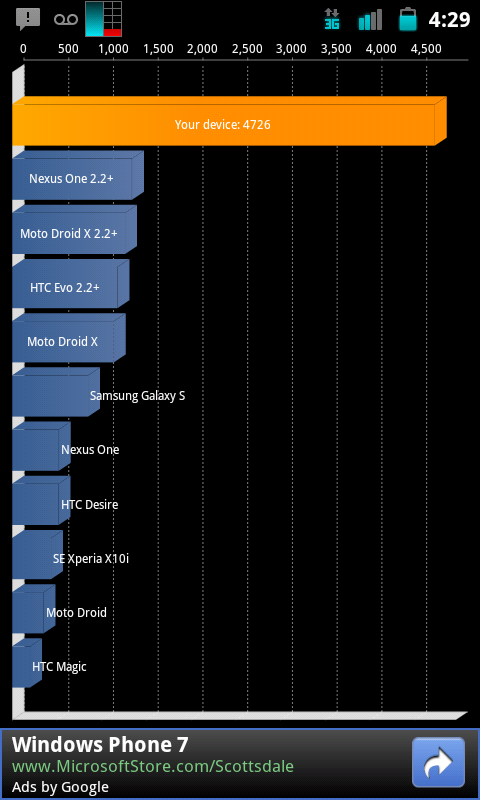
Thanks Isaac, this is incredible!
Thanks Isaac, this is incredible!

idbl_fanatic
Android Enthusiast
... I'll let the image explain everything
Thanks Isaac, this is incredible!
I SO want to try this, but I need my GPS, and front Camera, as soon as this is fixed, it's ON!!!