

Install the app
How to install the app on iOS
Follow along with the video below to see how to install our site as a web app on your home screen.
Note: This feature may not be available in some browsers.
-
After 15+ years, we've made a big change: Android Forums is now Early Bird Club. Learn more here.
You are using an out of date browser. It may not display this or other websites correctly.
You should upgrade or use an alternative browser.
You should upgrade or use an alternative browser.
Root Root + OverclockWidget = Insane Battery Life 40+ Hours
- Thread starter nick325i
- Start date
-
- Tags
- htc evo 4g


madhoosier357
Lurker
No go for me. Rooted via revoked and toast methods and tested with linpack. I got the same results no matter what I did in the Overclock widget on either root process. I guess I'll keep looking. Maybe SetCPU will workout better for me.
Maybe someone who has this working can downclock the cpu and run linpack just to be sure this is working?
I also ran cap /proc/cpuinfo many time and saw the CPU scale automatically.
Maybe someone who has this working can downclock the cpu and run linpack just to be sure this is working?
I also ran cap /proc/cpuinfo many time and saw the CPU scale automatically.

nick325i
Android Enthusiast
No go for me. Rooted via revoked and toast methods and tested with linpack. I got the same results no matter what I did in the Overclock widget on either root process. I guess I'll keep looking. Maybe SetCPU will workout better for me.
Maybe someone who has this working can downclock the cpu and run linpack just to be sure this is working?
I also ran cap /proc/cpuinfo many time and saw the CPU scale automatically.
I think you may have missed the point of the thread.
Is anyone using a task killer because this or setcpu still have not saved me any battery life. but AutoKiller - Android app on AppBrain has sped up my phone considerably and has saved me a little battery life.

EindhovenOne
Lurker
Just a couple of things, and thank you in advance for your time, great app...
1. "Use your frequencies" should be checked/selected, yes?
2. Do I need to worry about clicking "Detect Frequencies" or "Click here to define" ?
3. Does the "Set to it" button do the same thing as "Save" in the advanced settings?
Thanks!
-E
1. "Use your frequencies" should be checked/selected, yes?
2. Do I need to worry about clicking "Detect Frequencies" or "Click here to define" ?
3. Does the "Set to it" button do the same thing as "Save" in the advanced settings?
Thanks!
-E
I can't believe that madhoosier357 doesn't see the success all around him. No offense man, but seriously, come on!
I personally have used the methods here and have seen quite a bit of success. I unplugged my phone last night at 9:30pm and it wasn't even fully charged (about 95%). Used it a little bit on the web and such. Turned on wifi and had all of the other radio's off when I went to bed. Woke up, turned off Wifi this morning, used bluetooth, some texting, web, teathering and other such things on and off all day. I'm am in my 17th hour with about 25% left to go.
This thing works. If you don't have it working for you, you are doing something wrong. End of story.
I personally have used the methods here and have seen quite a bit of success. I unplugged my phone last night at 9:30pm and it wasn't even fully charged (about 95%). Used it a little bit on the web and such. Turned on wifi and had all of the other radio's off when I went to bed. Woke up, turned off Wifi this morning, used bluetooth, some texting, web, teathering and other such things on and off all day. I'm am in my 17th hour with about 25% left to go.
This thing works. If you don't have it working for you, you are doing something wrong. End of story.
madhoosier357
Lurker
You missed the point of this entire 4 page thread.
Congratulations!
Oh no, I got it. But if Overclock Widget is a program made to set the clock speed of the CPU, shouldn't it work whether or not the phone is in standby?
On the plus side, SetCPU does work on the EVO, both in and out of standby mode. It will even do profiles correctly. Linpack confirms that this works.

kathrynhr
Member
This thing works. If you don't have it working for you, you are doing something wrong. End of story.
OR you don't have the settings right where they need to be in order to see good benefits for the way YOU use the phone.
I finally got it working too, but I had to change my settings from the ones Nick suggested in order to see real savings. Things I changed:
--------------------------------------
Screen On
Min: 245000
Max: 576000
Update Interval: 120
Suppress Notification: checked (this, because it was driving me nuts)
Use your frequencies: Unchecked (not sure if default is unchecked or not, I tried this one both ways and unchecked is working for me)
--------------------------------------
Other things I've done:
Screen brightness at about 1/3; auto-brightness off
No live wallpaper, just regular scene
Turned all haptic feedback off
--------------------------------------
I don't know which combination of the above saved the most juice for me personally. All I know is that the original formula didn't work for me, and this one does.
YMMV
Bluesun_EVO
Newbie
Just adding to the success stories  . I've noticed at the very least a few hours increase in battery life.
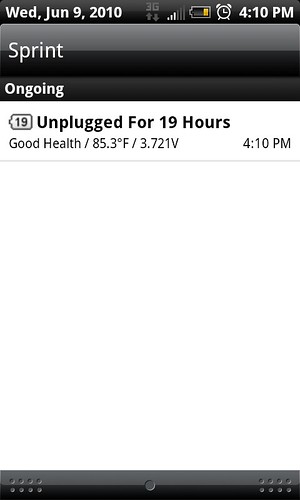
. I've noticed at the very least a few hours increase in battery life.
OR you don't have the settings right where they need to be in order to see good benefits for the way YOU use the phone.
I finally got it working too, but I had to change my settings from the ones Nick suggested in order to see real savings. Things I changed:
--------------------------------------
Screen On
Min: 245000
Max: 576000
Update Interval: 120
Suppress Notification: checked (this, because it was driving me nuts)
Use your frequencies: Unchecked (not sure if default is unchecked or not, I tried this one both ways and unchecked is working for me)
--------------------------------------
Other things I've done:
Screen brightness at about 1/3; auto-brightness off
No live wallpaper, just regular scene
Turned all haptic feedback off
--------------------------------------
I don't know which combination of the above saved the most juice for me personally. All I know is that the original formula didn't work for me, and this one does.
YMMV
With your settings, I"m thinking you are going to see some spectacular times. If you are maxing your CPU at 500mhz when the screen is on, you should average 30 hours at minimum.
AliLaPointe
Newbie
I installed unrevoked and then Overclock widget. However, it does not show up in my widget list. What am I doing wrong?
nick325i
Android Enthusiast
Just a couple of things, and thank you in advance for your time, great app...
1. "Use your frequencies" should be checked/selected, yes?
2. Do I need to worry about clicking "Detect Frequencies" or "Click here to define" ?
3. Does the "Set to it" button do the same thing as "Save" in the advanced settings?
Thanks!
-E
1. I do have it checked.
2. I did it the first time I opened it and nothing changed.
3. I don't think the buttons behave the same. I skip the simple screen altogether.
Whoa, Oshkosh Wisconsin? Or is it meant to come up for me because I live there haha.
I saw that too.. I'm in GB!
1 quirk from this... screen shuts off while in call...I pull it away from my face to end the call and the screen takes alot longer to come back to life...
Sherman901
Well-Known Member
Overclock Widget keeps Force Closing now and everytime I click it it brings me to SU Request which ends up just being a black screen.... what the hell?
thegame3202
Well-Known Member
Hmm... I set mine at 576 as a cap, and the widget displays 998 still... Does that mean it isn;t doing anything?

MaxPower
Newbie
Now that there are so many success stories rollin' in, I recommend a sticky guide to doing this.
Once one of the major blogs posts this...there is gonna be some serious traffic through this post.
And for the record, SPRINT! and HTC, this is why you want your phones "open". People exploring through roots will only ENHANCE your devices.
Admins, ready to "stick it up"?
Once one of the major blogs posts this...there is gonna be some serious traffic through this post.
And for the record, SPRINT! and HTC, this is why you want your phones "open". People exploring through roots will only ENHANCE your devices.
Admins, ready to "stick it up"?
AliLaPointe
Newbie
Nevermind....
I installed unrevoked and then Overclock widget. However, it does not show up in my widget list. What am I doing wrong?
Try rebooting.
Try rebooting.
Same problem here. Reboot didn't help.
I've been watching this thread for last couple of days and I'm SOLD!!
Let's do this....now someone tell me what I'm supposed to do.
ROFLMAO....But seriously
Yes, can someone please summarize the most up to date aka "best" settings for this widget??? This is awesome, simply awesome!!