
• After 15+ years, we've made a big change: Android Forums is now Early Bird Club. Learn more here.

Root Safe to update?

I have a rooted HTC Evo Design for Boost and am receiving notification that there is a system update available. Would updating my phone cause it to no longer be rooted?
 
I moved your thread into the root area for your Evo Design where the good members know your options well and will gladly address your concerns.
 
I have a rooted HTC Evo Design for Boost and am receiving notification that there is a system update available. Would updating my phone cause it to no longer be rooted?

I've been thinking the same thing did you update or didn't you. If so what happened.
 
I have a rooted HTC Evo Design for Boost and am receiving notification that there is a system update available. Would updating my phone cause it to no longer be rooted?

Curious to know if the system update you were talking about is this one I just got today. My phone is fully stock anyways (no root or boot loader unlocking) so I'll be updating in a few minutes here, but just wondering if it's the same one. From the description I wouldn't think it would mess with root since it doesn't mention "security fixes," but updates aren't always fully-descriptive.

1.14.653.0 (55.27 MB)
Screenshot_2013-02-20-08-54-41.png
 
Apparently a new update is coming soon (tomorrow?) for Sprint users as well. Sprint had this on the updates page at one point in time. Google cached it.
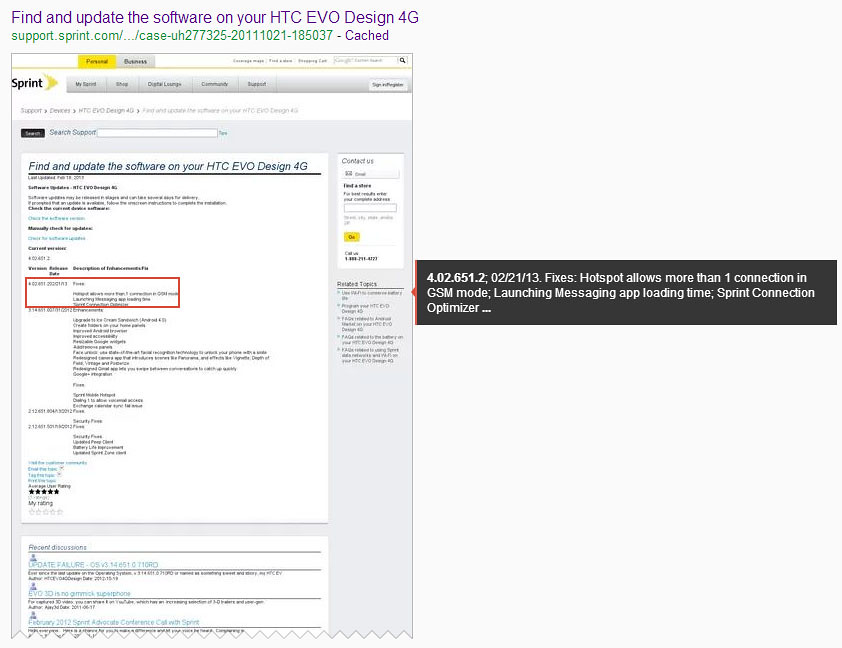
8491771077_ee13dc7762_b.jpg
 
Apparently a new update is coming soon (tomorrow?) for Sprint users as well. Sprint had this on the updates page at one point in time. Google cached it.

8491771077_ee13dc7762_b.jpg

Interesting. I pulled the update zip and poked around a little bit and in "system/app/" it has "ConnectionsOptimizerBoost.apk" along with a few others. So these two updates are probably "the same." (Besides the variations in the Sprint & Boost versions.)

"Android is upgrading... Optimizing application # of 82." (Bored watching it update lol)

Oh my! It says "3G" now instead of EvDo!

"Develop option" says "Developer options" now too.

"[Data] Usage" now has a 4G tab. (Mobile, 4G, Wi-Fi)

I don't really notice anything else that might have changed.

Baseband changed from 20.36W.30.0815U_1.11.00.0418_2 to 20.36W.30.0815U_1.11.00.1116
Boot Loader changed from 1.30.0000 to 1.32.0000

If anyone wants a copy of the update file, I have it saved and ready.

By the way, this isn't apart of the update (well, it might be in it), but a while back the Visual Voicemail had an update. I have a habit of checking for updates, so I got it from opening VVM, going to Settings, and clicking "Check for update." Mine is Version: T.5.3.1.18
 
I've tried to installing the update but keep getting an error. It tries to update thru cwm n that's where I get the error... I'm assuming it needs to be run thru the bootloader an I'm Not sure if its a good idea to update, you might loose root if u do... Can anyone confirm if I'm right...
 
I restored my phone to original boost software/fully bloated using the PH44IMG in Apaches thread.
Next, i did the manual updates (3) and now I'm on this latest version. All is working well, the only thing i noticed was that when i did the build.prop tweak to enable the apple functionality of clicking on links and phone numbers in email, the App Associations feature is still showing in settings. It does work though.
 
I've tried to installing the update but keep getting an error. It tries to update thru cwm n that's where I get the error... I'm assuming it needs to be run thru the bootloader an I'm Not sure if its a good idea to update, you might loose root if u do... Can anyone confirm if I'm right...

You are unfortunately kind of right.

The update requires the default recovery.

Which means if someone wants to update, they need to remove ClockWorkMod recovery and install the default recovery.img (and will most likely also have to relock the phone (bootloader/recovery).

 
You are unfortunately kind of right.

The update requires the default recovery.

Which means if someone wants to update, they need to remove ClockWorkMod recovery and install the default recovery.img (and will most likely also have to relock the phone (bootloader/recovery).

Yea that's what I thought. Doesn't seem like there's any significant update that we would need or want any... Thanks for confirming.
 
You are unfortunately kind of right.

The update requires the default recovery.

Which means if someone wants to update, they need to remove ClockWorkMod recovery and install the default recovery.img (and will most likely also have to relock the phone (bootloader/recovery).

No need to re lock bootloader. I didn't and everything worked on the first try.
 
i was rooted and running a custom rom and kernal it ****** up my phone really bad i had no data and wouldnt let me install cwm the update removed my recovery
i got a new phone today and updated it before i rooted this one
 
I need help I am receiving notification that there is a system update available ( 4.02.651.2) (53.7 MB)

I download update, when it finish (53.7 mb) i receive another message

(( Variant system version ))
(((We have determined that your phone may be running a modified version of its system software. For your protection, we cannot update your phone. Please revert your phone to the official HTC system software to update your phone. If you did not modify your system software or would like help reverting your system, please contact us via the support section at www,htc,com.)))


What can i do??

note:
- my phone (Boost mobile) work with (Sprint rom)
- no rooted
- have 2fs cwm-based Recovery v.5.0.2.7


- ** UNLOCKED ***
KINGDOM PVT SHIP S-ON
HBOOT-1.30.000
RADIO-1.11.00.0418_2
eMMC-boot
Mar 26 2012, 16:07:45
===================
ABOUT PHONE
Hardware Version 0002
Software Version 3.14.651.0.710RD
Android 4.0.3
HTC Sense 3.6
Kernel Version 3.0.16-g8ab725f htc-kernel@u18000-build-144#1 PREEMPT
Build number 3.14.651.0 CL409533 release-keys


I have the update file (OTA_Kingdom_ICS_35_S_Sprint_WWE_4.02.651.2-3.14.651.0_release_301049bl0vgrwcke0wguf6)

i copy it from download folder before failure to update
 
Just noticed something else that changed with this last update... Before the update photos Camera Maker & Camera Model would be marked as "Protected" and now they're "HTC" and "HTCEVODesign4G" respectively.
 
Just noticed something else that changed with this last update... Before the update photos Camera Maker & Camera Model would be marked as "Protected" and now they're "HTC" and "HTCEVODesign4G" respectively.

Did you install it from the SD card or was it just downloaded and installed by HTC?
 
Did you install it from the SD card or was it just downloaded and installed by HTC?

I haven't bothered to root/unlock boot loader yet at all since nothing has really sparked my interest so much yet. Plus I use my front camera and such often and most of the stuff still can't use them yet. So I just installed it normally.
 
No help for me !! :(:(:(

The answers are in the thread:

-You need to restore your phone, either with a clean PH44IMG.zip or a clean CWM Backup.

-You need to remove CWM and install stock recovery. After the update you can reinstall CWM again.

Was the phone purchased with Sprint or Boost Mobile ?

When you say you
 
The answers are in the thread:

-You need to restore your phone, either with a clean PH44IMG.zip or a clean CWM Backup.

-You need to remove CWM and install stock recovery. After the update you can reinstall CWM again.

Was the phone purchased with Sprint or Boost Mobile ?

When you say you
 
thank ripskee

- how can i remove CWM ???

- if I do relock and unlock , my data and app will delete or not? :confused:

- I don't live in USA I am in Middle East my phone is from boost mobile (have gift from my brother) but Because it Restricted (lock spc, no internet pass-through,no dign mode,.......) my friend change software from boost to sprint and it work Excellent (not rooted, use gsm and cdma network but cdma network logo is Boot mobile ?? :confused:) now i receive update form Sprint ( 4.02.651.2) (53.7 MB) not from Boost when download finish i haveVariant system version massage. I tried several timesand the same thing:(


part 1:
get fastboot, preferably from Welcome to HTCdev
[select unlock bootloader to download the application]

Set your phone to fastboot (explained at HTC dev), then on your PC/Mac or Linux computer:

fastboot devices (make sure that your phone is detected properly)

fastboot flash recovery XYZrecovery.img

XYZrecovery.img can be any file name [the ending img should remain].

once the update is completed you can install CWM the same way.

part2:
You do not need to relock or unlock bootloader (Thanks Heloguy) .

If you want to update, you need to reinstall the original software,
there is a 400 or 500 MByte large recovery image here in the forum.

That will store your phone to Boost once you flash it with hboot.
Just put the ph44img.zip on the root of your sdcard and get into hboot (on your phone) and flash it.

The downside is it will most likely wipe /data (your apps) or they may become non-functional. Use Titanium Backup to backup your apps.


You might have to also unlock the APN
 
Back
Top Bottom
