• After 15+ years, we've made a big change: Android Forums is now Early Bird Club. Learn more here.

Sense 3.0 Lockscreen and Exchange...

RedWingsFan

Android Enthusiast
When you set up active sync with Exchange on your HTC device you may be required by your IT policy to create a passcode. So when you unlock the device, the password request pops up and you must enter it to move on.

Anyone know how this will work with the new Sense 3.0?

If you try to move the circle on the lockscreen over one of the "tasks" (i.e...Camera icon, mail icon, etc..), will it prompt you for a password if you have it set up with Exchange?

Right now I am using a modified Mail.apk on my EVO 4G to avoid the password requirement all together.
 
You might have to flash a kingdom rom and test for yourself... I too am using a modified email.apk to bypass exchange security at the moment.
 
I HATE HATE HATE HATE that policy push! It would take me up 14 tries to get the thing to work properly. The keyboard just wouldn't type and it would end up locking again. I'd pretty much given up on my phone(Hero) until I found LockPicker.

Android Quick App: Lockpicker | Android Central

Unfortunately, it doesn't appear to work in 2.2 or 2.3. Hopefully the guy will update it.

I've considered using some rules based forwarding to a GMail account to get around that B.S. lockscreen when I upgrade. I was going to sync my calendar with Google Calendar as well. One question though, how does Android treat 2 separate GMail accounts? Does it just display them all together? That would be messy.
 
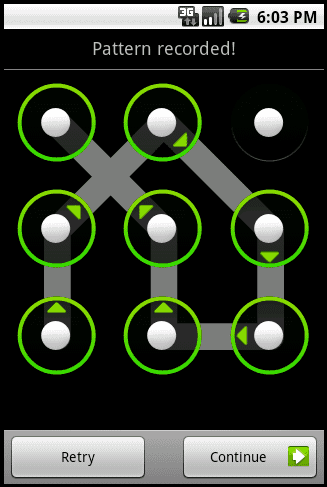
Does anyone know how the Lockscreen works if you want it password protected? I know I'v seen that password screen that looks like:
droid-unlock-pattern.png

... and you have to draw the correct pattern. I don't know if that will come with Sense though. My friend has a Moto Droid One and my other friend has a Fascinate and they both have that feature.

Sorry if this doesn't answer your question. Just trying to help. =)
 
Does anyone know how the Lockscreen works if you want it password protected? I know I'v seen that password screen that looks like:
droid-unlock-pattern.png

... and you have to draw the correct pattern. I don't know if that will come with Sense though. My friend has a Moto Droid One and my other friend has a Fascinate and they both have that feature.

Sorry if this doesn't answer your question. Just trying to help. =)

Android has three options for lock screen: 1) pattern (pictured above) 2) pin 3) password.

For pin you get a text entry box and the 0-9 buttons to select your pin. for password you get a text entry box, and your normal keyboard so you can select your password.

All three are part of standard Android and are manufacturer independent.
 
Does anyone know how the Lockscreen works if you want it password protected? I know I'v seen that password screen that looks like:
droid-unlock-pattern.png

... and you have to draw the correct pattern. I don't know if that will come with Sense though. My friend has a Moto Droid One and my other friend has a Fascinate and they both have that feature.

Sorry if this doesn't answer your question. Just trying to help. =)

It has always been on sense
 
Which app?

Oh duh... Can you update for 2.3?!?!?! Please, begging...more begging...and some more begging...:D

You don't know how great that little app is!

no no no no, I didn't write the app, I wrote the quick review of the app. Hehe, sorry.
 
Back
Top Bottom