
• After 15+ years, we've made a big change: Android Forums is now Early Bird Club. Learn more here.

Share your Huawei Ascend Desktop!

ScreenShot-5.png


Keepin' it simple.

Its just LP with toggle weather and widgetsiod.
 
ScreenShot-5.png


Keepin' simple. :D

Its just LP with toggle weather and widgetsiod.

I want mine like that. Can you please provide specific instructions of how to do that, down to the wallpaper. Maybe a little screenshot tutorial will be appreciated but not needed. Thanks! Yours is the best one ive seen so far. Also, how did you get the solid Glass Dock background. Mine looks transparent and you can barely see it.
 
Very cool! I like it a lot. Did you take the screenshot with the cube transition affect on? The wallpaper looks like it to me.

Also what text is that?

Jazz, I don't think he used the Cube effect because those effects only affect the widgets, not the wallpaper. I agree though, it is very cool. P.S. I'm gonna get my phone today!
 
Jazz, I don't think he used the Cube effect because those effects only affect the widgets, not the wallpaper. I agree though, it is very cool. P.S. I'm gonna get my phone today!

hmmmm.....maybe.

Oh good! I was hoping you would get it back today. :)
 
I want mine like that. Can you please provide specific instructions of how to do that, down to the wallpaper. Maybe a little screenshot tutorial will be appreciated but not needed. Thanks! Yours is the best one ive seen so far. Also, how did you get the solid Glass Dock background. Mine looks transparent and you can barely see it.

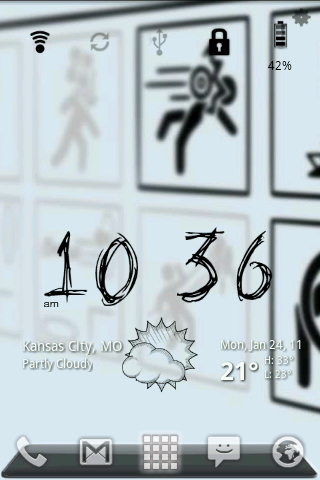
oops just realized i deleted the original pic lol :rolleyes:
here it is again
screenshot.png


Joser, theres no much of a tut. to do this. Its just Widgetsoid for the control panel and Weather and toggle widget with the dirty paper theme :). Im prety sure i got the dock from the Launcher pro web site.


heres the background
1283279009604.jpg


heres what it looks like with all the screens
screenshot.png

screenshot_1.png


screenshot_2.png

screenshot_11.png

Very cool! I like it a lot. Did you take the screenshot with the cube transition affect on? The wallpaper looks like it to me.

Also what text is that?

nope, no effects for the wallpaper thats just what it looks like. Its for the the video game Portal :cool:, its a great game. Every one should play it:)
 
nope, no effects for the wallpaper thats just what it looks like. Its for the the video game Portal :cool:, its a great game. Every one should play it:)

Thanks!!! Great screen shots and thanks for sharing!

That wallpaper is interesting in that it does give the effect of 3D cube transition. LOL

Nice! :D
 
I tried using Metamorph to alter my desktop, notification bar, and lock screen but a las, it did not work. I desperately want to mod my desktop and such but I cant find anything that works! I enjoy having the notification bar but wanted to change the color or make it translucent and I found some great skins you can apply using Metamorph but while installing the skins it would get hung up and just plain not work. :/ I am at a loss with this!
 
Junior, you can see the notification bar anytime you want by just pressing on 'menu' even when you have it hidden. Also, when you are in your settings, market, anywhere else, the notifation bar will show up.

The way you get rid of the dock is basically to select 'none' on dock background. Then remove all the dock icons.

I would leave the one in the middle for your app drawer, however. :D

I'm going to put some more instructions on this up at the top.

:)
 
To everyone wanting to customize their desktop:

I have added some very nice wallpapers in the second post from the top.

They are all at 960 X 800 resolution, which is the resolution you want your wallpaper set at for the Ascend.
 
I like a few of those wallpapers...did you get them from Zedge? some seem familiar. What I wanna know how to do is the rest of it. One of the first things I did was change my wallpaper but I still have a near full screeen of icons covering up and my qeather clock is a screen over cause its to big to add more than 4 icons to the same page.
 
Can't wait to make my phone look as cool as these but still learning the basics. Do I have to root before I change the desktop?
 
Can't wait to make my phone look as cool as these but still learning the basics. Do I have to root before I change the desktop?

Hi Amy!!! Welcome to the Huawei Ascend Forum! :)

No, you do not have to be rooted to do any of this. That's one of the cool things about it!! :D
 
I like a few of those wallpapers...did you get them from Zedge? some seem familiar. What I wanna know how to do is the rest of it. One of the first things I did was change my wallpaper but I still have a near full screeen of icons covering up and my qeather clock is a screen over cause its to big to add more than 4 icons to the same page.

I didn't get any of these from Zedge. These are all EVO 4G wallpapers. They are the same size as Huawei Ascend papers.

Take a look at the instructions in post number two here.

I have revised it to include instructions.

You need to have LauncherPro...best to have the paid version too.

Then you can drag the icons you don't want into the wastecan at the bottom by longpressing on them and dragging them down until they turn red. Then be careful not to select uninstall...just select cancel. They will then be gone and you can add more by long pressing on the screen and selecting either shortcuts, widgets, etc.
 
Hi Amy!!! Welcome to the Huawei Ascend Forum! :)

No, you do not have to be rooted to do any of this. That's one of the cool things about it!! :D


Thanks Jazz- I'm going to work on this tonight then! Haven't gotten up the courage to root yet since I'm new to smartphones but I'll get there with the help of all the info in this forum! :)
 
Thanks Jazz- I'm going to work on this tonight then! Haven't gotten up the courage to root yet since I'm new to smartphones but I'll get there with the help of all the info in this forum! :)

I'm so glad to have another girl in the forum! Hope you will be an active participant! :)
 
man this is dope !!, cant wait to start messing with my ascend if i ever get the time :/

i really like this one...

(paste fail) it was the picture of the cardboard guy reaching for the flower...
 
man this is dope !!, cant wait to start messing with my ascend if i ever get the time :/

i really like this one...

(paste fail) it was the picture of the cardboard guy reaching for the flower...

To copy a pic and put it in here:

Right click on the pic.

Select: copy image location

then select up at the top of the message box here the icon with the mountain in it.

paste the location there

click save :)
 
Okay I have added a TON of wallpapers for you to choose from. I will be deleting many of them once I get a chance and adding new and more interesting ones as I find them.

I hope you will contribute too.

In the meantime .......I hope you can find some you want to play with! :)

And also that this thread doesn't disappear mysteriously overnight!!! hahaha
 
Thank you so much Jazziette, I have a picture of my wife that I set as my wallpaper but I could never to place the whole pictures as my background, I would have to just settle for a part of it. Now I get to enjoy the whole picture and show her off. Nice!
 
Thank you so much Jazziette, I have a picture of my wife that I set as my wallpaper but I could never to place the whole pictures as my background, I would have to just settle for a part of it. Now I get to enjoy the whole picture and show her off. Nice!

You are very welcome, Strider! Now when you get your desktop customized you can show her off here too!!! :D
 
Back
Top Bottom