
Install the app
How to install the app on iOS
Follow along with the video below to see how to install our site as a web app on your home screen.
Note: This feature may not be available in some browsers.
-
After 15+ years, we've made a big change: Android Forums is now Early Bird Club. Learn more here.
You are using an out of date browser. It may not display this or other websites correctly.
You should upgrade or use an alternative browser.
You should upgrade or use an alternative browser.
Share your Huawei Ascend Desktop!
- Thread starter Jazziette
- Start date
-
- Tags
- huawei ascend



intrdrgn
Android Expert
i like it. looks clean & easy to surf through.I keep it simple. And for once a theme/icon pack has covered almost all my app icons. Theres only 4 or 5 that werent replaced.
I do wish I could find a black and green weather widget tho. Havent really looked tho

ShinySide
Extreme Android User
Yeah Im only disappointed about one thing tho. I paid for it off the Market but didnt get all the wallpapers that were shown on the Market. But hey its only 99 cents. But I just downloaded Black ADW Theme by Sean Work just so i could swipe some wallpapers. Ahaha
Edit- Didnt want to make another comment/post for just my newly added weather widget so its going on this post
Edit- Didnt want to make another comment/post for just my newly added weather widget so its going on this post
Attachments


Can0dope
Android Enthusiast
Is there any way to theme the lay out of an app? Like some metamorphs where the Markets lay out will change? I want to theme a couple apps that I just dont like the colors/layouts.
I would suggest going to XDA and search "theming apks". That's what I was told by a certain app developer. I never went that far though. LOL

nuttmeg
Extreme Android User
Yeah Im only disappointed about one thing tho. I paid for it off the Market but didnt get all the wallpapers that were shown on the Market. But hey its only 99 cents. But I just downloaded Black ADW Theme by Sean Work just so i could swipe some wallpapers. Ahaha
Edit- Didnt want to make another comment/post for just my newly added weather widget so its going on this post
i have a nice weather clock theme that goes with your current theme, from Fancy widgets, and that app is well worth the money, lol


kevinrubio
Android Expert

My current desktop.
Hint: it's not really blank, just looks that way. ;-)
lol u sure? all i see is black screen and a notification bar
Can0dope
Android Enthusiast
Ok I give up, hidden lock screen?
Nope... I just made all my icons a black square, use "no wallpaper", and hide dock background in GoLauncher Preferences.
I only have five icons (the dock), and I know what is where.
1. Phone
2. Market
3. App Drawer
4. Messaging
5. Browser
But that is a good idea. Next project...

Gmash
Extreme Android User
Well, that's one way to keep people from messing with your phone lol.Nope... I just made all my icons a black square, use "no wallpaper", and hide dock background in GoLauncher Preferences.
I only have five icons (the dock), and I know what is where.
1. Phone
2. Market
3. App Drawer
4. Messaging
5. Browser
But that is a good idea. Next project...
Can0dope
Android Enthusiast
Well, that's one way to keep people from messing with your phone lol.
Exactly

nuttmeg
Extreme Android User
here is another new theme im using (atm)
http://i12.photobucket.com/albums/a215/nutthead/screenshot-1317581613478.png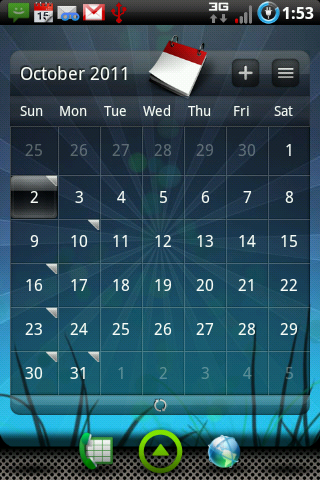
http://i12.photobucket.com/albums/a215/nutthead/screenshot-1317581613478.png


kevinrubio
Android Expert
here is another new theme im using (atm)
http://i12.photobucket.com/albums/a215/nutthead/screenshot-1317581613478.png
cm6?
nuttmeg
Extreme Android User
This thread used to be a sticky...?
just thing about that, and yes it was, don't know why it's not but im guessing it got unstuck when all the stickies was gone due to system errors.