• After 15+ years, we've made a big change: Android Forums is now Early Bird Club. Learn more here.

Help Skyrocket has battery meter issue... i.e. stuck at 100%

Grrrrrrr....it hit me today. Using the same charger I have been using for 30 days


Plugged in phone at 9% and used for about 45 mins before I fell asleep


Phone was at 15%

Took phone off charger at 8 am, it was at 100%.


Its now noon and the meter is still at 100% and I know it is not right.

I am currently using one of my eBay batteries
 
Perhaps I'll by a second OEM Samsung battery and see if the results change for the one charger I have the issue with. Finishing he testing on the current Scosche should be interesting. I haven't tested the two cables known to cause issues with one charger.
 
Grrrrrrr....it hit me today. Using the same charger I have been using for 30 days


Plugged in phone at 9% and used for about 45 mins before I fell asleep


Phone was at 15%

Took phone off charger at 8 am, it was at 100%.


Its now noon and the meter is still at 100% and I know it is not right.

I am currently using one of my eBay batteries

Correction....this is a stock battery , the one out of her phone
 
Perhaps I'll by a second OEM Samsung battery and see if the results change for the one charger I have the issue with. Finishing he testing on the current Scosche should be interesting. I haven't tested the two cables known to cause issues with one charger.

No worries I have two. It would appear that this entire time my wife has had the issue it had just not shown itself. I never thought to test hers :/


I ran another test for today to verify the issue is reproduced
Will have her charge this battery in her phone tonight with my charger and see if it happens again in her phone

Should have a sure verofied answer tomorrow that this is or is not battery specific triggered by specific chargers
 
I know this has been answered already. But I had the same issue and it was due to the charger. I was using a POWERCURVE MOBILE charger. After I switched back to my Samsung charger the problem was fixed. Even when using a Motorola charger this issue never came up...
 
I know this has been answered already. But I had the same issue and it was due to the charger. I was using a POWERCURVE MOBILE charger. After I switched back to my Samsung charger the problem was fixed. Even when using a Motorola charger this issue never came up...

The issue is brought forward by using a different charger, the actual issue is in the battery itself.

Many are experiencing it on the stock charger as well

can you check you charger and let me know if is the 1 a version or the .7 version please, in the research we have been doing we are finding that they have used both


also a quick note

Normally my phone runs flawlessly and smoothly

while this battery is in my phone it is a completely different phone and not in a good way.

I am having data issues
Not receiving calls
Sluggishness etc.
 
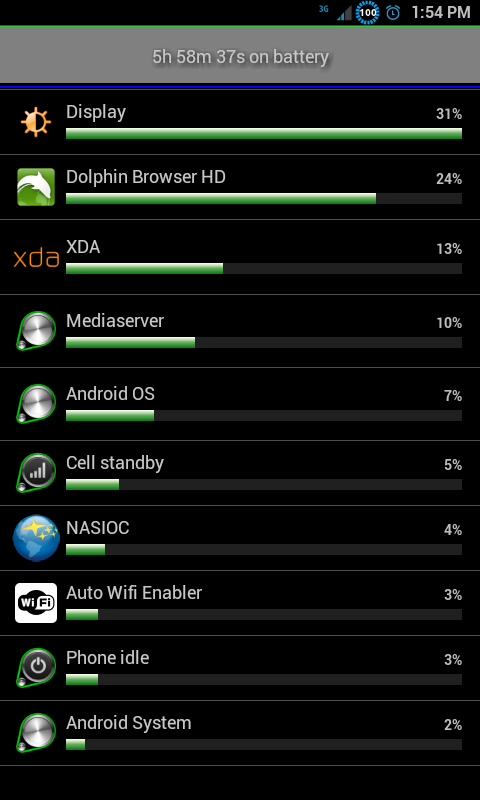
SC20120114-135434.png


Lol
 
Well, well... after my initial testing with my oft stated, preferred Belkin dual port charger which caused problems, I have found no other problems with any of the other chargers I've tested... until today. The Scosche dual port charger "stuck" me today with one of the two cables that always gives the Belkin a hard time. It worked just fine last night with the AT&T "Charge only Cable," as that cable did with the Belkin.

http://www.amazon.com/Scosche-reVIVE-Dual-Home-Charger/dp/B003N7NO4G/ref=sr_1_29?s=electronics&ie=UTF8&qid=1326445451&sr=1-29

Both the cables that gave me trouble with the Belkin gave me trouble with this one. AT&T's Zero Charge cable worked fine... just like on the Belkin... but it's no good for data connections.
 
Interesting findings in my test guys

My wife's phone plus her battery an HTC cable and iPhone charging block yields no issue

My phone with the above yields stuck @ 100%


Still testing to find the cause
 
Looking closely at the AT&T Charge only cable... it appears no different from a standard MicroUSB cable. 4 pins on the large end, 5 on the MicroUSB connector. What's the extra pin? It can only be duplicating voltage (or ground, which seems unlikely) to a 5th connection inside the device. The connector is too small for me to get anything inside to test continuity from one end of the cable to the other. Whatever is missing from this cable is partially responsibe since I can't make it cause the issue on any of the chargers I have tested... 50% of which cause the problem with any standard cable. Somewhere, inside this cable, at least one of the 5 pins is not connected to anything.
 
Had the "stuck at 100%" problem with the charger that came with the phone. When I
Use a blackberry wall charger, the problem disappeared and the meter seems to be working. Hope this helps.
 
This keeps getting more and more interesting.

My skyrocket
Has issue when charged with apple wall block only 1 stock battery
Has issue when charged with Zenus dock any battery
Using same cable above

Her skyrocket
No combination of charger/cable/battery causes the issue
 
Update.

Wife called in to ATT about a different issue and mentioned our battery woes

She was transferred to tech support and they immediately offered to send us new batteries

They asked us to charge Only via USB/pc over the weekend and they are calling us Monday to follow up

We were told to keep the old batteries

If the problem continues we are to take our phones in for testing to determine if the phones should be replaced.

What I need from you...

MIDIman you have specific cables that cause the issue..can you charge via USB/PC and tell me if it still does the 100% bug

Same goes for anyone else having the problem.

Will update next week!

Without a shadow of a doubt they know something is wrong...but it sounds like they do not know how to fix it
 
MIDIman you have specific cables that cause the issue..can you charge via USB/PC and tell me if it still does the 100% bug

Never tried that. I like to keep the phone by the headboard when I sleep but I have a nice little tillable, portable laptop stand that's perfect for bedside. Have never charged from the PC. Will give it a shot with one of the two known cables that causes problems with select chargers. Not ALL chargers.

Maybe I should call them and ger a free battery too. I took it up to the store today and took advantage of their price guaranty. I got $50 knocked off my bill because they lowered the price that much a week after I bought it. Tomorrow is day 30 for me.

I mentioned the SIM issue. Others are posting pics of their LTE SIMS and claiming they all have green blocks on one side. Mine is blue in that area. They said I have the right SIM and the color is not indicative of anything. They said if I had the wrong SIM, my data connection would probably not work properly. I'm not convinced so I had planned to call and ask about it tomorrow anyway. How would I know? I don't think we have LTE here but I'm not even sure of that. I was halfway down the block when I thought to ask.
 
I am not sure what areas in New York have LTE but do this, go to menu.settings.about phone and see what is listed under network. That is the best way to tell for sure.

From everything I have read the cards are fine as long as they are not the ols cingular card....the provisioning on the account is the important part


Never tried that. I like to keep the phone by the headboard when I sleep but I have a nice little tillable, portable laptop stand that's perfect for bedside. Have never charged from the PC. Will give it a shot with one of the two known cables that causes problems with select chargers. Not ALL chargers.

Maybe I should call them and ger a free battery too. I took it up to the store today and took advantage of their price guaranty. I got $50 knocked off my bill because they lowered the price that much a week after I bought it. Tomorrow is day 30 for me.

I mentioned the SIM issue. Others are posting pics of their LTE SIMS and claiming they all have green blocks on one side. Mine is blue in that area. They said I have the right SIM and the color is not indicative of anything. They said if I had the wrong SIM, my data connection would probably not work properly. I'm not convinced so I had planned to call and ask about it tomorrow anyway. How would I know? I don't think we have LTE here but I'm not even sure of that. I was halfway down the block when I thought to ask.
 
I am not sure what areas in New York have LTE but do this, go to menu.settings.about phone and see what is listed under network. That is the best way to tell for sure.

From everything I have read the cards are fine as long as they are not the old cingular card....the provisioning on the account is the important part


Never tried that. I like to keep the phone by the headboard when I sleep but I have a nice little tillable, portable laptop stand that's perfect for bedside. Have never charged from the PC. Will give it a shot with one of the two known cables that causes problems with select chargers. Not ALL chargers.

Maybe I should call them and ger a free battery too. I took it up to the store today and took advantage of their price guaranty. I got $50 knocked off my bill because they lowered the price that much a week after I bought it. Tomorrow is day 30 for me.

I mentioned the SIM issue. Others are posting pics of their LTE SIMS and claiming they all have green blocks on one side. Mine is blue in that area. They said I have the right SIM and the color is not indicative of anything. They said if I had the wrong SIM, my data connection would probably not work properly. I'm not convinced so I had planned to call and ask about it tomorrow anyway. How would I know? I don't think we have LTE here but I'm not even sure of that. I was halfway down the block when I thought to ask.
 
I don't see anything specific in the location your mentioned. No "Network" under menu.settings.about phone. There is Wireless and Networking... but I could discover nothing there.

Ah... under status, it says Network: AT&T, Mobile network type: HSPA.

The 6' cable that has given me trouble in concert with two chargers (not not two OTHER chargers) worked fine off the laptop last night.
 
Sorry this post is sloppy...on my way to work

Its the kernel.. trying to organize my findings now , but that is why my wife's phone does not do it and mine does.

The stock kernel definitely does it ...just tested that. At least one of the Dev kernels does it. I sent him a pm in hopes of a solution there

What I am looking for now is how many official kernels were released.. if this kernel was part of the 2.3.6 update then that very well be the mystery reason it was pulled (or one of them) and why one Dec kernel does it but the other does not (different base?)

I have to go in to work but will pick back up on this from there.


Sent from my SAMSUNG-SGH-I727 using XDA App


Sent from my SAMSUNG-SGH-I727 using XDA App
 
If any of you having the issue could let me know

Stock 2.3.5
Stock 2.3.6

Rooted which rom and kernel

Thanks!

This issue may very well be why 2.3.6 update was pulled
 
Ok, so far this is what I have, testing ATT kernels. I don't know enough to dissect these to know the kernel is the issue, but the kernel definitely affects whether or not the issue is present. I started this with the notion that it was a defective battery, tested on two skyrockets, multiple cables and chargers and have 2 stock batteries, 3 generic. I have used primarily quickwiz and buoyancy, these results were on buoyancy

Faux kernels: I have this bug. His kernel is based on 2.6.35.14 from what is listed in his thread. CPU spy lists 2.6.35.14 gcc version 4.4.1
I have the issue while on version .8 and the new version .9

Da_g kernels: I do not have this bug (at least not any of the versions I tested)
tested .3 listed in CPU spy to be 2.6.35 gcc version 4.4.1
and .42 listed in CPU spy to be 2.6..35.11 gcc version 4.4.1

Using the stock kernel listed in Da_g's thread I DO however have this issue
that kernel is listed in CPU spy to be 2.6.35.11-I727UCKJ2-CL6260251, it also does not appear to sleep but I have not been testing this, processor was pegged at 1512 entire time

romracer Stockish: I don't have the issue on this Kernel. Phone isn't sleeping and processor was pegged at 1512 but again, I have not been testing this. listed to be 2.6.35.11+ gcc version 4.4.1


still trying to figure out if the kernel that shipped was different than the kernel in the 2.3.6 OTA update. I am doing this at work and getting interrupted pretty frequently today.

I also believe there are two issues ...a kernel issue, and a battery issue.

I have one battery that I believe was bad, which is what instigated the tests. I am going back tonight to test strictly that one battery with all kernels.

Hopefully our kernel devs can help with the issue...

not sure what to tell folks who are stock and having the issue lol

 
Ha... on the phone right now with AT&T Customer Care and, after explaining my problem, they have offered to SELL me a replacement battery for $30 or a Duracell for $35.

Will update...

This obviously won't fix my issue, but I'll take a free battery if they'll give me one.

Now I'm on hold while he speaks to the warranty department.

Have now been transferred to the warranty department and am trying to understand Chinese.

I am being admonished in broken English about charging my phone over night, but they're sending me a battery. Really? I'm supposed to sit there for 2.36 hours, wait for the extremely faint beep and immediately disconnect my phone?? Charging it before bed and giving it eight hours of drain time before I leave is kind of ridiculous. Maybe I can explain to my employer (I don't really have one) that I need to come in three hours late every day so I can charge the phone after waking up.

I have no idea if she said anything about returning the original battery. I didn't understand 70% of what she said. I hate that crap. She did have a very nice, frequent giggle though...
 
Lol. Thanks for the update...

For what it is worth....taking it off or letting it sit afyer full charge has no affect. It sticks either way
 
Yeah. I know. I was just after a free battery in case I actually have to use the phone a lot one day. I've let it go 48 hours of typical use for me (after the honeymoon) and still had a 69% charge.

They claim letting it sit on the charge overnight will shorten battery life, I think. Hard to tell between accent and giggling.
 
My problem is a little different - my battery appears to be charging when plugged in, but never reaches over 15% even after 20 hours plugged in. Had the phone since 12/5/11 and worked great until 1 week ago. I don't have many apps but 2 days before this happened I installed sugarsync. Not sure if this is related or not.
ATT sent new battery - same issue. Tried charging with the phone off as they suggested - 14 hours - still no charge. Shows battery empty the minute I unplug it.
ATT store tried a fully charged battery in my phone and it showed to be dead as well. Since over 30 days referred to warranty dept. First guy had me go through many idiotic things already tried and would not veer from the "cookie cutter recipe" he was reading from. After a 20 - 30 minute phone call he finally acknowledged "known issue from manufacturer and there is a firmware update needed". Told me he would send the update to my phone and I would need to "click INSTALL" when it appeared, and it might then take up to 24 hours to update.
Waited 2 hours - still no "install" to click has appeared so called them back. GREAT! This person asked me the same idiotic questions, had me go through all the same steps the other guy had until I got upset and told her wasn't doing all this again, "just need to know about the firmware please". She then told me the phone was updated 1 hour ago, to turn the phone off and charge it only 3 - 4 hours, no longer.
She advised I should:
Never charge until completely drained
Always power off the phone when charging
Charge only for 3 - 4 hours and never charge overnight!
Are they kidding? I was told many years ago this was no longer required with cell phone batteries.

Anyway, charged the phone for "4 hours only" in "off mode" as told last night and after 4 hours it was at 19%! Left it powered on while I slept so it would again be completely drained this a.m. so I can try it again. This phone will be monopolizing my weekend (and my life).

By the way - using the charger that came with the phone and have tried wall plug and USB to PC with no difference. Same problem using my car charger (micro usb) that was NOT made for the skyrocket.
 
Back
Top Bottom