
• After 15+ years, we've made a big change: Android Forums is now Early Bird Club. Learn more here.

Root The PRS Complete Rooting Guide

Ok I've noticed that when I plug my usb cable in before I go into recovery, and loop is running, I don't get the "normal" usb sound. I get 3 quick tones instead of the "normal" long then short tone a normal usb cable makes...

Any idea on that one???

Screw it. Hopefully someone will get the one-click method sooner rather than later. (Big frustrated sigh)

watch my video
http://androidforums.com/all-things-root-incredible/98936-howto-get-superuser-apk-working-video.html

it'll show you the method described at the beginning of this thread
 
watch my video
http://androidforums.com/all-things-root-incredible/98936-howto-get-superuser-apk-working-video.html

it'll show you the method described at the beginning of this thread
I've watched your video about 15 times. For some reason you can get your loop to work while your phone is on. Mine just goes into adb un-recovery. From everything I've gathered, I need to get to adb recovery.

I wanna punch something hard!

Aight. When you get "exec '/system/bin/sh' failed: No such file or directory (2)". I get "error: device not found". Constantly. The only thing that's different is the directory of sdk, and then the only difference is literally the name.
 
So heres a dumb question. Do you have to get back into recovery to remove stock apps after you root? If not what program is need? Also if I need to go back into the recovery is there a way to do it from the cmd prompt? When I type in abd reboot recovery, it doesn't reboot my device anymore, the prompt just spits out a bunch of info.
 
Are you guys getting any type of acknowledgment that the computer is recognizing the phone when you plug it in while in the menu?
 
So heres a dumb question. Do you have to get back into recovery to remove stock apps after you root? If not what program is need? Also if I need to go back into the recovery is there a way to do it from the cmd prompt? When I type in abd reboot recovery, it doesn't reboot my device anymore, the prompt just spits out a bunch of info.

I am away from my PC and its been I while since I did this stuff on my Droid but isnt it

adb shell
SU
reboot recovery

ANd I have always used the paid verison of root exploer to remove stock apps from System/app
 
Right that's what I was thinking, but when I enter "loop.bat" I get "adb shell $". So it never loops.

If I enter "loop.bat" I go straight into adb shell, If I enter just "loop" it loops... try that. After going into adb shell i tried "adb devices" to see if it sees my phone but it does not list it.
 
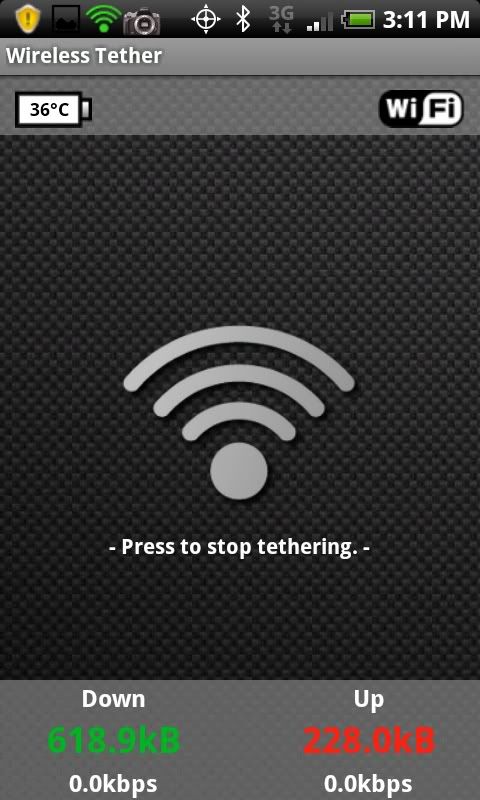
WIFI TETHER WORKING...... INSTRUCTIONS IN FIRST THREAD!

CAP2010061115111.jpg
 
I am away from my PC and its been I while since I did this stuff on my Droid but isnt it

adb shell
SU
reboot recovery

ANd I have always used the paid verison of root exploer to remove stock apps from System/app

When I did it from HTC Sync I only had to type adb reboot recovery. So I kinda thought root explorer was my answer. Sorry wish I didn't sound so ignorant, but this stuff is WAY different than messing with an I phone. (Feel free to boo now)
 
Ok I've noticed that when I plug my usb cable in before I go into recovery, and loop is running, I don't get the "normal" usb sound. I get 3 quick tones instead of the "normal" long then short tone a normal usb cable makes...

I get this too and I notice that nothing populates in the device manager. :confused:

I had a hard time trying to get the driver to install even after running the HTC Sync from the internal memory. When I would go into recovery and it would try to load the driver, I'd get an "Android 1.0" device showing up in the device manager with no driver installed. I forced it to install the one from the Android SDK hoping it would work and it installed it apparently because it comes up as "Android ADB Interface" when I plug the phone back in. But when the phone has the /!\ on the screen and I plug the USB cable back in, I get the three tones and then nothing populates, any suggestions?

Win7 x86 on a Compaq mini 110.
 
stuck on getting error:device not found when going to recovery mode
tried methods 1 & 2 as well as the SD card trick and a different SD card

help?
 
Any one have any tips on setting up the drivers properly? I think my issue is my computer isn't recognizing the incredible while its in recovery mode, it prompts me to install new hardware but fails because the drivers aren't available. HTC sync doesn't appear to be working.
 
im new on this. is that using the 3G connection or a wifi from a router to tether?

you are using your phone as both a modem and a router. using 3g for the internet connection, and using wifi to send the data to you computer, or ipad, or whatever.
 
Well there are the adb r3 drivers in the sdk and the android 1.0 driver the comes with sync. The adb inf file needs mods to recognize the inc.

I've tried all posted methods with no joy despite having the drivers working right. There is something in the setup of the successful folks that is allowing the root to work. I have a bs in computer science abdomen familiar with Linux dos and Windows and I'm a bit stumped.
 
Question?
when you hit the volume up arrow and power and see the error message E:can't open.........what drive letter is the phone showing up for you when in drive mode?

If you think about it C: is windows and D: is a disk drive so then E: would be the next drive it would think to look for it on.

Then ones who rooted...Is that the configuration of you PC? I have multiple partitions on mine and the phone goes to G: when in drive mode.

Maybe nothing but then again......
 
Any one have any tips on setting up the drivers properly? I think my issue is my computer isn't recognizing the incredible while its in recovery mode, it prompts me to install new hardware but fails because the drivers aren't available. HTC sync doesn't appear to be working.

Mine worked great last night, but tonight I had the "DuDuDuh" sound when plugging in my device. In the Device Manager in Windows, it was showing as an "Android 1" device and unable to install drivers. I had followed this guide before: http://www.flexjunk.com/2010/05/01/installing-htc-incredible-android-sd-drivers/ , but I followed it, again, and to install the driver from Device Manager, I told it I would select the driver instead of showing it where to look. Hit the "Have Disk" option, pointed it to my Android-sdk/usb driver folder, and installed the ADB driver. Worked great after that. I wonder if the driver becomes corrupted easily?

Hope it helps,

jakewill

Edit: updated link
 
you are using your phone as both a modem and a router. using 3g for the internet connection, and using wifi to send the data to you computer, or ipad, or whatever.

what will happen if Verizon find that out? i mean, the percentage of chances they will find out.
 
what will happen if Verizon find that out? i mean, the percentage of chances they will find out.

just don't abuse it. don't use it as a replacement for regular internet and you should be ok. also don't do things that would make it obvious, like bit torrent.

i only plan to use it when i either lose my internet at my house for some reason, or when i'm traveling.
 
Mine worked great last night, but tonight I had the "DuDuDuh" sound when plugging in my device. In the Device Manager in Windows, it was showing as an "Android 1" device and unable to install drivers. I had followed this guide before: Droid Incredible Usb Driver | PC Tutorial , but I followed it, again, and to install the driver from Device Manager, I told it I would select the driver instead of showing it where to look. Hit the "Have Disk" option, pointed it to my Android-sdk/usb driver folder, and installed the ADB driver. Worked great after that. I wonder if the driver becomes corrupted easily?

Hope it helps,

jakewill

That site isn't working for me, any chance you can provide a download link for the driver?

EDIT: Found guide elsewhere, isn't working for me still (still the 3 duh's)
 
just don't abuse it. don't use it as a replacement for regular internet and you should be ok. also don't do things that would make it obvious, like bit torrent.

i only plan to use it when i either lose my internet at my house for some reason, or when i'm traveling.

and you said dont abuse it :cool:

what about ip checking? will they know it if they check your ip.
 
and you said dont abuse it :cool:

what about ip checking? will they know it if they check your ip.

no idea about IP checking. but i won't abuse it. i'll only use it when i have to and it'll only be for browsing the forums and stuff so it's not a lot of usage.
 
DONE!!!

It took about a half dozen tries but got it using "method 2" and took out CityID immediately. Now let's have some fun with this! OK, what do I do now?

Loo
 
Back
Top Bottom
