
• After 15+ years, we've made a big change: Android Forums is now Early Bird Club. Learn more here.

Root [THEME] Gummy_WaterMark for GummyJar

Btros

Android Enthusiast
This is a really cool looking theme for the GummyJar ROM (which is awesome by the way).

Updated for GummyJar 2.5:
With animations:LFY_Watermark_2.5-anim.zip

No animations:LFY_Watermark_2.5.zip

Credit to mikeyinid, original thread here:

[THEME] Gummy_WaterMark - Droid Forum - Verizon Droid & the Motorola Droid Forum
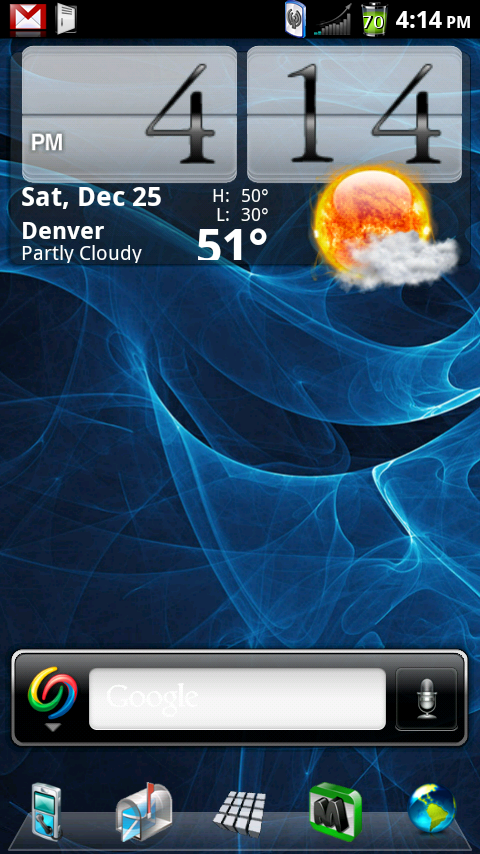
THIS IS A PORT OF THE WATERMARK THEME FOR

LIQUID FROZEN YOGURT 1.95. THE ORIGINAL POST IS HERE

LIQUID FROZEN YOGURT v1.95 THEMES

SO A SHOUT OUT TO THOSE GUYS FOR PUTTIN THIS THING TOGETHER!!

biggrin.gif
This is a complete theme, most system apps are themed, including phone, music, google search bar, and many more. I did change the notification tray, it had blue splatter marks and you couldnt read your notifications.

Get it here:
LFY_WaterMark_D2_DX.zip

If you notice anything I should change let me know, enjoy!
**When you download the theme, dont freak out when you see its called something-something D2_DX, it will work for both

snap20101225_161450.png
 
Are you running GummyJar? If so I think just wipe data and cache first. That's all I did and it's running fine.
 
Usually you don't need to wipe cache/data before installing a theme.. It's not a ROM, just a theme
 
Yeah, that's actually what I meant...I was thinking wipe data and cache before installing the ROM, not the theme. Steps I took: flash back to stock nandroid, wipe data and cache (probably not neccesary either but I usually do it anyway), install ROM, install Theme, restore apps with Titanium backup.
 
I'm running apex 1.3.1 what should i do ?

I'm not that familiar with apex...but it looks that's the newest one so I assume you are on 2.3.340 system, if so just do exactly what I did in the post above yours. Flash back to stock nandroid, wipe data/cache, install GummyJar ROM (or Rubix Focused 1.9.5, this theme is compatible with that too), then install theme.
 
well,i don't know if change this rom for tha one i love this one and the most thing tha i love is the terminal emulator so....i keep this so far i'm just installed a few days a go.....one question, what this rom have tha apex doesn't have? or vice versa.....
 
Got the ROM running fine from a .340 "stock/rooted" nandroid but the theme sticks on the boot animation (which is otherwise cool BTW). Battery pulls do nothing except allow me back to CWM recovery Redownloaded the file, mount sys, mount data nothing works to get the theme.The only thing I did not do was wipe data.
 
Ok I've flashed plenty of ROMs, but I've heard on here time and time again that it's when you start to theme that you goof things up and brick your phone. Therefore, I've yet to theme anything to date. So, I'm on the newest Gummy (2.5), now what do I do? Just download the theme zip, wipe the cache, go into bootstrapper and flash the zip from the SD card?

I'm asking because I'm not sure where people go wrong when applying a theme that throws them into a boot loop? Like, what could I possibly forget that would cause my phone to do just that? Tell me so that I can be sure to watch myself closely and make bloody well sure I don't screw my phone up any!
 
Ok I've flashed plenty of ROMs, but I've heard on here time and time again that it's when you start to theme that you goof things up and brick your phone. Therefore, I've yet to theme anything to date. So, I'm on the newest Gummy (2.5), now what do I do? Just download the theme zip, wipe the cache, go into bootstrapper and flash the zip from the SD card?

I'm asking because I'm not sure where people go wrong when applying a theme that throws them into a boot loop? Like, what could I possibly forget that would cause my phone to do just that? Tell me so that I can be sure to watch myself closely and make bloody well sure I don't screw my phone up any!

You pretty much got it...just make sure you download the 2.5 version and not the 2.1 version. They say before you install the zip to mount system - go into bootstrapper and select mount/storage, then mount system. Back out and install the zip. You should be good, although if you look at dhoffman's post, he got into a bootloop doing everything right. So I don't know, it works fine for me *knocks on wood*
 
the market...directly from Verizon. It is pretty damn accurate since it only updates every 24 hrs at midnight or if you manually login into you Verizon account via the widget.
 
Back
Top Bottom