

Sakib
Well-Known Member
Hello !
A Lot of people ask Me How to Theme there Android W/O Apktool and Stuff ...
So here it is !
This Maybe the Fastest Way to Theme your Droid[Maybe]
Note: I AM NOT RESPONSIBLE FOR ANY DAMAGES TO YOUR PHONE , DO THIS IN YOUR OWN RISK !
Requirements -
*A Rooted Phone
*USB Cable
*A Rom That you wanna take files from / Or a system.img / or a framework-res.apk from a ROM
*A Computer
*A Brain
*5 Minites of Your Time
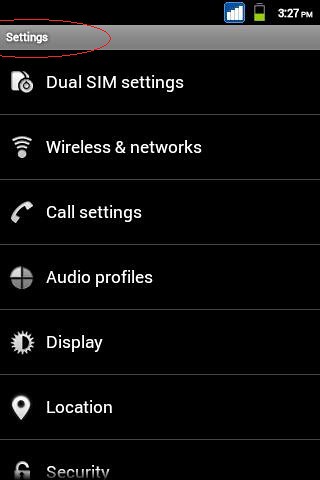
Okeey ! ..... Before anything , Look at the Picture Below !
It is My Stock ROM before any MODS or Anything .... i Will Just MOD the Red Marked Place (For Example)
1sT Step -
1.Download NinjaMorph APK From Here - https://www.dropbox.com/s/ohhx0db4uesntmb/NinjaMorph (2.6).apk
2.Install it as a Normal APK !
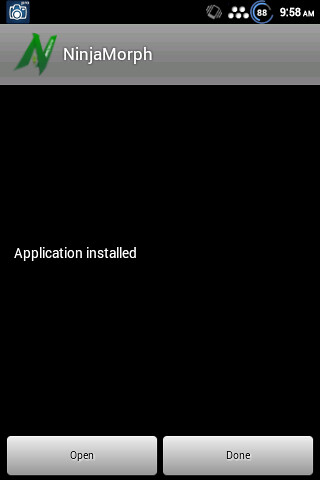
3.Open It and Give It Superuser Permission !
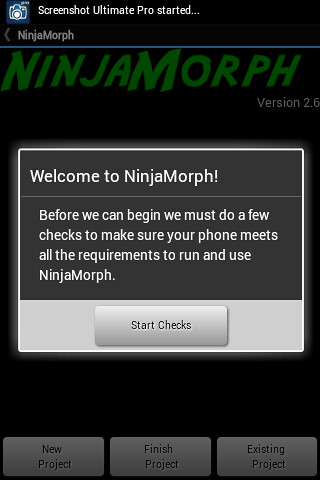
4.And Now it wll Run a Small test on Your Phone to check That Everything is OK ! After the Checking Finishes , press New Project !
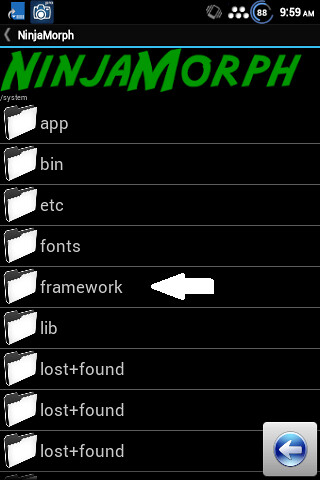
5.After Pressing New Project , Navigate to system -
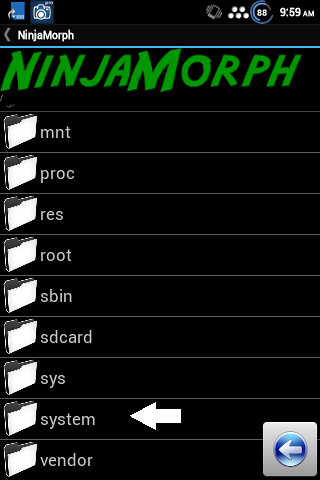
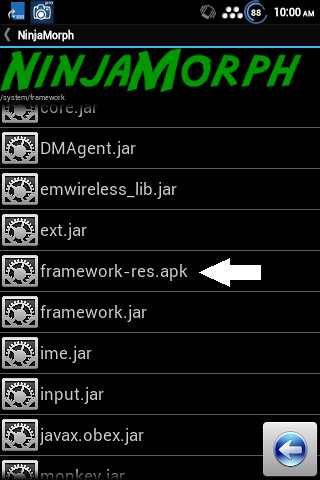
6.After Entering the system folder Navigate to Framework and Go down and Select deamework-res.apk -
7.Now it will Start Extracting the Files ....
8.After The Extraction finishes just close the APP and Connect your Phone to your PC in Mass Storege/or Connect The SD card with a card reader in your PC !
2nd SteP:
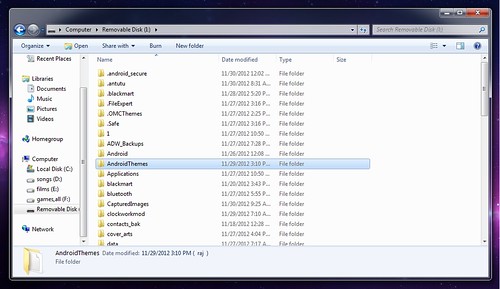
1.Open Windows Explorer and Navigate to Your SD>AndroidThemes
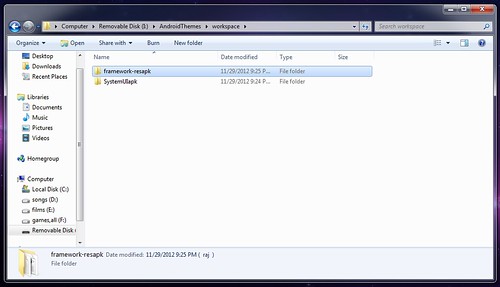
2.Then Navigate to Workspace>framework-resapk
3.Inside framework-resapk folder Go to res folder and Enter the drawable-mdpi folder !
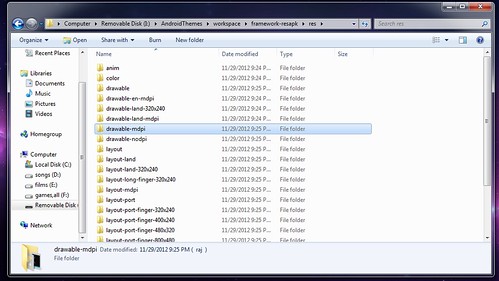
4.Now as i told you guys to get a files from rom / Or a system.img / or a framework-res.apk from a ROM
Put them both aside , And Start Copying [Remember to replace those files]-
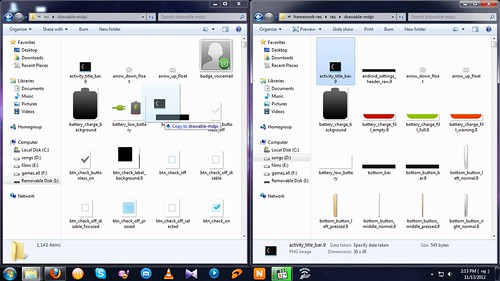
5.When You are Done Disconnect/Put the SD in your phone ...
3rd SteP:
1.Open Up The NinjaMorph app Again ,
2.Press Finish project ,
3.Select framework-resapk
4.Now it will stat Creating the Package !
5.Wait till it finishes !
6.Now it will ask you to Confirm the Action , Hit Yes !
7.It will ask you that you wanna Zipalien or not . Hit Yes !
8.Next Window PressOK and it will Start the Work .....
9.Wait a few Moments As it patches the file .....
it will ask you that if you wanna Delete this project ? Hit no if you wanna do more with this
10.Finally It will say all Done ..
Reboot Your Device And You are all Done !
Go Ahead Mate ! Hit the Thanks Button If You like my Work !
More Coming Soon !
A Lot of people ask Me How to Theme there Android W/O Apktool and Stuff ...
So here it is !
This Maybe the Fastest Way to Theme your Droid[Maybe]
Note: I AM NOT RESPONSIBLE FOR ANY DAMAGES TO YOUR PHONE , DO THIS IN YOUR OWN RISK !
Requirements -
*A Rooted Phone
*USB Cable
*A Rom That you wanna take files from / Or a system.img / or a framework-res.apk from a ROM
*A Computer
*A Brain
*5 Minites of Your Time
Okeey ! ..... Before anything , Look at the Picture Below !
It is My Stock ROM before any MODS or Anything .... i Will Just MOD the Red Marked Place (For Example)
1sT Step -
1.Download NinjaMorph APK From Here - https://www.dropbox.com/s/ohhx0db4uesntmb/NinjaMorph (2.6).apk
2.Install it as a Normal APK !
3.Open It and Give It Superuser Permission !
4.And Now it wll Run a Small test on Your Phone to check That Everything is OK ! After the Checking Finishes , press New Project !
5.After Pressing New Project , Navigate to system -
6.After Entering the system folder Navigate to Framework and Go down and Select deamework-res.apk -
7.Now it will Start Extracting the Files ....
8.After The Extraction finishes just close the APP and Connect your Phone to your PC in Mass Storege/or Connect The SD card with a card reader in your PC !
2nd SteP:
1.Open Windows Explorer and Navigate to Your SD>AndroidThemes
2.Then Navigate to Workspace>framework-resapk
3.Inside framework-resapk folder Go to res folder and Enter the drawable-mdpi folder !
4.Now as i told you guys to get a files from rom / Or a system.img / or a framework-res.apk from a ROM
Put them both aside , And Start Copying [Remember to replace those files]-
5.When You are Done Disconnect/Put the SD in your phone ...
3rd SteP:
1.Open Up The NinjaMorph app Again ,
2.Press Finish project ,
3.Select framework-resapk
4.Now it will stat Creating the Package !
5.Wait till it finishes !
6.Now it will ask you to Confirm the Action , Hit Yes !
7.It will ask you that you wanna Zipalien or not . Hit Yes !
8.Next Window PressOK and it will Start the Work .....
9.Wait a few Moments As it patches the file .....
it will ask you that if you wanna Delete this project ? Hit no if you wanna do more with this
10.Finally It will say all Done ..
Reboot Your Device And You are all Done !
Go Ahead Mate ! Hit the Thanks Button If You like my Work !
More Coming Soon !


