• After 15+ years, we've made a big change: Android Forums is now Early Bird Club. Learn more here.

Root Unrooting help

So my wifi is broke, keep getting the error message, so i have to return my phone for service.

i have tried using this method to unroot
http://androidforums.com/evo-4g-all...ooting-dummies-guide-gingerbread-edition.html

i have got s-on now. but when i try the 2nd pc36img file it doesn't pick it up.

and the boot image [the one when you turn on the phone it usually says 4g] is the same as the old rom i had on the phone, but the rom looks pretty stock.

here is a little information, and any help would be greatly appreciated.
under about phone
android version
2.3.5

baseband
2.15.00.12.19

kernel
2.6.35.10-g94d0005
htc-kernel@and18-2 #1
mon mar 12 19:29:30 CST 2012

build
firepower_v3 <<<<<<

software
5.07.651.1 710RD

PRI
2.33_033

PRL
60687


Under HBoot

supersonic EVT2-3 SHIP S-ON
hboot 2.18.0001
microp-041f
radio 2.15.00.12.19
dc 21 2011 12:50:32
 
So my wifi is broke, keep getting the error message, so i have to return my phone for service.

i have tried using this method to unroot
http://androidforums.com/evo-4g-all...ooting-dummies-guide-gingerbread-edition.html

i have got s-on now. but when i try the 2nd pc36img file it doesn't pick it up.

and the boot image [the one when you turn on the phone it usually says 4g] is the same as the old rom i had on the phone, but the rom looks pretty stock.

here is a little information, and any help would be greatly appreciated.
under about phone
android version
2.3.5

baseband
2.15.00.12.19

kernel
2.6.35.10-g94d0005
htc-kernel@and18-2 #1
mon mar 12 19:29:30 CST 2012

build
firepower_v3 <<<<<<

software
5.07.651.1 710RD

PRI
2.33_033

PRL
60687


Under HBoot

supersonic EVT2-3 SHIP S-ON
hboot 2.18.0001
microp-041f
radio 2.15.00.12.19
dc 21 2011 12:50:32

If you are on H-boot 2.18 it never should have said S-off.

You are using the wrong guide to unroot.

you'll need this one for H-boot 2.18:
http://androidforums.com/evo-4g-all-things-root/488901-rooting-gingerbread-2-3-5-dummies-guide.html


-------------------------------------------------------------------------------------------

Chances are you can fix this without returning the phone. What ROM/kernel are you on?
 
rxpert is correct. the process is so much more involved to get everything removed. because you unlocked the bootloader, it is now watermarked. to trully erase the watermark you will need to follow the steps in the guide that rxpert linked. otherwise you can just leave it as is and see what they say. you can re-lock the bootoader but it will say re-locked at the top. so it will still be known that you had unlocked it before.
 
Unrooting
ok so you want to unroot your phone. unfortunately, the process is more complicated then the previous methods. basically to get rid of the watermark you will need to change the misc partition and then you can flash the PC36IMG RUU to finish the process in getting a stock rom and recovery.

so here is how you do it:

these are the files you will need:
step #1 downgrading the misc partition
1.download the first three files and create a folder and call it android then move the downloaded files to the android folder.
2.download and install (do not run) htc sync:HTC Sync 3.0.5551
3.connect your phone to the pc via usb cable
4.we need to extract and then move the flash_image and the mtd-eng files on to the sd card. make sure that you do not put the extracted files in any folders. they need to be on the root of the card (very top level)
5.change the setting from disk to charge only, make sure that usb debugging is turned on, settings>apps>development>check usb debugging, and lastly make sure that fastboot is disabled, settings>apps>uncheck fastboot.
6.on your pc hold shift while right clicking on the android folder. select open command window here option.
7. in the command window type:
Code:
adb shell

ok you should get # in the command window if not then something went wrong.

if you do get # then type:
Code:
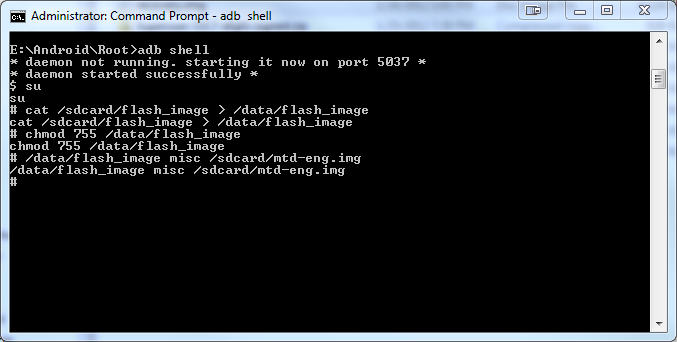
cat /sdcard/flash_image > /data/flash_image
then:
Code:
chmod 755 /data/flash_image
and last:
Code:
/data/flash_image misc /sdcard/mtd-eng.img

the command screen should look like this when all the commands are entered:
attachmentvf.png

step #2 installing the stock rom and recovery
1.download the 4.67 PC36IMG file and rename it by deleting everything but the PC36IMG part in the name. make sure not to add an extra zip as windows hides extensions.
2.move it to the root of the sd card that means on the top level of the card and not in any folders.
3.power off then press and hold power+vol down. this will take you to the bootloader. if you named the file right and it is on the root of the card then it will ask you to update. select yes.
4.before you reboot your phone double check your bootloader screen. at the top it should say locked and your hboot should be 2.18 with s-on. if that is what you see then congrats!!!!!!!!!! you are now unrooted!!!!!!!!!!!!

So after typing "adb shell" i get the response "sh-3.2#" so something went wrong.. and that would be? and to fix that i would have to..?
 
rxpert is correct. the process is so much more involved to get everything removed. because you unlocked the bootloader, it is now watermarked. to trully erase the watermark you will need to follow the steps in the guide that rxpert linked. otherwise you can just leave it as is and see what they say. you can re-lock the bootoader but it will say re-locked at the top. so it will still be known that you had unlocked it before.

Man this sucks, i love my s2 so much better when it comes to this! =[

well i am trying to follow those steps but somethings not working, i posted in that thread to maybe get an answer but maybe ya'll can help me??


After typing "adb shell" i get the response "sh-3.2#"
 
So after typing "adb shell" i get the response "sh-3.2#" so something went wrong.. and that would be? and to fix that i would have to..?

i have only seen this a few times, but it looks like you might be ok. you have the # instead of $ so you have root permission. try and proceed and see what happens. not exactly sure why it does it, but others have been able to enter commands with it.

edit: i moved your other post here as it applies to what you are trying to do. it is just hard to converse on two different threads.
 
i have only seen this a few times, but it looks like you might be ok. you have the # instead of $ so you have root permission. try and proceed and see what happens. not exactly sure why it does it, but others have been able to enter commands with it.

edit: i moved your other post here as it applies to what you are trying to do. it is just hard to converse on two different threads.

thanks for moving it! and i typed the next line "cat /sdcard.." and i get the response
"cat /sdcard/flash_image > /data/flash_image: invalide length"
 
i copied and pasted, same thing, i copied and pasted the rest, it all looks the same except
*deamon not running
*deamon started successfully
su

so you are getting the same error after pasting the command in?

also do not proceed with the other commands until this issue is resolved.

did you extract the two files? did you place it on the root of the sd card?
 
so you are getting the same error after pasting the command in?

also do not proceed with the other commands until this issue is resolved.

did you extract the two files? did you place it on the root of the sd card?

yes sir, same error.
they are extracted, and on the root of the sd card.

and i do not know which rom im on, but the kernel
kernel
2.6.35.10-g94d0005
htc-kernel@and18-2 #1
mon mar 12 19:29:30 CST 2012
 
ok lets try this. close the command window and start all over. instead of typing in adb shell, type in adb devices and report back on what you see.
 
just a question, mine is c: the example is e:...e im expecting is a removable? should i someway get it to be like that??

no need for that. i took the picture from captain throwback's thread on downgrading the misc partition to allow the change of the bootloader. that is just the directory where he has put his android folder.

if you have it on the c drive then you are fine.

ok this is odd. my suggestion is to reboot the phone and get some sleep and try this tomorrow.

and out of curiosity why do you need to unroot the phone?
 
no need for that. i took the picture from captain throwback's thread on downgrading the misc partition to allow the change of the bootloader. that is just the directory where he has put his android folder.

if you have it on the c drive then you are fine.

ok this is odd. my suggestion is to reboot the phone and get some sleep and try this tomorrow.

and out of curiosity why do you need to unroot the phone?

Because I dropped my phone really hard and now I get an error when starting wifi. And I use wifi 90% of the time considering sprints slow slow slow data speeds. So I think I crack something or loosened something in the inside.
 
Because I dropped my phone really hard and now I get an error when starting wifi. And I use wifi 90% of the time considering sprints slow slow slow data speeds. So I think I crack something or loosened something in the inside.

have you tried and wipe dalvik ccahe and cache and see if that helps? also you can always try a different rom.
 
have you tried and wipe dalvik ccahe and cache and see if that helps? also you can always try a different rom.

i have wiped everything multiple times, tried different roms, nothing works, im just at a loss. maybe if i tried rerooting then unrooting again?!
 
Back
Top Bottom