• After 15+ years, we've made a big change: Android Forums is now Early Bird Club. Learn more here.

[Verizon] Google Wallet Guide: Avoid Secure Element Brick [Updated 5/25/13]

jmar

Nexican
Hey Y'all!

My guide to Google Wallet: Simple and fail-safe...here goes!

BACKGROUND

I have been using Google Wallet since December 27, 2011.

I have employed this method since December 27, 2011.

Other than Google's shutdown of the app when security issues disabled the app, I haven't had a single issue with Google Wallet.

GUIDE

1. Install Google Wallet: Google Wallet Thread on XDA: latest version always posted in OP

Credit: OneAn9ryN00b

2. Use Wallet.

3. When prepping for a ROM flash/factory reset first reset GWallet from within the app. After inputting your pin, tap the menu overflow button in the top right corner and choose Settings. Now, select Reset Google Wallet app. Confirm and let it do its thang!

This step is OPTIONAL. I do it because I'm weird like that.
4. Next, Navigate to Settings app--->Apps--->All--->Wallet: Wipe Data

5. Now, backup Google Wallet app using Titanium Backup (buy this app!; best tool for all app backups). Because this app requires root, you will have to find an alternative if you are not rooted. You could also just sideload Google Wallet as you did the first time you downloaded it.

6. Wipe data, et al/Factory Reset.

7. Restore (DO NOT restore data!)/sideload app

8. Setup Google Wallet from scratch.

Profit!

jmar

P.S. If I've made any errors, please let me know ASAP!

Ultimately, I take no responsibility for a Secure Element Error and am only trying to help my fellow Wallet users.

Hope I helped.

Contributions to this guide from: NSutherl, jova33, efApple, AndroidDad75, and AntimonyER.

THANKS Y'ALL!
 
OP updated. Kept having issues with edits saving. Made the guide read a little funky. Might be an issue with Tapatalk.

Hope it makes a little more sense now.

jmar
 
so i installed it, and have been waiting for a chance to use it. i got through the drive through, hand the girl at the window my card, then i see the pay pass.

missed opportunities lol

does it matter the warning about root users?
 
so i installed it, and have been waiting for a chance to use it. i got through the drive through, hand the girl at the window my card, then i see the pay pass.

missed opportunities lol

does it matter the warning about root users?

Gotta take advantage of those awesome payment opps!

I am still investigating the why's behind the updated Wallet requesting root access. It is the very reason I have not updated my app and offered a download of that version in the OP. I will keep the OP updated and include my findings as it develops.

For now, this is what I do know:

Users who have granted the app root permissions have had mixed success using Wallet. Those who did not grant root access have seen no difference. Users who had problems after granting the app root permissions got Wallet functioning by disabling root permissions through the SuperUser app. Developing...

jmar
 
This may be a beginner question, but how do you install the apk? I've copied it to system/apps using Root Explorer, changed the permissions to rw-r-r, and rebooted. Nothing there. Then I tried long pressing in both Astro and Root Explorer and selecting "Install AKP" and I get the error about not being able to parse the package. Then I tried emailing it to myself and selecting install with the GMail app, same parse error.
 
This may be a beginner question, but how do you install the apk? I've copied it to system/apps using Root Explorer, changed the permissions to rw-r-r, and rebooted. Nothing there. Then I tried long pressing in both Astro and Root Explorer and selecting "Install AKP" and I get the error about not being able to parse the package. Then I tried emailing it to myself and selecting install with the GMail app, same parse error.

I am looking into it. I may need to reupload the app.

jmar
 
I downloaded, emailed to myself, downloaded to phone. Went to downloads folder. Click. It installed.

Sent using Tapatalk, the free one.

I tried this and am still getting a parse error. I could be doing something wrong, but I followed the same steps as jova.
 
I just get a banner at the top that says this device is not supported, and when i click it, it sends me to a webpage that says something about rooting may effect the security of the wallet stuff.
 
I just get a banner at the top that says this device is not supported, and when i click it, it sends me to a webpage that says something about rooting may effect the security of the wallet stuff.

That is because Wallet doesn't have official support on Verizon Wireless. You can use the app regardless. I have been since last year. If you need more help let me know.
 
Its not working...... I have the Samsung 2100 mAh battery, and otterbox defender. Would either of those effect the sensor?

Sent using Tapatalk, the free one.
 
I have the extended battery and mine works no problem. So unless you got a defective battery, I don't think the battery is the problem.
 
Try downloading the apk directly to your phone.

See if that works.

This worked! Before, I was on my computer, so I downloaded to my PC, moved to Google Drive (on my PC), then downloaded it from Google Drive on my phone. Somewhere along the way, this messes up the apk resulting in the parse error.

If anyone else ever gets the parse error, click the link directly from your phone, then the download will show up in your notifications, click it, and install :)
 
Well it registered the pay pass. Held it there twice and google wallet came up and said the transaction didn't go through and to ask the cashier if it went through. Maybe it was just that fast food place...

Sent using Tapatalk, the free one.
 
When prepping for a ROM flash/factory reset first reset GWallet from within the app.

I got Wallet all set up and working a few days ago, and made my first purchase yesterday. It's really awesome watching the confusion on the cashier's face :)

One question, I can't find the option to reset the app in Google Wallet. I found this help topic on Google Support, but when I hit Menu from the main screen in the app, the only 2 options I see are Help and Send Feedback. When I hit menu from a specific card's page within the app, the options I get are Refresh, View Card Transactions, About Card, Remove Crd, Help, and Send Feedback. I don't see a Settings option anywhere.

I want to get on AOKP B38 (with swipeable nav bar!) soon, but I don't want to ruin my Google Wallet.
 
Right when you sign in with your pin, when you see the options for payment cards, reward cards, offers, and whatever else, click the three dot for options thing

Sent using Tapatalk, the free one.
 
Right when you sign in with your pin, when you see the options for payment cards, reward cards, offers, and whatever else, click the three dot for options thing

Sent using Tapatalk, the free one.

Hahaha. I've never actually seen the screen you're referring to until just now. I ended up flashing a softkey mod that wasn't compatible with my ROM so I restored a NANDroid from earlier tonight. When I opened up Wallet it took me this screen and I found the settings option. Every other time I've opened the app, it took me to card summary page, where there is no settings option.

Thanks for the tip!
 
I got Wallet all set up and working a few days ago, and made my first purchase yesterday. It's really awesome watching the confusion on the cashier's face :)

One question, I can't find the option to reset the app in Google Wallet. I found this help topic on Google Support, but when I hit Menu from the main screen in the app, the only 2 options I see are Help and Send Feedback. When I hit menu from a specific card's page within the app, the options I get are Refresh, View Card Transactions, About Card, Remove Crd, Help, and Send Feedback. I don't see a Settings option anywhere.

I want to get on AOKP B38 (with swipeable nav bar!) soon, but I don't want to ruin my Google Wallet.

The option is wipe data is Remove Card. I will update OP.

Thank you for bringing this to my attention.

EDIT: OP updated!

jmar
 
OK, so this is not a secure element issue. However, I couldnt find a more suitable thread.

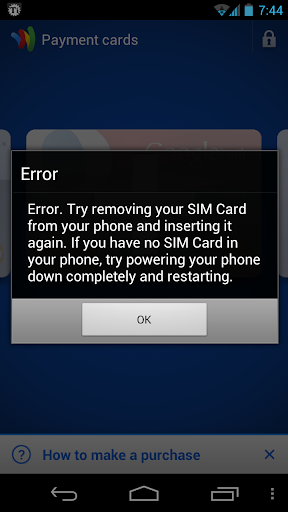
My phone was running on IMM30B (rooted). I had Google Wallet running with a prepaid card. Today I decided to go to IMM76K (rooted). Went through the usual steps.. created a Titanium backup of all app/data and created a nandroid backup. Then I reset Google Wallet. Flashed the new rom (wiped only cache and davlik). Everything is running great. I tried to setup Google Wallet but received an error I haven't seen posted anywhere.

Screenshot_2012-06-04-19-44-28.png


I did what it said, to no avail. I called Google Wallet, and they refused to help since its a Verizon GNex. So I finally decided to restore the app from my nandroid backup.. and VOILA! Anyone know what causes this issue... and for the sake of helping others.. does anyone know how to correct the issue without restoring from nandroid.
 
Back
Top Bottom