• After 15+ years, we've made a big change: Android Forums is now Early Bird Club. Learn more here.

Root [VIDEO GUIDE] Test Mode/No service fix (# to Hidden Menu)

055-1.gif


SEE^
 
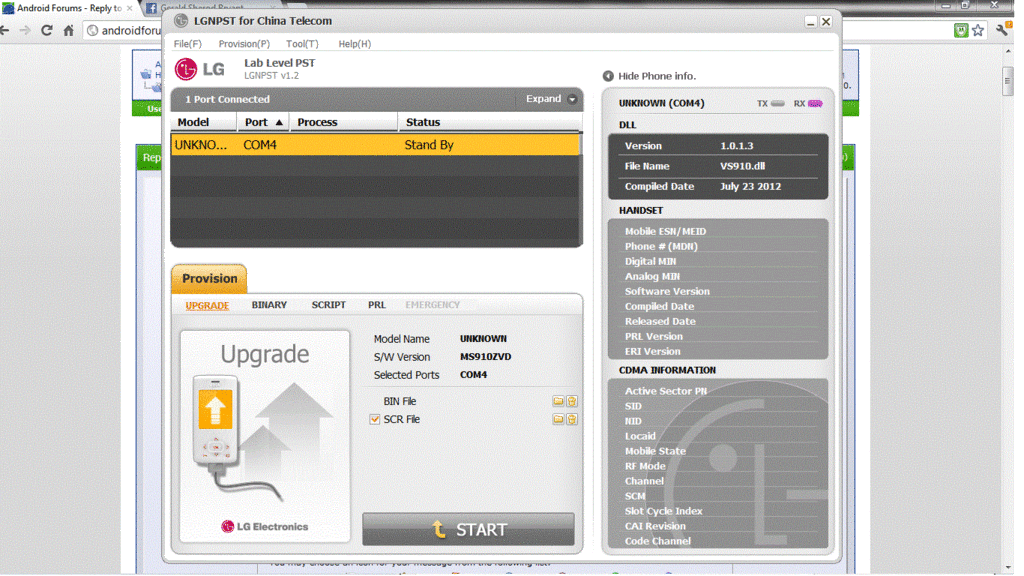
It would be to your benefit to go back through the direction to reinstall LGNPST. Just take your time and use the screenshots that Fuzzy put there to help.
 
Lestats Hill said:
I did everything exactly how he told me to do it. I downloaded what he told me to put. What am I missing?

Yeah that's the wrong lgnpst. I would suggest deleting lgnpst installing it again.

You should have two exes to open once installed. Dont open the one with ct after it.
 
can you im so you could walk me through this? Please

If you want, I can take control of your PC with team viewer and I can install do everything from my pc.

Just download team viewer and run it.

Give me the ID and Password and I will then connect directly to your PC.

Ill open up notepad and communicate with you through that.

I've got a little bit of time to do it but we got to do it now.

Here

Download and run
http://www.teamviewer.com/download/TeamViewerQS_en.exe
 
Here was where someone had the same issue with the MIN BUT they didn't have service or anything unlike you. So strange.


Called customer support and had it fixed :D. Had me dial the ##626* and you were right, my MIN wasn't identical to my phone number. The SID (I think) was also incorrect, not sure how I messed that one up lol.

Still very thankful and appreciative of your help here Fuzzy, got me out of the test mode with the guide :). Much thanks for the super quick replies and assistance :thumbup:.
 
Here was where someone had the same issue with the MIN BUT they didn't have service or anything unlike you. So strange.
thats why i had a different min it wasnt the same as my number. they told me that the min cant be the same. the min has to be given from metro .
 
thats why i had a different min it wasnt the same as my number. they told me that the min cant be the same. the min has to be given from metro .

90% of the time it's the same. Mine is the same, always has been the same. I've only seen the 3 people here that have had a different one.

This could be something to do with the area or "their" area but even if you google MIN from metro you will see that most of the time it's the same as your phone number.
 
Hey Ive been trying to get out of test mode since i had a bad clockwork backup go bad. I found an issue when I used any verizon driver other than 2.4.1. I was using 2.5.2 at first. Now the issue I get reads as follows:

Connecting to COM10...
Reading Device Please Wait...
Connected To: LG Revolution (VS-910)
Device Unlocked Successfully
Error: This tool is only for the VS910/MS910!
Program will now exit!

Anyone else have this issue or fix?
 
Hey Ive been trying to get out of test mode since i had a bad clockwork backup go bad. I found an issue when I used any verizon driver other than 2.4.1. I was using 2.5.2 at first. Now the issue I get reads as follows:

Connecting to COM10...
Reading Device Please Wait...
Connected To: LG Revolution (VS-910)
Device Unlocked Successfully
Error: This tool is only for the VS910/MS910!
Program will now exit!

Anyone else have this issue or fix?

I got that error before it was built for the Esteem. No clue, works perfect on the Esteem though.

Also make sure the recent DOTnet 3.5 framework is installed on your computer.


Just checked the OP from XDA and it seems all revolution people are now having this problem. IDK

Try the drivers I listed in the OP.
 
OP updated with a video to work in conjunction with the post. There should be no more mistakes from here on out. :D
 
OP updated with How To video and download link for video. YouTube quality is awful. I suggest just downloading the video and watching it through Windows Media Player. It looks 10x better.


Hope this makes it easier for you guys. :D

Enjoy
 
worked like a dream fuzzy thanks alot for this wonderful tutorial it was a life saver. my buddies phone just lost all service one day for no reason after he did a reboot. i figured it was this and hit the # key to confirm sure enough straight to hidden menu. was able to get his phone up and running in less than a half hour. great work bro
 
worked like a dream fuzzy thanks alot for this wonderful tutorial it was a life saver. my buddies phone just lost all service one day for no reason after he did a reboot. i figured it was this and hit the # key to confirm sure enough straight to hidden menu. was able to get his phone up and running in less than a half hour. great work bro

I am so glad to hear it. Im glad it was easy and painless for you ;)
 
Does anyone know how to back your original system before rooting. The last time I rooted my phone I deleted my original launcher and when I reset my phone it went completely blank.
 
Back
Top Bottom