• After 15+ years, we've made a big change: Android Forums is now Early Bird Club. Learn more here.

What browser are you currently using?

Which Browser are you currently using (or is your favorite)?


  • Total voters
    65
I had Dolphin HD already for downloading files as it seems to be the most reliable, but never really used it for surfing. And now I know why. It's the most annoying browser I've ever used. I hate having to scroll to the top of the page to change tabs, it's slower (even with their Fast Browser addon), and that stupid menu thing that keeps getting in my way when I scroll to the right is the stupidest feature I've ever seen.


I've used Dolphin / Dolphin HD for quite a while. I don't like the way the stock browser handles multiple tabs/windows. You have to hit Menu > Windows to see them every time you want to switch tabs. In dolphin you just hit menu to see them or if you are at the top of the page you are on, they are right there and you can switch back and forth between tabs a lot faster.

The menu that appears when you scroll left or right can be turned off in the settings.
 
I'm also using the stock browser as many others are in here. I don't use it for the speed though, I use it as my default browser because of its memory and battery usage. I find that when I use other browsers such as xscope or dolphin, they drain my battery way too fast.

I was using stock with xscope as an alternative until the "trial" version came out, after that I switched to using dolphin. Not sure what you mean when you say you have to scroll to the top to switch tabs though, my tabs are always displayed at the top. Maybe its because you have the HD version? Try using just the regular Dolphin Browser.
 
One more vote for stock. Tried dolphin and opera, didn't like either.
Going to try xscope as posted above.

EDIT: also looking at the FF beta as well
 
I use Opera. I like how it's faster than stock, and REALLY like the UI's:
* customizable home screen
* easy tab switching
* single press zooming and context menu
* easy way to copy text

The only thing I dislike is the pic rendering,
 
I use Dolphin HD - it runs fast on my setup and I like the features. Also, you don't have to scroll all the way to the top of the page to change tabs, just press your menu button.
 
Yanno, I've never done that. Good idea!

Um...ok, this is embarrassing, being as I've been here so long, but I don't know how to do it. I wonder if I need a Guide or Mod to edit that.

If you're in the thread as the one who started it. Look up and click on "Thread Tools". There's an option to add a poll to the thread. Took me a second to find it, but it's definitely there. Enjoy! :D
 
I downloaded that Fennec POS and all it did was cost me 45 MB of internal memory I'll never get back. It wont stay open for more than 30 secs.
 
I downloaded that Fennec POS and all it did was cost me 45 MB of internal memory I'll never get back. It wont stay open for more than 30 secs.

huh? you'll never get it back? delete it.


Anyway, I don't think there's really any point in using other browsers when the Froyo browser has been proven and dubbed the fastest mobile browser. I love it so much. plus it has flash. It's just amazing!
 
Wonderful, thanks!

Sorry it took so long, but I'm a doofus. Everyone make sure you come back and vote.
Just came back for two reasons
1 - to vote
2 - to see your response to his suggestion of the poll. I really thought you were going to be a douche to him, acting as if you knew of the option and how dare such a noob try to tell you how to do something on the forum. It was so refreshing to see that I was wrong. For this thread alone I will take even more trust in your ROM reviews as it seems you are as honest as can be even if it makes you look a bit of a noob yourself. Bravo!!
 
huh? you'll never get it back? delete it.


Anyway, I don't think there's really any point in using other browsers when the Froyo browser has been proven and dubbed the fastest mobile browser. I love it so much. plus it has flash. It's just amazing!

Couldn't find it. When I did I put it on the SD card, hopefully it will get some attention from the Dev. The potential is great with it being windows. Might even work now if my phone was rooted.
 
Couldn't find it. When I did I put it on the SD card, hopefully it will get some attention from the Dev. The potential is great with it being windows. Might even work now if my phone was rooted.

yea the tabs are nice, but it was uber slow. and text was blurry even when it was finished loading; so you would have wait a while for that too. even when they improve it, i dont think ill ever use it. stock froyo browser is just too fast to beat. (IMO) i think using alternative browsers are for phones that dont have froyo bcuz android really did when they made the browser for froyo. when i was on 2.1, the browser was just ok.
 
yea the tabs are nice, but it was uber slow. and text was blurry even when it was finished loading; so you would have wait a while for that too. even when they improve it, i dont think ill ever use it. stock froyo browser is just too fast to beat. (IMO) i think using alternative browsers are for phones that dont have froyo bcuz android really did when they made the browser for froyo. when i was on 2.1, the browser was just ok.

I haven't used the stock in a while. I download a lot of files and I wasn't able to download rar with stock so I've stuck with Dolphin since then.

That's why I'm hopeful for Fennec because I'll be able to use rapidshare once they get it worked out, other than that it is a pretty bad option.
 
I've attached xScope 5.0.9. This is the version that was out just before the current version 6. Best browser I have used. Includes:

-1 finger touch to zoom
-Tabbed browsing
-Hides URL bar and Notification by swiping up. Swipe down to reveal.
-After you exit the browser and move on to other apps, it retains the pages you were on unless you closed the browser.
-Built in Task Manager
-Built in Download Manager

Plus more, and did I mention how fast it was?? :p

Hmm, I installed this over whatever newer version I had (v.6.0.6 I think?). I didn't notice any speed difference in opening or loading pages. The only difference I see is how the settings menu was laid out and that the favorites menu is poorly laid out (at least compared the newer version, I have to scroll right to see all of them as opposed to them all being in columns). Maybe they fixed it..?
 
Just came back for two reasons
1 - to vote
2 - to see your response to his suggestion of the poll. I really thought you were going to be a douche to him, acting as if you knew of the option and how dare such a noob try to tell you how to do something on the forum. It was so refreshing to see that I was wrong. For this thread alone I will take even more trust in your ROM reviews as it seems you are as honest as can be even if it makes you look a bit of a noob yourself. Bravo!!

Glad I could surprise you.

I had never created a poll before and just didn't consider it when I made this thread. Once natty suggested it, it was like, "That's a great idea." I tried editing my post and didn't see any way to do it and was just figured it was too late. So glad he was able to tell me how to do it.

When it comes to this tech world, I very much am a noob. But I did get my Droid on Day 1 so I've had a lot of time to get used to it (almost everything I know I can directly relate to this site).

I think that's part of the reason I was asked to do reviews. I'm not this tech savvy guy, I just know I want my Droid to perform to the best of it's abilities. And b/c I'm a bit of a flash addict I would try even the most obscure ROMs, so I really started to get a feel for the whole process.
 
Hmm, I installed this over whatever newer version I had (v.6.0.6 I think?). I didn't notice any speed difference in opening or loading pages. The only difference I see is how the settings menu was laid out and that the favorites menu is poorly laid out (at least compared the newer version, I have to scroll right to see all of them as opposed to them all being in columns). Maybe they fixed it..?

I am unsure of the speed difference between this version and the new version, but the new version 'should' be slightly faster or the same speed.

You're right about the 'favorites' and having to scroll down and left. I don't like that either. But I use LauncherPro and have a pop-up gesture on my Browser icon so that when I swipe up on the icon on my home screen, a scrollable list of my 'favorites' pops up. So I access my favorites that way more times than not.
 
I am unsure of the speed difference between this version and the new version, but the new version 'should' be slightly faster or the same speed.

You're right about the 'favorites' and having to scroll down and left. I don't like that either. But I use LauncherPro and have a pop-up gesture on my Browser icon so that when I swipe up on the icon on my home screen, a scrollable list of my 'favorites' pops up. So I access my favorites that way more times than not.


Oh yeah, I have LP Plus too and forgot about that swipe action he added to the dock. I just did the same. But I went back to my previous version too, which was 5.36, not 6.x.x, which looks and runs totally different than 5.x.x. I'm not sure what would have changed from 5.0.9 to 5.36 though, I wouldn't imagine much. What's weird is that the icon for all of these versions are different. Like the dev can't make up his mind on what he wants the icon to be.
 
I am unsure of the speed difference between this version and the new version, but the new version 'should' be slightly faster or the same speed.

You're right about the 'favorites' and having to scroll down and left. I don't like that either. But I use LauncherPro and have a pop-up gesture on my Browser icon so that when I swipe up on the icon on my home screen, a scrollable list of my 'favorites' pops up. So I access my favorites that way more times than not.

I'm experiencing a weird issue with the version I DLed from you. For some reason, I can't close tabs. Matter of fact, I can't change tabs unless I swipe to them. And the only way I can close them is to hit the back key. Are you or anyone else having this issue.

I'm having a hard time deciding between xScope and Opera. They both have some things I really like and just a few minor quirks. But for my Droid, they truly are the best options.

I'm really surprised that stock is doing so well. It's no where near as fast on my Droid as xScope or Opera, and not quite as functional. To each their own, I just wouldn't have expected it to be so overwhelmingly preferred.
 
Just saw this thread and thank you for posting this question because after trying a few browser I was wondering what everyone else preffered. For me, the stock browser was not the fastest but the least troublesome.

Learning something new everyday!
 
I'm experiencing a w
eird issue with the version I DLed from you. For some reason, I can't close tabs. Matter of fact, I can't change tabs unless I swipe to them. And the only way I can close them is to hit the back key. Are you or anyone else having this issue.

I'm having a hard time deciding between xScope and Opera. They both have some things I really like and just a few minor quirks. But for my Droid, they truly are the best options.

I'm really surprised that stock is doing so well. It's no where near as fast on my Droid as xScope or Opera, and not quite as functional. To each their own, I just wouldn't have expected it to be so overwhelmingly preferred.

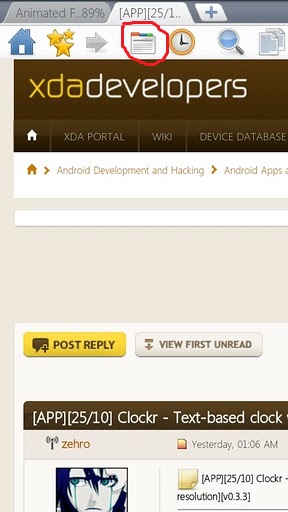
I've never used a previous version so I do not know how they.worked. but if you scroll the url bar to the right, there is a icon for tabs that looks like a document with
Red, blue, and green tabs. I touch that to access my tabs.
URL%20bar.jpg

I wish I could just touch the tab but it doesn't seem to work. Did this work in previous versions?
 
I've never used a previous version so I do not know how they.worked. but if you scroll the url bar to the right, there is a icon for tabs that looks like a document with
Red, blue, and green tabs. I touch that to access my tabs.
URL%20bar.jpg

I wish I could just touch the tab but it doesn't seem to work. Did this work in previous versions?


Yeah, in previous versions you could just touch the tab and go to it. And to close it, you could just hit the X to close it.
 
Back
Top Bottom