• After 15+ years, we've made a big change: Android Forums is now Early Bird Club. Learn more here.

Help Why is my battery draining so fast!!???

danny310

Newbie
I have started to experience horrible battery drain on my Optimus V about a month ago. I know some people easily make it through the day with charge but i cant get more than 7 hours out of my battery. i can literally just stand there and watch my percentage go down. I have been going through almost every forum possible and tried almost everything.
Airplane mode toggle upon boot,
*#*#4636#*#* CDMA only CDMA auto trick,
battery drain then charge to full and wipe battery stats
battery calibration
delete all unnecessary apps
turn off data
turn off sync
delete bloatware
turn off wifi, gps and Bluetooth,
install juice defender,
install bumblebee ROM which comes with TWS bug fix
new battery

this is stressing me out. could it be the firmware vm670zv4 bug. for people who have baseband vm670zv5 do you experience battery issues? is there no fix? if there is no fix then i might have to buy a different phone or possibly move on to a different carrier.

 
You probably did this already but if not, go to Settings → About Phone → Battery Use. See if there's any unusual activity from Battery Use.
 
Reset the battery statistics, and get rid of any social networking apps that you can. Restarting sometimes helps as well.

Keep in mind, on the stock rom, 7 hours is considered decent by some people, depending on their habits.
 
In airplane mode I easily get a couple of days off of my battery, if you're not getting that, then there is a problem with your phone.
 
In airplane mode I easily get a couple of days off of my battery, if you're not getting that, then there is a problem with your phone.
Airplane mode can get you a week, but what's the point of a smart phone if you have the smart features disabled.
 
Airplane mode can get you a week, but what's the point of a smart phone if you have the smart fetures disabled.

There is no reason behind it, but the OP is wondering if he/she had a phone or battery problem, by going into Airplane mode it's a good way to test if the problem is battery related or hardware issue.
 
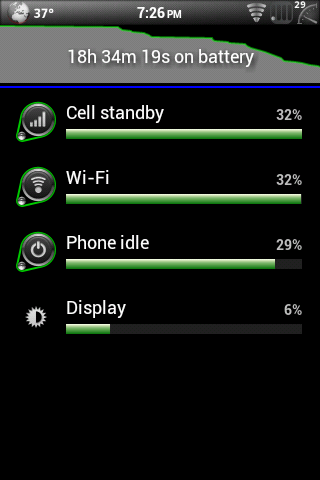
sorry im a little late on the reply. here are my battery stats.
Cell Standby - 44%
(TWS 0%)
Phone idle - 37%
Android System - 12%
Display - 6%
Voice calls - 2%
(Im on the latest version of Harmonia)
 
Looks about normal to me. If you are on 3g and your battery is draining fast then I assume you may only be getting around one bar of connectivity. I know when I'm on 3g near home my battery melts away so I try to stay on wifi. When I'm closer to cell towers my 3g lasts longer.
 
That looks about right. Try looking for Better Battery Stats from XDA. That will let you know which app is using what percentage of your battery.
 
Looks about normal to me. If you are on 3g and your battery is draining fast then I assume you may only be getting around one bar of connectivity. I know when I'm on 3g near home my battery melts away so I try to stay on wifi. When I'm closer to cell towers my 3g lasts longer.

That's an excellent point many people seem to not realize. The further away from a cell the more power the phone has to use to transmit to the cell and since a smart phone is syncing on a regular basis with the cell (even while sitting on the kitchen table), your battery will certainly drain faster if you're at 1 bar of signal level.
 
^ yet report not so great battery life and the first things everyone says is the phone is broken or you have a bad app.

Im always down to the 60% range after a night of sleep.

1-2 3G bars max in the house. 3-4 outside.
 
Well I'm on wifi at home and at work. What I find strange is tht even on airplane mode, my battery still goes down about 12% an hour. So that means it must be an app?
 
Well I'm on wifi at home and at work. What I find strange is tht even on airplane mode, my battery still goes down about 12% an hour. So that means it must be an app?

Either an app, bad battery, or a problem with the phone checking in that order. In airplane mode you should maybe see at worst 1-2% battery drop over an hour. I would check apps first, followed by replacement battery, and last replacing the phone.
 
Either an app, bad battery, or a problem with the phone checking in that order. In airplane mode you should maybe see at worst 1-2% battery drop over an hour. I would check apps first, followed by replacement battery, and last replacing the phone.

What he said.
 
Try Connection Tracker. It monitors connections in the background and data usage. It will tell you what apps keep trying to connect even when your not aware. This drains your battery.
The other thing is some apps don't like to be on the sd card, even though they can be moved there. It freaks them out and they start crying for moma (trying to connect).

As a rule of thumb: Turn everything off unless you need to use it. Data connections, Bluetooth, GPS, Autosync. etc.
I also turn down the screen brightness to a level that allows me to see it, but I don't have to squint.
 
sorry im a little late on the reply. here are my battery stats.
Cell Standby - 44%
(TWS 0%)
Phone idle - 37%
Android System - 12%
Display - 6%
Voice calls - 2%
(Im on the latest version of Harmonia)

That's a pretty high cell standby %... do you have a weak signal where you are?

Mine is usually 0%.... if I forget to the CDMA only/auto toggle, the standby will report 50% and the battery will die very quickly. Your 44% is pretty close to that 50%, so I'm not surprised it is dying.
 
screenshot-1329438397874.png


I never turn off WiFi, but I should.
 
Back
Top Bottom