
Install the app
How to install the app on iOS
Follow along with the video below to see how to install our site as a web app on your home screen.
Note: This feature may not be available in some browsers.
-
After 15+ years, we've made a big change: Android Forums is now Early Bird Club. Learn more here.
You are using an out of date browser. It may not display this or other websites correctly.
You should upgrade or use an alternative browser.
You should upgrade or use an alternative browser.
Root ZTE Warp Sync - All Things Root Guide
- Thread starter bcrichster
- Start date
-
- Tags
- zte warp sync

Basketbuild is down for some reason. I will replace links asap.Hi guys, has anyone had any problems with the download links SupeR posted ? everytime i click on them all i get is unexpected error thanks
edit: twrp link is up
edit2: deodexed rom link is up
edit3: unmodified rom link is up
edit4: stock recovery is up
I think that is all of them. Let me know if I missed anything

Last edited:
Gldrz1
Android Enthusiast
Yeah i think that's all of them thank youBasketbuild is down for some reason. I will replace links asap.
edit: twrp link is up
edit2: deodexed rom link is up
edit3: unmodified rom link is up
edit4: stock recovery is up
I think that is all of them. Let me know if I missed anything
6th_Hokage
Android Enthusiast
Has anyone figured out how to tether?
6th_Hokage
Android Enthusiast
Like without having to subscribe to boost
Last edited:

WiFi tether for root users by TrevEmod.
https://code.google.com/p/android-wifi-tether/
Same settings as Warp4G.. Yes, I successfully used it on the Sync.
As well as WiFi Tether Router by Fabio Grasso
https://play.google.com/store/apps/details?id=net.snclab.wifitetherrouter
https://code.google.com/p/android-wifi-tether/
Same settings as Warp4G.. Yes, I successfully used it on the Sync.
As well as WiFi Tether Router by Fabio Grasso
https://play.google.com/store/apps/details?id=net.snclab.wifitetherrouter
Last edited:
What Did'ja find out from the boot grabber?Wondering if someone would do me a favor and flash this zip from TWRP. It will not harm your phone or change it in any way. No need for wiping anything either. It will only copy the aboot partition (aka bootloader) to /sdcard/aboot.img. Please upload that file once you have it (about 8MB). Thanks a bunch in advance
warp4_aboot_grabber.zip
Nothing actually. It was an experiment for the zmax that did not pan out.What Did'ja find out from the boot grabber?
OK, right on. [emoji41]Nothing actually. It was an experiment for the zmax that did not pan out.
Usually.. yes, he does. Always taking care of us! But I usually add/change out for Stericson Busybox cuz certain APK's won't work without that specific one (i.e.: VIPER4Android)Hey guys,
does anyone know if busybox is included in SupeR's rom ?
The deodexed version includes busyboxHey guys,
does anyone know if busybox is included in SupeR's rom ?
JAWheat411
Well-Known Member
Glad you like it. I went from the galaxy s5 to this one after I signed up with boost. It was even on the free phone list. Just as good as the s5 in my opinion. I was hesitant because the last ZTE I had was with sprint a few years ago. The ZTE flash. That phone was crappy. I had it rooted but no other development was available. Hopefully more roms will surface for the sync.
If I manage to get a hold of a Sync soon: count on it. KillerKobalt Theme might be an easy transfer too, leading up to a JollyRoger port if we get an OC kernel with init.d support. [emoji6]Glad you like it. I went from the galaxy s5 to this one after I signed up with boost. It was even on the free phone list. Just as good as the s5 in my opinion. I was hesitant because the last ZTE I had was with sprint a few years ago. The ZTE flash. That phone was crappy. I had it rooted but no other development was available. Hopefully more roms will surface for the sync.
6th_Hokage
Android Enthusiast
If I manage to get a hold of a Sync soon: count on it. KillerKobalt Theme might be an easy transfer too, leading up to a JollyRoger port if we get an OC kernel with init.d support. [emoji6]
sounds great
Gldrz1
Android Enthusiast
So i've been playing with the Sync a little and noticed a few things , one thing thou have not activated it yet still on the Sequent but sooner or later. Just to be clear the Sync is a great phone and love it but there's a few things that are worth noting , nitpicking at this point.
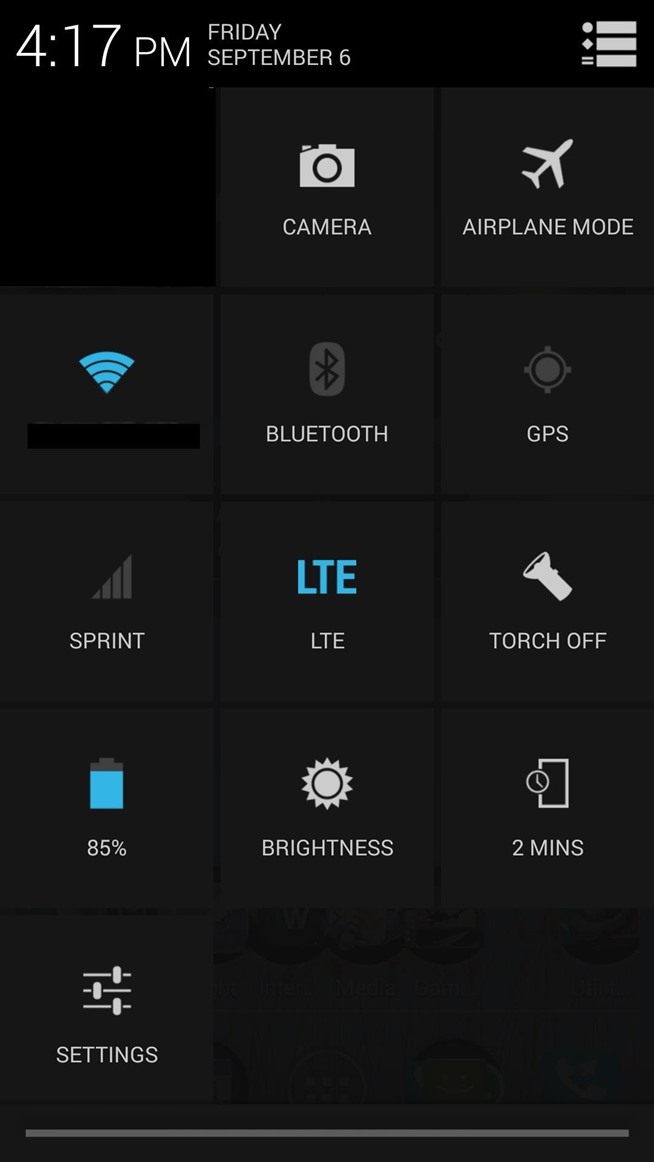
Quick Toggles - Ever since version 4.2.2 android had that cool toggle grid that pretty much covered the whole screen once u pulled down the panel with two fingers and the notification with one also using Gravity Box u had the ability to add more toggles to it so kind of a bummer there but not a big deal.
Lock Screen - For some reason can't find a way to activate widgets on lockscreen cause u should be able to do that right? unless i'm missing something or not looking hard enough also another cool thing was while on lockscreen or even on main screen u could press on the home icon and get this ring with shortcuts and be able to add more using gravity box.
Apps to SD card - Downloaded a bunch of apps already but to my surprise none of them can be put on sd card something i could do on the sequent. But i think read somewhere that Google decided to get rid of it so it is what it is.
One thing that was really cool about the Sequent u could record phone calls out of the box but seems with this phone u can't but maybe an app might do the trick .
Last thing i guess would be this Dolby thing i wasn't aware of , seem to give the phone a nice sound not sure how it would differ from something like Viper4android or DSP manager maybe don't need them.
Well those are sort of letdowns for me but in no way dealbreakers. Great phone overall Zte did a great job with this one.
Quick Toggles - Ever since version 4.2.2 android had that cool toggle grid that pretty much covered the whole screen once u pulled down the panel with two fingers and the notification with one also using Gravity Box u had the ability to add more toggles to it so kind of a bummer there but not a big deal.
Lock Screen - For some reason can't find a way to activate widgets on lockscreen cause u should be able to do that right? unless i'm missing something or not looking hard enough also another cool thing was while on lockscreen or even on main screen u could press on the home icon and get this ring with shortcuts and be able to add more using gravity box.
Apps to SD card - Downloaded a bunch of apps already but to my surprise none of them can be put on sd card something i could do on the sequent. But i think read somewhere that Google decided to get rid of it so it is what it is.
One thing that was really cool about the Sequent u could record phone calls out of the box but seems with this phone u can't but maybe an app might do the trick .
Last thing i guess would be this Dolby thing i wasn't aware of , seem to give the phone a nice sound not sure how it would differ from something like Viper4android or DSP manager maybe don't need them.
Well those are sort of letdowns for me but in no way dealbreakers. Great phone overall Zte did a great job with this one.
Last edited:
JAWheat411
Well-Known Member
Are you able to get the quick toggles to show up? Maybe I am missing something but mine is not showing up with or without gravity box. As far as long lock screen I think it is a zte thing. I am normally trying out other lockscreen.
Gldrz1
Android Enthusiast
Yeah quick toggles do show up but they don't have the kitkat layout like on the nexus 5 or cyanogenmod 11. Just to make sure that when i say quick toggles i'm talking about the shortcut icons located on top once ur on the notification panel like if you want to activate say wifi, gps, blutooth, airplane mode etc. with GB u could add more toggles to it. But i agree with u must be a Zte thing.Are you able to get the quick toggles to show up? Maybe I am missing something but mine is not showing up with or without gravity box. As far as long lock screen I think it is a zte thing. I am normally trying out other lockscreen.
JAWheat411
Well-Known Member
I was referring to the gravitybox tiles, the quick setting tiles from gravitybox. I have the master switch on but nothing changes like it is supposed to. It makes the pull down look completely different and customizable . I am only showing stock pull down.
JAWheat411
Well-Known Member
Exactly.. I can't figure out why it won't show up on our phones.. It works on everything else I have put gravitybox on.
Gldrz1
Android Enthusiast
Right! that's what im saying the GB tile settings doesn't change anything when activate it.I was referring to the gravitybox tiles, the quick setting tiles from gravitybox. I have the master switch on but nothing changes like it is supposed to. It makes the pull down look completely different and customizable . I am only showing stock pull down.
JAWheat411
Well-Known Member
I have looked online before but either I don't know how to ask the question or no one else has the problem.
I agree with both of you, the quick toggles on the Sync kinda look Samsung/LG instead of ZTE.. I do remember saying something about GB being finnicky to get working on the Sync, lol. But yeah.. I shut down Dolby and installed V4A cuz it has many more options tooI was referring to the gravitybox tiles, the quick setting tiles from gravitybox. I have the master switch on but nothing changes like it is supposed to. It makes the pull down look completely different and customizable . I am only showing stock pull down.