• After 15+ years, we've made a big change: Android Forums is now Early Bird Club. Learn more here.

Root ZTEROOT

Do not root try to put a Rom on this yet !!!!! You will brick your phone ...it may be rootable but it is still not safe to do !!! Look up research on Android forums and G+ ZTE ZMAX discussion page for further assistance and info
Thanks for the heads up. I'll keep researching.
 
Do not root try to put a Rom on this yet !!!!! You will brick your phone ...it may be rootable but it is still not safe to do !!! Look up research on Android forums and G+ ZTE ZMAX discussion page for further assistance and info
I have already flashed my phone back to 100% stock and updated it to b13 then temprooted, installed twrp, and flashed the b06_modem.zip and restored my nandroid of BrokenOS that I made before updating. In the last couple days since all this I have had no issues so its safe to say that the only risk is risk of user error. If you do it right you won't have any issues.
 
Do not root try to put a Rom on this yet !!!!! You will brick your phone ...it may be rootable but it is still not safe to do !!! Look up research on Android forums and G+ ZTE ZMAX discussion page for further assistance and info


I have installed TWRP, BrokenOS, Carbon ROM, CM12.1 RC5, Blisspop and Candy 5. And they all run great.

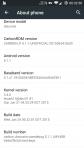
I attached a screenshot of my phone information.
 

Attachments

  • Screenshot_2015-11-13-00-32-51.png
    Screenshot_2015-11-13-00-32-51.png
    89.7 KB · Views: 206
IF YOU HAVE NOT UPDATED YOUR PHONES THIS WILL NOT WORK

IF YOU DO NOT HAVE TEMP ROOT THIS WILL NOT WORK


DO NOT FLASH THE CONTAINED ZIP FILES.. UNZIP THEM AND RUN ZTEROOT.BAT

This file cuts all the dirty work out of the root method... after hours of testing not one device has been bricked because of the script...

Thanks to @mingolianbeef @Flame3element for help writing, cleaning it up and being my first victu......... beta testers
Thanks to @jcase @beaups for the commands and all the work it took to find them

If there are any legitimate problems with the scripts pm me so i can try to fix them.....
even with all of the testing we did something may have snuck through


**************EDIT***************

Ok so after some troubleshooting with another user on XDA i came to realize i made an error with the last five commands in the script so ive updated the zip files to amend "su -c" from the last 5 commands....

I was testing against an already rooted device so those commands slipped under the radar as successful... the rest of the rules still apply but the scrip should now work 100%

im on zte z936l trac phone i tried your script and no go so i read it checked my getprop same as yours ??? can ya help was thinkin bout modifyN your script to my ideas but i have a dozen bricks here telln me not tooo
 
so this wont help me with the z936l

It might. But I do not promise anything. Phones from Tracfone, Net10, Straight Talk, etc, etc tend to use very highly customized roms for the service they are made for. From what I see the ZTE Lever is a bang on clone of the ZMAX. However as I said before the exploit that exists in the ZMAX may not exist in the Lever. Use king root, if it gives you temp root, give it a shot. the worst that can happen is you can lose root on reboot.
 
It might. But I do not promise anything. Phones from Tracfone, Net10, Straight Talk, etc, etc tend to use very highly customized roms for the service they are made for. From what I see the ZTE Lever is a bang on clone of the ZMAX. However as I said before the exploit that exists in the ZMAX may not exist in the Lever. Use king root, if it gives you temp root, give it a shot. the worst that can happen is you can lose root on reboot.
If you have the time I would love the exact instructions on how to attempt root on the ZTE Lever. I tried kingroot apk. and that didn't work. I got it to work once with kingo root but it was only temp also and won't work anymore. Thanks in advance for any help you could give.
 
If you have the time I would love the exact instructions on how to attempt root on the ZTE Lever. I tried kingroot apk. and that didn't work. I got it to work once with kingo root but it was only temp also and won't work anymore. Thanks in advance for any help you could give.

Let me give you primer on rooting phone that are use identical hardware but are on different carriers or MVNO's.

Just because the same phone is on two carriers/MVNO's doesn't mean the root process for one version will work on an other. And this is especially true with Tracfone, Net 10, Straight Talk and a few others because of the requirements to use the phone on those services.

Your best route is to Google ZTE lever root.
 
file issues
will not unzip with windows 10
android 4.4.4
winzip
7zip
or winrar
?how am i supposed to use it if it doesnt unzip on windows 10 or windows 8 with any of these programs?
also the file wont even download to an android device
any suggestions?
 
file issues
will not unzip with windows 10
android 4.4.4
winzip
7zip
or winrar
?how am i supposed to use it if it doesnt unzip on windows 10 or windows 8 with any of these programs?
also the file wont even download to an android device
any suggestions?
Install latest version of kingroot
Install hroark13's twrp installer apk
Download latest SuperSU recovery zip
Use kingroot to get temp root
Install twrp with twrp installer
Reboot to twrp
Flash supersu recovery zip
Reboot to android
Uninstall kingroot
Install and open terminal emulator
Run "su" command ( without the " " )
Run "reboot disemmcwp" command (without the " " )
Profit.
 
Back
Top Bottom