• After 15+ years, we've made a big change: Android Forums is now Early Bird Club. Learn more here.

My installed bixby capsules

On a Samsung S22 Ultra with Android 12 and bixby 3.2.03.2

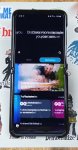
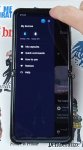
When I searched for my answer, I saw this older bixby video in the screenshot with a full bixby UI with pictures and categories and when you swipe over or press settings there is a my capsules button.

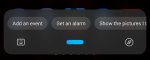
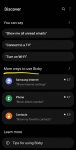
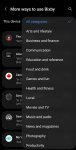
When I open bixby I just get a listening bar at the bottom. When I press the compass thing on the right there is settings and more ways to use bixby to add capsules. In there is a long complete list or you can view categories. But to see if I already have one and the commands to use it, I have to open them one by one to see if it says add or remove. Is there another way to see my capsules?

Attachments

  • Screenshot_20220326-102751~(1).jpg
    Screenshot_20220326-102751~(1).jpg
    487.2 KB · Views: 405
  • Screenshot_20220326-102802~(1).jpg
    Screenshot_20220326-102802~(1).jpg
    377.8 KB · Views: 288
  • Screenshot_20220326-103059_One UI Home.jpg
    Screenshot_20220326-103059_One UI Home.jpg
    110.2 KB · Views: 292
  • Screenshot_20220326-103133_Bixby Voice.jpg
    Screenshot_20220326-103133_Bixby Voice.jpg
    118.9 KB · Views: 344
  • Screenshot_20220326-103201_Bixby Voice.jpg
    Screenshot_20220326-103201_Bixby Voice.jpg
    146.3 KB · Views: 294

  • Locked
How to make my phone temporarily defective

So this is a bit unethical, but I recently broke my phone and needed a quick replacement. I bought a new a52s 5G without putting a lot of thought into it. I quickly regretted that decision and tried to return to Amazon. They sent over a technician once but he said everything works fine and it cant be replaced. So, how can I make it defective enough(temporarily) that it can be replaced?

It can be something like making the wifi not work until it is reset, or some kind of screen issue.

Help Need to know this app icon...

I gave my old Samsung S10+ phone to my high functioning downs syndrome brother so we could stay in contact and it is a phone i know inside and out. Or i thought i did!
We check it regularly just to be sure he us not goingbto the wrong places on internet etc.
However the last time i checked i found an app icon i have never seen before on the apps opened area. I clicked on it and got a message saying "please wait your instant download is processing now" followed by "we're sorry something has gone wrong. Please try again". I looked through the apps imstalled and could not find an app with anything similar. I have had to remove the phone from him until i can verify he has not gotten an app or anything else that, either on purpose or accident, can cause issues. Please look at the icon below and messages. Let me know if there is a spot i can look in the phone that might show what apo its attached too. Or if someone might recognize it please please let me know!
Screenshot_20220319-153615_Video Player.jpg
Screenshot_20220319-153609_Video Player.jpg
Screenshot_20220319-153600_Video Player.jpg
Screenshot_20220319-153542_Video Player.jpg
Screenshot_20220319-153504_Video Player.jpg

Can I find a carrier to support this Note 5 phone?

I am being forced to upgrade 4 phones by Sprint & T-Mobile. I have the Note 5 and they are giving me a free Samsung Galaxy A32 with lower resolution, no stylus and poorer quality. The new note they want $1100.00 for with a stylus, but I don't want to buy from them and I am not happy being arbitrarily forced to change. I wonder if anyone still has this phone with another carrier?

Should I add internal storage ?

Hello,

My Motorola Moto G5 has 16 GB ROM and 3 GB RAM. Recently, app updating slowed to a crawl, then became almost impossible. I deleted a few apps to free some memory, and as a result, updates resumed normally.

Now, Setting/Storage says I have 14.21 GB used out of 16 GB (89 %). My conclusion is, I need to make sure to have much more free ROM, so I don't run into problems again.

So I got into the idea of adding a Micro SD card, formatting it as inside storage. Then I read a few scary posts explanining it would make apps slower, however fast the card. Is this still true, with this phone and today's cards ?

If so, what are my other options ? Would it be better to format a card as portable storage, and only store app data there ? Is it even possible to store app data on a card if it is formatted as portable storage ?

I use my phone very little. It's always off, unless I need to use it. I don't play games, I don't shoot or watch videos and I take very few pictures. I mostly use productivity apps and utilities. I have very few documents or media files saved.

However, I like to test a lot of apps, and I usually leave them on my phone. That's, I guess, what gobbles up space. Also, I have installed several mapping apps, together with downloaded, offline maps. Is it possible to move the latter on a portable storage card ?

Thank you for your suggestions.

Galaxy S7 Edge no longer connects to PC

I recently upgraded from an S7 Edge to an S20 + Ultra, both using Verizon. Before upgrading, I used Win10/Windows Media Player to update music files on the S7 with no issues. Since upgrading I have successfully update music files on the S20 using the same PC, same version of WMP, and same WIN10 operating system.

When I got the S20, I kept the S7, planning to continue using it as a music source in one of my cars that has aux input capabilities but no bluetooth. That still works. However, I recently added a bunch of new music to my collection, and want to update the files on the S7. I have been unable to do so.

I have set developer options on the S7 and checked that Media Transfer Protocol is set, Despite this, the PC recognizes only that a device has been connected, but not that it is a smart phone, and hence the S7 is not recognized as a device by WMP nor does it show up in Windows Explorer.

Is it possible that file transfer to the S7 is blocked because it is no longer under contract to Verizon?

If so, does anyone know a work around?

Thanks

Dennis

YouTube Mobile with "Xd" in video address causing an emoji to appear - Solution

I was trying to share a YT video address in a text to a friend. The YT address had "Xd" in it and it was being sent with an emoji in that part of the address, instead of the "Xd" showing in the YT address.

Solution: I searched the Settings, on the Main Page for Texting, from the triple-dot icon, and under a sub-heading labeled "Eye Candy" I de-selected the option: "Show ASCII Smiley as Emoji."

I use a 3rd Party App for texting called "Chomp" on my Android phone.

In Android devices we are receiving two pairing dialog pop ups ? We need user input pairing pop only

From Xamarin forms application While initiating pairing firstly it will ask pair with device (device name)i.e just pair pop up appears on click of OK button one more pairing pop up appears requires user input (pin)is required to pair. I want a user input pairing pop up we require only one pop up in android device dont want just pair How do we archive in android devices? Please suggest.

I observed in IOS devices we are receiving only one pairing pop up dialog i.e ( user to enter pin) but in android devices we are receiving 2 pop up dialog. Please let me know the root cause.

I am using Xamarin forms to run on android & IOS . I tried to initiate the pairing by reading characteristic and receiving two pairing pop up. in IOS it is only one.

Only user input pairing pop up is required in android devices. Please suggest how do we get this.

[Free][New Game] Comic Fights - Super Boys

Hello, I'm developer of Comic Fights - Super Boys, a game which got recently released on Android. Mobile version is 100% free. Comic Fights - Super Boys is Beat-Em-Up Brawler Fighting game, There's unrest in school and you're the chubby kid who everyone picks on. Get back at the bullies by beating them up! But be careful not to turn into one! - It’s an old-school rumble for a new generation!

Play on Google Play Store: https://play.google.com/store/apps/details?id=com.streetfighter.beatemup.mortal.combat

full


full


full

Apps I need a PHP index for accessibility permissions.

Hello, I'm looking for an android coder that makes me an index to take the accessibility permissions in each device that contains android, that is, if it is Samsung, the index changes and says "go to installed services, search for the app that I say, and grant the accessibility permission" and so with each of the models on the market I know that xiaomi changes to downloaded services, oppo, to installed applications, I really don't know the others worse I need it, the programmer who does this to me I will pay you, it will not be free, thank you.

Android Studio - does not resolve to a valid reference in the project

I've completed the demo at
successfully. Well done by Philipp Lackner.

When I attempted to do it a second time to capture better notes, it fails when trying to resolve a layout item while creating a function in the adapter code.

The successful version of the adapter code somehow added this line, which appears to enable the layout id resolution:
import kotlinx.android.synthetic.main.time_series.view.*

Pasting that line into the version of the adapter does not resolve.

Is there a way to tell the interpreter/compiler that an id/item is in a specific (layout) file?

Thanks in advance!

Force Security Upgrade

Hi,

My company requires me to install a "Mobile Device Manager" on the Samsung Galaxy Fold3 Z they gave me on AT&T here in the USA; however it tells me I have an old version of the security Patch Sept 2021 and need the Jan 2022 patch. When I tell the phone to check for updates it tells me I'm on the latest software.

Has AT&T rolled out this new security patch? If so is there another way I can force the phone to check for it and install it?

2022 NFL Football Season.

The season hasn't even started and I'm already having anxiety pains. I've never seen so many trade deals in the NFL. It's a daily shocker. I liken it to the NBA. Brady retired and now is back. Roethlisberger retired and the Steelers picked up Mitch Trubisky and rumor has it they are looking at Baker Mayfield. The Chiefs just traded off Tyreek Hill to Miami for five draft picks. It will make Hill the highest paid wide receiver and his leaving breaks my heart. I knew that Tyreek's days as a Chief were over when they acquired JuJu Smith-Schuster last week. JuJu is no Tyreek but may prove to be a decent long ball receiver with Mahomes' arm. Davante Adams is now a Raider. Denver gets Russel Wilson. Browns get Deshaun Watson. The trade list goes on and on. My head spins.

Has your team done any drastic trade moves?

A-Xess Watch Face

Hi,

I released a new watch face: A-Xess Watch Face
https://play.google.com/store/apps/details?id=fr.thema.wear.watch.axess

Try it with its free version and customize colors, date & hour format, and a lot of other features.

And if you like it, you can unlock the premium features to access to all settings: complications, custom shortcuts, secondary timezone, blending colors, a lot of backgrounds, etc...

I hope that you will like it :)

hOq7J0Qm.jpg
7O5mdWbm.jpg

nrWQXU2m.jpg
Z7cE7rrm.jpg

X7uRWJhm.jpg
exXVcUMm.jpg

Filter

Back
Top Bottom