• After 15+ years, we've made a big change: Android Forums is now Early Bird Club. Learn more here.

[Free] [Game] GrandQuiz

GrandQuiz — a free quiz game for trivia addicts and quiz fans of all ages! By answering questions about certain or various categories in the game, players can easily improve their knowledge, abilities, and skills. At the end of each quiz, players can see the correct answers for all the questions which will help in self-assessment. There is even the classic Snake game to have fun and earn bees at the same time!

If you really like to have a simple yet pretty interesting and effective way to improve your knowledge and train your brain, GrandQuiz could be a nice one to start with!

Challenging Trivia Gameplay

- Pick your favorite category and train your brain by answering different questions
- In case if you run out of time, use the get help option
- Answer correctly to win coins and bees
- View your correct answers at the end of the quiz
- Play classic Snake game to earn more coins and bees
- Try to stay on top of the Snake game leaderboard

GrandQuiz Features

- Free to download
- Easy to use UI with eye-catching design
- Lots of quizzes in various categories such as: Artists, Baseball, Basketball, Books, Biology, Botany, Cricket, Festivals, English, Food, Music, Movies, Personality, and more!
- Answer quizzes, earn coins and bees by correct answering
- View your score at the end of each quiz and share it with friends
- Play classic Snake game for more coins and bees, and try dominating the leaderboard
- Play as a guest or create a free account to save your progress
- View your current level, the total number of quizzes taken, quizzes won, correct answers, coins, and bees in your profile
- Invite friends and earn rewards together.

So, what are waiting for? Download the GrandQuiz trivia quiz game right now, start as a guest, or create a free account, and then try answering the quizzes to sharpen your brain and improve your knowledge!

Download GrandQuiz on Google Play: https://play.google.com/store/apps/details?id=com.chellobee.grandquiz
Download GrandQuiz on App Store: https://apps.apple.com/in/app/grandquiz/id1541507921

I Am Rich Pro - Luxury Boss

I Am Rich Pro - Luxury Boss

Download: https://play.google.com/store/apps/details?id=com.thedgames.iamrich

Are you rich or poor?

Are you really rich? You can become a member of the secret private billionaire club. Do you want to prove it to your friends or everyone who don't believe to you? Here is the best time to show how successful you are. Show the world that you have the most prestige here and get a Luxury ID Card of the appropriate level. You can share this card to your friends who will respect you.

Be first on leaderboard and get a Special VIP Luxury Boss Card ID. Be famous and respected. Now you can do it. It's time for you. Your time has come.
Start your billionaire club life now. The decision is in your hands. Join the secret private billionaire club!

Features:
- No Ads
- Beautiful high-quality luxury graphic
- 3 different Luxury Card ID what you can show to everybody to prove you are the best:
- Silver Card
- Gold Card
- VIP Card + Rich Certificate
- Rich level indicator background in the app... Show everyone that you have more rich than them
- Rich level calculator
- Social sharing - Show how rich you are in your country or around the world


Facebook: https://www.facebook.com/iamrichpro


Screenshots:
jTijTHk.jpg

6FUsG1R.jpg

DZxpaSk.jpg

tk7ueyH.jpg

Kr6NwcJ.jpg

BnwnO88.jpg

Help Remove "hidden" account without factory reset

Hi All

Left a job recently and they allowed me to take the company phone.

All work accounts have been removed and I have signed into all my own personal accounts.

However when the phones lock screen shows, it still has my old work email showing. But this account doesn't exists in the phone or any app now.

What is going on ? How can I get the screen to show my new personal email address ?

Samsung S4 Mini - problems with whatsapp.

Hi.

I'm wondering if there's anyone on here who has hands on experience regarding the following problem and any useful / practical information :

my wife has a new Samsung Galaxy S4 Mini GT19195 it runs on Version 4.4.2

She has a problem using whatsapp . We checked this software version and it would seem that it was software versions prior to this that may have issues with whatsapp .

It goes like this : she can connect but the image is ' blocky ' and stilted - a couple of times it has been ok and worked perfectly well , but the bias is towards it not working. Whatsapp voice frequently ' choppy ' . In checking at the same time on my phone ( S5 mini ) things work ok so this would appear to be a phone issue rather than an internet problem ( although our net connection isn't the strongest ) .

Thanks for any constructive comments anyone can provide .

Verglas

Help Less available free storage after flashing phone

Hi!My Tecno phone was getting stuck at starting Android apps thus I flashed the phone erasing all apps and data.

When I started reinstalling my data the phone storage suddenly got full.I have only installed 60% of the apps that I had before flashing the phone so wondering why I have less available storage than before flashing.

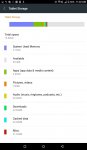
Total storage is 16 GB yet when I check from storage settings (see attached image tecno storage from settings.jpg) I can see when you add the various storage components ie system used memory,apps,pictures etc it doesnt add up to 16 GB.Also why is there so much usage of system used memory of over 5 GB.Is this where the Android OS is and can it be reduced to smaller storage size?

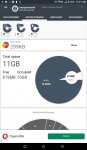
Also from Disk Storage Analyzer app that I downloaded,it shows total storage as 11 GB not 16 GB (see attached image tecno storage from disk analyzer.jpg)as shown in storage settings.Why is there such a discrepancy?

Kindly assist in recovering/allocating more free space on my phone so that I can reinstall all apps and add more data similar to how it was before flashing the phone.

Thanks.

Attachments

  • tecno storage from disk analyzer.jpg
    tecno storage from disk analyzer.jpg
    46.9 KB · Views: 280
  • tecno storage from settings.jpg
    tecno storage from settings.jpg
    35.5 KB · Views: 206

Acme Solitaire

Play solitaire!
Solitaire is also known as بازی یک نفره in Persian, and सॉलिटेयर in Hindi. There are various solitaire games in the world of solitaire. Solitaire is an amazing game and all it's versions. Free solitaire game on your phone. Play solitaire which is one of the best free solitaire games. Download now this amazing solitaire card games.

A difficult variation of Canfield where you build in suit, can't move sequences, and only get two passes through the stock. "Acme," the greek word for the zenith, was a popular name for companies who wanted to be listed first in the phone book until the Coyote and Roadrunner ruined it.

Features:
- 7+ Card Themes
- 7+ Backgrounds
- Smart AI

Cards:
One standard deck.

Goal:
Move all cards to the foundation.

Foundation:
Four foundation piles.
An ace is initially dealt to each foundation pile.

A card may be added onto a foundation pile if it is one higher than the old top card of the pile and of the same suit.Thus, the only card that could be played on a J♠ would be a Q♠.

Once on the foundation, cards may not be moved back off.

Reserve:
There is one reserve, initially containing thirteen cards. The top card in the pile is dealt face up, all others are face down. It is not possible to move any cards into the reserve. The top card of the reserve can be played to the tableau or the foundation.

Tableau:
Four tableau piles of one card each, splayed downward. All cards are dealt face up.
A card may be added onto a tableau pile if it is one lower than the old top card of the pile and of the same suit.Thus, the only card that could be played on a 5♥ would be a 4♥.

Cards on the tableau that are not under another card are available for play onto the foundation or any other tableau pile.

Empty spaces in the tableau are automatically filled with a card from the reserve. If the reserve is empty, then empty spaces in the tableau may be filled by any card.

Only one card may moved at a time, never sequences.

Stock and Waste:
The remaining cards form the stock and there is one waste pile.
Each time you click on the stock, one card will be dealt from the stock to the waste. Two passes through the stock are permitted.

The top card of the waste is available for play to the tableau or the foundation.

Attachments

  • unnamed (4).png
    unnamed (4).png
    186.6 KB · Views: 164

Roll back googoo

I'm trying to put this new Samsung A20s(?) on a diet. I'm looking for things I can remove, shut down, etc. When I checked out that googoo stuff I wasn't surprised that it's not removable, but at least it can be rolled back to an earlier, presumably less bloaty, version. I hesitate only because it means data removal, although it's probably nothing important. Also, I've noticed a lot of things such as Outlook, which I believe are Microsoft. Do I need any of these or should I delete or otherwise incapacitate them?

Accessories New microSD going read-only

Today I made an upgrade from a SanDisk microSD 8GB to a 32 GB Kingston microSD but for the while it keeps showing that it goes into read-only mode because the SD card started working incorrectly. So I did formatting, unmounted and mounted again to see if it would fix and guess what? It keeps happening. I don't know what to do. My phone is Samsung Galaxy A01 (16GB ver.)

Help Need help with screenshots

I beta test an app that heavily uses the drop down notification list. I could take screenshots of this with my previous phone, an LG V40 ThinQ with Android 10.0. With the Pixel 6 Pro, when I try to take a screenshot of the drop down list, it retracts first. I've tried a few apps but so far, none work. Any ideas or work around would be greatly appreciated.
Thanks in advance,

Is bypassing FRP illegal?

I did a factory reset on my phone yesterday but I went to the bootloader mode (if that is the correct term) to do the factory reset because my mom forgot my phone's password (by the way, this phone used to be hers). After successfully doing the factory reset, I underwent the setup process. Within the setup process, I was asked by google to verify the account that was previously associated with my phone. I remember seeing my dad's account associated with this phone prior the factory reset. However, I am clueless as to what is the password of my deceased dad's google account so I tried entering my own account but I got a message saying that the sign-in process was unable to be done due to a recent password change and that I need to wait for 24 hours in order to be able to sign in again.

What should I do? I'm also thinking if bypassing the FRP of my own phone is illegal or not.

God bless.

Help Android 11 show device contacts/UI issue

TCL Pro 20 5G with Android 11 (November patch)
Long story, short: I need to see my device (phone not Google contacts) in the Contacts App.
Suggestion from one person: When you open the contacts app, tap the three dots in top right corner... Tap settings... Tap contacts to display... Select "phone only"
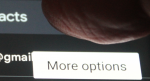
On my phone that option does not appear. If I long press on the three dots, I get a floating "More Options":
menu2.PNG
but there is no way to press that More Options button.

How can I see my device contacts/select the More Options button ?

Bandwidth-limit Android's HotSpot ???

I set up my pixel2 as a wifi hotspot. Works great. Now, I wish to bandwidth-limit the clients who connect to that hotspot. ie. any client who connects to my phone's hotspot will be limited to 1mbps or whatever I specify.

The reason I want this: The chromecast device, when playing netflix, *always* defaults to the highest possible quality the network connection will allow, and there is no way to change this. The bandwidth settings in the netflix app have ZERO effect when it is cast through to chromecast.

Any help would be appreciated.

Fingerprint not working..

On my moto edge plus....

Even when getting into the fingerprint setting is not working at all, it was up til about an hour ago, when IO decided to reboot it twice, suddenly it was just a shattered image of a flawless phone with the phone app not being able to clear until this happen to me just now. :(

Criiiiiiiiiippppppppppppppeeeeeeeeeee...... :(

Restrict apps from using 4G?

So, my kids have Tracfones. I want them to have 4G when out and about only to make sure location services are working so I can see where they are. I care less if they can check their email or search up a cute cat video. They can do that at home or somewhere else on wifi. They only have a limited amount of data to use.

Is there a way to restrict apps from using 4G and only work on wifi but make sure the base Android has full access to the 4G?

Help Android 11 gps signal disconnect when screen turned off. Anyone else?

Annoying issue in Android 11 with my moto phone where gps signal will disconnect after 1 minute if the screen is off.

Battery conservation is too aggressive or something.

When i was on Android 9, there was an app that could keep the gps connection alive when the screen was turned off, but that does not work anymore in 11.

How common is this gps signal loss in other brands of Android 11 with the screen turned off?

Play Store Missing From Phone

In looking at a family member's Samsung J3 Orbit member's phone, I could not find Play Store. I looked in Settings and found that it had been disabled. I enabled it but how do I to get it back to either the Home or APP screen so that I can use it?. And how do I get it to work? I opened it in the Settings -> APPS list then pressed it but nothing happens.

P.S. I just tried holding an empty space on the home screen and brought up the list of widgets, which included apps. Play Store was not there.

Filter

Back
Top Bottom