• After 15+ years, we've made a big change: Android Forums is now Early Bird Club. Learn more here.

Slow charging (7W) google pixel (4a). Which USB A-C cable to use?

Hi everyone.

I bought a power bank which has an output power (USB-A - USB-C) of 12 and 18W for my pixel 4a.
If I understand correctly, with the Pixel the only way to have fast charging is through: USB C-C cable and "power delivery".
I would therefore exclude the possibility of using 18W but the problem is that I cannot go beyond 7W (5V, 1.4A) whatever cable (USB A-C) I use and this causes a really slow charging of the phone.

Is there a specific cable that allows me to go beyond 7W?
(not 18W ok, but a few W more ...)

NB: this slow charging also happens with all the chargers I have at home using the USB A - C cables I have, so it is not a defect of the power bank but a "problem" of the phone

Notification bar and task manager keys

I appologize, my search skills must be really weak this morning, but I'm trying to find out if there is a key (keyboard shortcut) to pull down the notification shade/bar in bluestacks and a key for the native android task switcher/recents.

I know I can assign a gesture to a keyboard shortcut to get the notification shade, but I was wondering if there is a keyboard shortcut already setup that I'm missing.

Thank you in advance for any help

Honda Handsfree and Google Maps Problem

When my S20+ is connected to my Honda SUV's handsfree system with Bluetooth, Google Maps will no longer give directions out loud. The map will show on the screen, but there are no audible directions. If I turn bluetooth off on my phone, so that the handsfree connection with the car is turned off, Google Maps functions normally. This is most annoying. I've taken my phone to the T-Mobile store, and they couldn't find any settings that I was missing. Has anyone else experienced this problem? Did you find a solution? Thanks.

Help Cannot see global address list on Outlook apps

hi folks,

Good day. A quick check what when wrong here. My handphone is Vivo Y15. Android version 9.
I set up my exchange email on Outlook Apps. Connection setting was fine and able to send/receive email.

However, when replying or sending email, it not able to search or display any of global address list from server.

And i did configure same email using builtin email in hp, it works. i just type few words and it display some email accordingly.

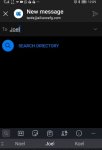
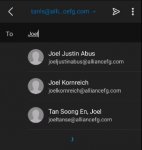
Please advise. Thanks.Using builtin email apps.jpg using Outlook apps.jpg

Turn Off Motorola Automatic Software Update

Hi All.

Something that i've noticed with the Moto G Power (2020) is that it likes updating itself whenever the latest one comes out

Every time, it does it automatically and doesn't even let you choose not too. This worries me, as i'd like to 1) Not be bothered by so many notifications or forced to restart, and 2) Would like a chance to check the updates and vet them before actually applying them

Is there any way to turn off Motorolas System Updates on this phone, or at least without rooting it?

Dark Born : Under Development v0.2.3 is out!

Hello everybody,

ive been developing a unique souls-bourne like game for the past 4 months,
and now its in testable stage,
i wish you will try it and tell me what you think by contacting dark.born.feedback@gmail.com
The game still in its very early stage,
i released a closed alfa version on google play.

# to download the game:
1- join the google group
https://groups.google.com/g/darkborntesters ,
and make sure that you joined the group with the same google account on your google play app.
(this step is required to able to approach the store page).
2- download the game from
https://play.google.com/store/apps/details?id=com.SaudAlomari.DarkBorn

# Gameplay Video of Version 0.2.3

# Main Thread
https://androidforums.com/threads/i...id-and-i-hope-you-will-join-the-ride.1332352/

CUA8 Global update rolling out with FEB Android Security patch

Samsung have started rolling out their 4th stable Android 11 update to their Global, Exynos, S20 flagship devices... SM-G98*F/B

The Galaxy S20 Global, Exynos, devices that will receive this update are...


  • S20 4G/5G model SM-G981B
  • S21+ 5G model SM-G986B
  • S21 Ultra 5G model SM-G988B

This release appears to be mainly for the February 2021 Android Security patch.

It is a FOTA, (Firmware Over The Air), update and you should check... Settings > Software update... to see if it has arrived for you.

Be advised, initial roll-out is mainly to stock Samsung unbranded devices and it may take longer to arrive on some carrier branded models.

The update = G98*F/BXXS6CUA8

Download size = 180.42MB

Build date = 14 January 2021

DOWNLOAD

7IWFC3zl.jpg


One UI version = 3.0

Camera version = 11.0.01.20

Android Security patch = February 2021

This is the 20th stable update in 321 days = 1 update every 16 days on average

Emoji

Salve a tutti vorrei sapere se qualcuno mi toglie una curiosità. Durante il gioco (oltre al pop-up delle emoji tramite pulsante) noto che dei giocatori mandano degli emoji a determinati altri giocatori del tavolo. Qualcuno mi sa dire come si fa?
Grazie

Powershare on my Moto Edge Plus...

So yesterday I had a mishap with my Phonax hearing aids, they where dead out of the blue, when going down two blocks, from the park of where my ex-friends still have to the grocery store next door, they where completely off, so I tested something to work with my powershare. I thought I saw a cranberry light on the back of one of them, turns out could of been the lighting inside the lobby.

So my question is, will it work with my phonax hearing aids, ladies and gentlemen?

Printer not supported - any workaround?

Wondering if there's a way of sneaking past this block. On my Moto G4 (and G2 and -G1!), no problem, but when I input the printer's IP address the G8 says 'Printer not supported'.

Phone : Moto G8 power lite
Printer : Brother MFC-J430W

Software :
. Brother Print Service Plugin v. 1.7.0
https://play.google.com/store/apps/details?id=com.brother.printservice
. Brother iPrint&Scan v. 6.4.0
https://play.google.com/store/apps/details?id=com.brother.mfc.brprint

Previously I've ignored the print service plugin because it's so useless, and been absolutely fine with iPrint&Scan.

The printer must be ten years old (I know, I know...) and of course doesn't do Wi-Fi Direct. But it's going strong, good as new, and I'm not prepared to get another - I can print from my laptop. But it would be nice to print from the phone too (especially with rural wifi that's very often sulky about email attachments - or even simply reading an email - on the laptop, which I can download easily on the phone! Also sometimes I like to print a screenshot to, say, put up on the wall, without having to get it onto the laptop).

Game restarts when switch to another App/Game

Iam using Unreal Engine 4 to create a game. The game runs fine on phones but for some reason when I switch to another App/Game and go back to the game Iam developing it always restarts (does not pause). Locking the screen works fine.

Any ideas if this is a phone setting or something I have to figure out inside the game engine? I have tried with developer mode on/off.

Thanks

Help How to get older versions of YouTube app?

Here's my problem. I hate pretty much every change that youtube is making to the YouTube app these days. So I want to use the older versions. I can download old version apks, but I can't actually install them because it says that the app is already installed. If I delete the YouTube app(through ADB), then I can install them. But the YouTube app stays on my phone, it just doesn't appear like it, so I can't install any YouTube apks from before my phone's latest software update. The only solution I can think of is to root my phone and properly delete the YouTube app, but I don't want to root my phone so I'm just wondering if there's any other solution.
Also don't say "use YouTube vanced" because I don't want to use that, I want to use the actual YouTube app.

Help strange android system behavior if application is running more than ~8 hours

im currently building a digital signage app, which is running on displays which are based on android 7.*. Everything is working perfectly, except a weird OS behavior:

After a while (6-9h) of running the app, android minimizes my application, i don't get any error logs nor do i get a exception thrown.

My workaround solution is that im reopening the app every 2 hours, this is working fine, but its not what it should be.

I already tried it with WakeLock, Keep alive, Kiosk Mode, nothing seems to be working.

Does anyone have a idea how i could solve this android behavior?

I am getting pretty frustratet. PLS help

Help Weird android system behavior if application is running more than ~8 hours

im currently building a digital signage app, which is running on displays which are based on android 7.*. Everything is working perfectly, except a weird OS behavior:

After a while (6-9h) of running the app, android minimizes my application, i don't get any error logs nor do i get a exception thrown.

My workaround solution is that im reopening the app every 2 hours, this is working fine, but its not what it should be.

I already tried it with WakeLock, Keep alive, Kiosk Mode, nothing seems to be working.

Does anyone have a idea how i could solve this android behavior?

I am getting pretty frustratet. PLS help
smile.png

Filter

Back
Top Bottom