
• After 15+ years, we've made a big change: Android Forums is now Early Bird Club. Learn more here.

Root LG Home App successfully installed AND themed black and blue.

connwa

Well-Known Member
OK. I made a new LG_home app and its colored too! To install,copy to the root of your sd card, reboot into recovery, Go into the mounts in the recovery and mount /system and /sdcard. Then in command prompt do adb shell (instant #) and type mv /sdcard/LG_Home.apk /system/app/ it should be successful. here is the file
EDIT: you can also use cat /sdcard/LG_Home.apk > /system/app/LG_Home.apk WITHOUT BEING IN RECOVERY.
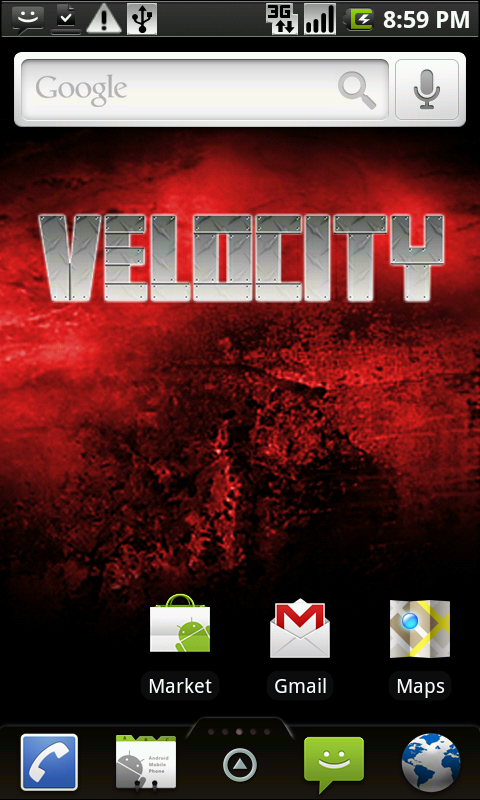
screenshot.png


https://docs.google.com/leaf?id=0B2kZa_dxydalZGI4Y2EzNGQtNjZmNi00M2M4LThkNWMtMGI4YTMyMjkwNjcy&hl=en
 
yessir lol. Blonde moment turned smart moment. It actually works that way with ALL apks if youre in recovery
 
Yes mv works in recovery with any apk because you have full permissions. however it will not work when in androidOS itself

@connwa: how did you theme this? Ive got a little more time now to do these things so id love to start
 
I never liked the LG Home but I have to say, turning it black really did it a lot of justice. Good work man.
 
Yes mv works in recovery with any apk because you have full permissions. however it will not work when in androidOS itself

It's not a matter of permissions, it's a technical problem. mv'ing a file across devices is usually not a capability of the mv command. Does the recovery partition have a different set of tools than you'd normally use from within Android?

EDIT: Did some tests, and yes the recovery image comes with its own copy of busybox. This also led me to discover that this *would* work within Android if you used /system/xbin/mv rather than mv (assuming you have busybox in /system/xbin).
 
I was on my Ally when I tried the first time, it sent me to my Google Docs. I tried again on the lappy just now and it worked fine. Oddness.
 
No this is a remodded app. BTW the busybox tools in recovery is factual lol. i tested this myself. Ill make a thread on how to do this
 
How do you get to the command prompt in ClockWorkMod Recovery? Also, do I need to unmount the /system and /sdcard before rebooting?
 
Thank you. Guess that means I need the sdk tools as well. Never had much luck with using them, but I guess i'll give it another try.
 
think you could make it a little easyer to install ima liittle bit of noob when it comes to abd

It's only like 2 lines, given in the first post. Really, you should get familiar with adb. Give it a try, and if you run into problems come back and we'll help. It's the best way to learn and if you're living in the world of root, you should really get to know the terminal.
 
Can anybody post some more screenshots of the actual menu open and stuff, I want to try this out, but my Ally is limited on space so I want to see if its worth the extra "testing"
 
Yeah but I have a mac that's not able to run sdk and after some searching I couldn't find how to abd on mac
Couldn't I just install zip in clockwork?
 
Yeah but I have a mac that's not able to run sdk and after some searching I couldn't find how to abd on mac
Couldn't I just install zip in clockwork?

I'll assume you mean you have a powerpc mac, then. I've heard you can build pieces of the SDK from source, but not all.

Another option is to execute the same lines from the terminal emulator on the phone (see Market).

As far as flashing a zip, you'd have to make one. If you zipped this up in /system/app/ within a zip archive, it may work. Probably worth a shot if you can't use the terminal at all.
 
Hhaha I got it thanks though yeah I used terminal emulator and used the cat ccommand I also installed the lg themes app this way too I love it but can't decide between that or launcher pro
 
The "easy" way imo would be to do the following in terminal emulator on the phone.

Code:
su
mount -o remount,rw -t yaffs2 /dev/block/mtdblock4 /system
cat /sdcard/LG_Home.apk > /system/app/LG_Home.apk

That's what i gave kninetimmy and seems to have worked for him.
 
Back
Top Bottom