• After 15+ years, we've made a big change: Android Forums is now Early Bird Club. Learn more here.

Root [ROM] ApeX 1.3.1 for Droid X - Running, running, as fast as it can (12/16/10)

thanks for the help with the question. TY. now can some help me with
one more question. i didnt make a back up when i used rom manager to install apex. reason is because i had to try rom manager 10 times for it to finaly work. boot strap works so much better now and rom manager to me is too buggy because it wont but into recovery like its suppose to do. so i didnt make a back up of my droid x rom. if i ever want to go back to the stock rom how would i do that??
 
thanks for the help with the question. TY. now can some help me with
one more question. i didnt make a back up when i used rom manager to install apex. reason is because i had to try rom manager 10 times for it to finaly work. boot strap works so much better now and rom manager to me is too buggy because it wont but into recovery like its suppose to do. so i didnt make a back up of my droid x rom. if i ever want to go back to the stock rom how would i do that??


Did you ever select the option "Flash clockworkmod recovery "in rom manager?that may be your problem .....open rom manager select it then select your device and then it should boot onto recovery .....
also to return back to stock you can flash the .340 system sbf or use madderstocks zip found here
maderstcok - OTA 2.3.340 update.zip
 
Your correct about Rom Manager. Lots of people find it just doesn't work they way it should. :(:(

I just use Bootstrap for all my stuff. I rename the file after i get it saved and restored using Astro file manager. IE: 2011-02-08Apex (keeps my date of backup that way)

If you did not make a nandroid then you probably (most likely) would have to do a SBF on your phone. No issue at all..........just takes time.
 
I've been running Apex 1.3.1 for a while now w/ADW Ex, etc and it runs great(can't wait for the next version)! I've finally decided to overclock. I got the Jrummy Droid Overclock app and set the scaling freq to LV 1.25GHz, and to set on boot, etc. I've also downloaded linpack and got a benchmark for 16.939MFLOPS. How do I know if my overclock is working?
 
quadrant standard will let you see how well it works, from just holding and playing with it, you may not notice but it is slightly faster, but other than that the naked eye really cant see it because the x is already a beast of a machine and you just basically gave it, its daily dose of steroids
 
Thanks, i just tried quadrant standard and I measured 1603(i think i'm satisfied). Just curious, has anyone seen differences in quadrant standard or any other tool after installing Apex 1.3.1?

Also, are there known problems when using Ultra Low Voltage with 1.25GHz overclock?
 
I just started having a problem with the Gmail app not syncing correctly with Gmail when I mark something as Read. It doesn't change it on the website and then later it says that I have unread messages on the app but all are marked as read. Any thoughts?
 
Thanks, i just tried quadrant standard and I measured 1603(i think i'm satisfied). Just curious, has anyone seen differences in quadrant standard or any other tool after installing Apex 1.3.1?

Also, are there known problems when using Ultra Low Voltage with 1.25GHz overclock?

before apex mine was 1200+ after apex 1400+ overclocked its between 1600and 1700+

and i just use low voltage, not ultra low
 
It's Andrew Xie (bigxie) on Twitter


So, I'm going to be starting on the Blur restoring menu of the Toolbox in a bit. What are some common apps people like to restore from the removedapps archive?

The only ones I can think of off the top of my head are like the hotspot app, status updating widget, and weather widget. Any others you want included?


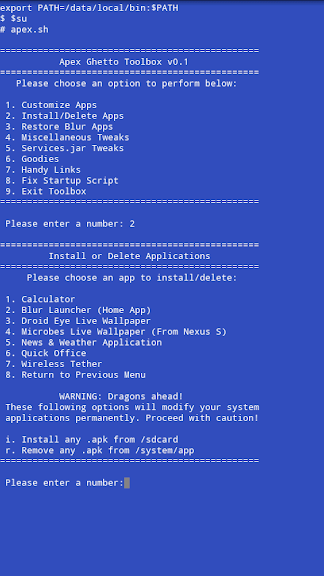
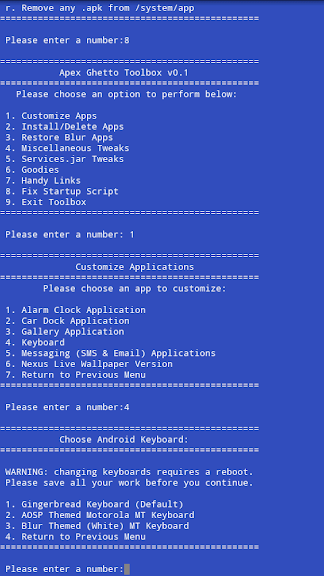
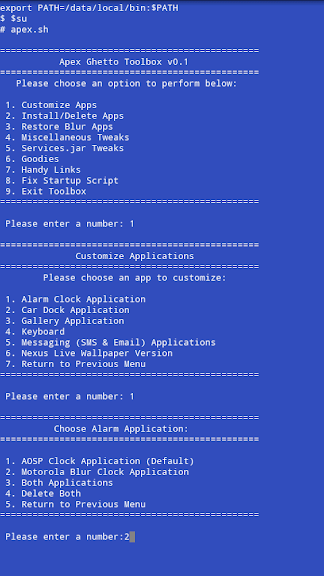
P.S. here's a little preview of how the toolbox interface is going to look like:

toolbox1.png
toolbox2.png
 
I'd really like to see a pulldown text editor (editing the "Verizon Wireless" in the notifications bar) like in Liberty.

Also, if we can modify the background of the pulldown shade.
 
Just use the default music player, they only show up when music is playing.

Is there a way to disable the music controls on the lock screen. I'm having some issues when skiing and the music stopping. Thinking it might have to do with the lockscreen, might be wrong?


Thanks for the great ROM.
 
Sorry guys, that's a little beyond the scope of my programming skills ;)

I can do that manually, but I don't know of a clever way to implement it methodically through a script.

But, I've finished the majority of the script. The remaining features to be implemented (Blur Restoration, Services.jar tweaks, Goodies, and Links), I can finish tomorrow night. So I expect there to be a test release either Friday night or Saturday afternoon, if everything goes according to plan :D

Good night!
 
Hey Fab are we going to need to wipe cache and data going from 1.3.1? Was on Lib for a while, not sure if I should start my Apex switch now or wait for new version...
 
Back
Top Bottom