• After 15+ years, we've made a big change: Android Forums is now Early Bird Club. Learn more here.

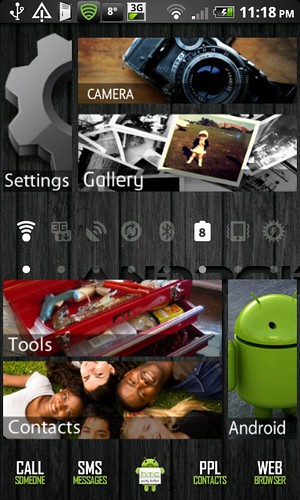
Show us your DHD Screens!

Installing now!

Edit: Need to get used to the input method but i really like it. i'm sure that i will be using this from now on. when does it run out thou?

It doesn't run out. You are a selected beta user now. It is just that the beta is normally closed unless you get lucky.

It's not like a trial or anything.
 
5150158270_91bd0ebd41.jpg


Ok, I have been trying to achieve this for two weeks now with no success. The widgets just do not align as perfectly in tile fashion as they do for you guys!

What am I doing wrong???
 
5150158270_91bd0ebd41.jpg


Ok, I have been trying to achieve this for two weeks now with no success. The widgets just do not align as perfectly in tile fashion as they do for you guys!

What am I doing wrong???

What app have you been using to achieve pictures to shortcuts to app?
 
What app have you been using to achieve pictures to shortcuts to app?

Desktop Visualizer is the app that I'm using and the actual Icons are from the XDA forum as quoted in the OP. I use Zeam Launcher, because it is proven to be the most light-weight with the features that I require. I'm not sure if that has anything to do with it? But then again some people are getting to work using "Sense" so I don't see that being an issue.

:confused:
 
I see you've got Android Agenda Widget, absolutely brilliant! I spent well over an hour making mine look the way I want, mega happy with that app!
 
How do i get nice big screen shots on here??
Using shootme, but png file too large for both dimensions & file size.
Used the attachment button to add this (crap) one... after resizing & reducing quality.
 

Attachments

  • snap20110331_084237.JPG
    snap20110331_084237.JPG
    23.3 KB · Views: 126
ajwconsult .. what are you using for your lock screen, and the calendar bit at the top of the lock screen?

The lockscreen is using "WidgetLocker" and the Calendar is from "Pure Calendar Widgets" which as 2 type on the market, this is not the grid one.. each there own...

I still have the same lock screen now, but now have the fantastic SPB Shell 3D and paid for it as well it is that good..... and working without any issue..

I'll post some screen tomorrow...
 
here's my current screens..... i posted them in the main theme thread, but i thought you may like them in here too ;)

lockscreen
device-4.png


left screen
deviceL-2.png


centre
device-5.png


centre with all the circle launchers open
deviceCLx3.png


right screen
deviceR-2.png
 
I have finished my screen again now using:
WidgetLocker
SPB Shell 3D
Fancy Widgets
3G Watchdog Pro Widget (from main program)

Lock Screen (WidgetLocker + Pure Calendar Widget + Power Control Plus Widget)
htc1.jpg


Home Page
(Bottom Bar is SPB Shell 3D, Fancy Home Small is weather+time, Data Widget is from 3G Watchdog Pro)
htc2.jpg


Communication Page
(Message Widget from SPB Shell 3D, Birthday Widget from SPB Shell 3D)
htc3.jpg


Travel Page
(World Time from SPB Shell 3D)
htc4.jpg


The Following 4 Screens are the 3D navigation from scrolling pages in the SPB Shell 3D
htc5.jpg


htc6.jpg


htc7.jpg


htc8.jpg


The screen captures was taken using "Delvivk Debug Monitor"
 
sure thing :)

lockscreen is made using widgetlocker with a custom glassjaw theme, the clock and date are minimalistic text. The left screen is using qoute a day, pure calendar widget (NOT the grid one) with the transparent skin and traffic counter. Centre screen is usingmake your clock widget, three hidden circle launcherson the right hand side and i used minimalistic text to make a battery bar along the bottom. The right hand screen is using extended controls for the top and bottom sets and fancy weather with the realistic weather skin.
 
sure thing :)

lockscreen is made using widgetlocker with a custom glassjaw theme, the clock and date are minimalistic text. The left screen is using qoute a day, pure calendar widget (NOT the grid one) with the transparent skin and traffic counter. Centre screen is usingmake your clock widget, three hidden circle launcherson the right hand side and i used minimalistic text to make a battery bar along the bottom. The right hand screen is using extended controls for the top and bottom sets and fancy weather with the realistic weather skin.


Thankyou very much good sir, could you do one last favour for me?

Can you please explain how you made the battery bar on minimalistic text, i have tried to mimic yours and the best i can do is have a really ugly looking thing that reads 10203040506070809100, i guess i need to know how to put those little marks in that you have between the numbers.

I tried make your clock, and its to complex for me! Really loving traffic counter though , thats my replacement for 3G watchdog!

Thanks again, friend!
 
I'll pull the clock from Make Your Clock and put it for download for you :)

The battery bar was made by selecting custom and inserting all the battery bar pieces with custom text inbetween each..... the custom text is just a lowercase L ;)

Is that widget locker free?

no you have to pay for it unfortunately, but it IS worth the money :)
 
Here you go buddy, this HERE is the Make Your Clock design that I did. Download it and add it to your sd card (DO NOT RENAME IT OR PLACE IN A FOLDER) the open the Make Your Clock design editor and hit the spanner on the top right, select restore and accept the warning. Then you have the design useable on your phone :) (you can delete it from the SD card now ;))

Oh yea.... it's only a 2x2 widget :)
 
screenshot1an.png


screenshot2xg.png


screenshot3sn.png


All off one Homescreen with the 3 docks first image shows central dock with Calls/Messages/App Drawer/Net/Facebook.

Second image shows docks with access to Music/Video/Gallery/Camera/Camcorder (basically my media dock).

Third shows all my net activities with the car dock included for easy access.

Also using Extended Controls for the power management.
 
Back
Top Bottom