• After 15+ years, we've made a big change: Android Forums is now Early Bird Club. Learn more here.

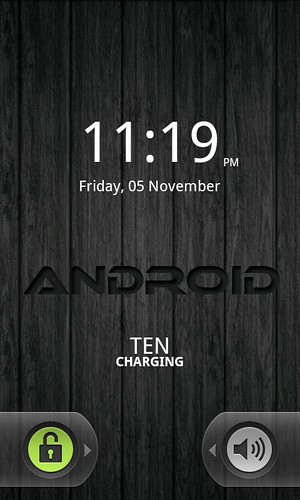
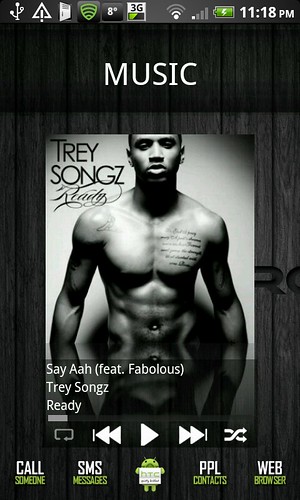
Show us your DHD Screens!

You could be right actually.

I've my key guard set to activate after 3 minutes (for the simple reason that unlocking via a pattern constantly during SMS conversations was a pain in the tits) so 50% of the time I'm unlocking my phone, I see the animations. I've just locked, left it a few mins, then unlocked via the pattern and there was no animation.

I've obviously never noticed before :o
 
Is there a way to take a screenshot on my phone without rooting?

Yep -

If you're looking to take a screenshot, that can be done with the Android SDK. Initial setup is a bit long winded (but not difficult by any stretch of the imagination), but once setup, it's easy enough to do. Alternatively, you can use MyPhoneExplorer. Which ever method you use, I'd recommend installing myphoneexplorer any way, it's a cracking piece of software.

Once you've saved the pic, you can upload to imageshack then put the url between a couple of image tags like this -

[IMG]Your url[/IMG].

Taken from a post about 5 or so above yours :p
 
Haha thanks. I actually remember that post now that I see it. I just see that pretty much every home screen looks like it's been rooted.
 
You could be right actually.

I've my key guard set to activate after 3 minutes (for the simple reason that unlocking via a pattern constantly during SMS conversations was a pain in the tits) so 50% of the time I'm unlocking my phone, I see the animations. I've just locked, left it a few mins, then unlocked via the pattern and there was no animation.

I've obviously never noticed before :o

Damn, do you know of any other form of security for this phone by any chance? So i can get rid of the pattern lock and then just have one lock screen essentially.
 
When I experimented with Tasker, I had it setup so that when I was connected to my home, or Work WiFi, it wouldn't require a pattern.

That's the only workaround I can think of at present.
 
Damn, do you know of any other form of security for this phone by any chance? So i can get rid of the pattern lock and then just have one lock screen essentially.

Yeah you can go pin or password, can be changed via the same Settings>Security menu :D
 
Yeah you can go pin or password, can be changed via the same Settings>Security menu :D

Haha yeah yeah. Might just forget it and have no lock on it. Frankly i always check i have my phone (literally like every 2 minutes) so it won't be that bad.

Im surprised Widgetlocker doesn't have something, the name would suggest otherwise :D
 
Haha yeah yeah. Might just forget it and have no lock on it. Frankly i always check i have my phone (literally like every 2 minutes) so it won't be that bad.

Im surprised Widgetlocker doesn't have something, the name would suggest otherwise :D

There's an option for gesture unlocking with gb (2.3), don't know if you have it yet.

This is different to pattern unlocking, you can create your own gestures entirely.
 
There's an option for gesture unlocking with gb (2.3), don't know if you have it yet.

This is different to pattern unlocking, you can create your own gestures entirely.

I'll give it a go but the problem is that the lock screen is interfering with WidgetLockers weather animations (not showing them). Having any type of lock screen is doing this so i'm just going to forget it.
 
There's an option for gesture unlocking with gb (2.3), don't know if you have it yet.

This is different to pattern unlocking, you can create your own gestures entirely.

Is this a stock thing or are you talking about with widgetlocker?
 
My first Android phone and first customization on Android phone with DHD.


Got a few questions based on these screens. Any chance anyone knows what music app that is? Since i don't have HTC Sense anymore i don't have a good music widget and this one seems perfect.

Also what about the widget to show "TEN charging" on the lock screen, anyone know what that is?

Would really appreciate any help towards this.
 
Got a few questions based on these screens. Any chance anyone knows what music app that is? Since i don't have HTC Sense anymore i don't have a good music widget and this one seems perfect.

Also what about the widget to show "TEN charging" on the lock screen, anyone know what that is?

Would really appreciate any help towards this.

Not sure about the music app, but the "Ten Charging" is most likely minimalistic text.
 
That's the thing, i have minimalistic text already and they have a predefined layout for a "battery bar" but that comes out like this: "0102030405060708090" Your battery level will then be highlighted in bold. Think i'll check some youtube videos, there might be a few tutorials. Cheers
 
I edited custom ROM seraphic-0.3 zipfile ever so slightly before install


  • re-removed Facebook apps (was removed in 0.2 but replaced in 0.3 :mad:)
  • deactivated HTC screenlock (renamed system/app/htcLockScreen.apk as htcLockScreen.apk1) see #img1 (HTC) & #img4 (Std)
  • reactivated StartUp sound (renamed system/customize/resource/android_audio.mp3.bak to android_audio.mp3

then I added a few custom mods (battery/icons/font) via UOT Kitchen Update file :cool:

Guess its time to play with launchers and start Theming..... (much easier than using Carbide.ui for Nokia)


View as an ImageShack(TM) slideshow
 
xb9stt.jpg


Hi this is my screenshot
how do i get this screen saver, and how have they managed to get so many short cuts on 1 screen
 
WOU, I read the whole threat, it is amazing, I never though to do something like this but I am in a mission now! Thank anneatkins for starting it and the rest of you for all the tips and tricks.

I guess that I can start anywhere, can I? I mean do the wall papers first and then change the icons...or is it better the other way around? My idea is to start first with the lock screen...


Or do you need to do some preparation in advance before changing things?
 
A background is pretty easy, it's probably a sensible starting point because then you can set colours of other things to match (for instance my background is mainly red, black and white, so my clock is red and white to match). There's no real "order" though, I kind of just jumped into it. Pick something you want to do, do it, then pick something else.
 
A background is pretty easy, it's probably a sensible starting point because then you can set colours of other things to match (for instance my background is mainly red, black and white, so my clock is red and white to match). There's no real "order" though, I kind of just jumped into it. Pick something you want to do, do it, then pick something else.
yes, well thought! I have done the lock screen, it is easier than it seems when you think about it.

One only thing I am stuck with is the icons that are made of text. How do you do them? I had a look in folder organiser but could not find the way to make the icons as text?

any tip appreciate it
 
yes, well thought! I have done the lock screen, it is easier than it seems when you think about it.

One only thing I am stuck with is the icons that are made of text. How do you do them? I had a look in folder organiser but could not find the way to make the icons as text?

any tip appreciate it

Here's a post I made earlier detailing some of the basic tools used to create some of what you're seeing.

I'm not sure what else is used, but if you want to create text icons for the likes of the gmail/internet shortcuts etc, have a look at this app, it might be what you're after.
 
Here's 3 of my 4 current screens. Rooted DHD running LeeDroid ROM & using LauncherPro

Main - Clock/Weather widget is Fancy Widget Pro with 3D Glass clock
3G Watchdog, Current Widget And Switchpro Widget


1st Left - Pure Calender Widget, Music Widget ( this is where I miss the Sense widgets )


1st Right - large Twitter Widget ( I no it's sad:D ).


The text Icons were created using Desktop VisualizeR from the market and the text downloaded from here [ICONS]aSmoothStar Icons Release! - xda-developers
 
Back
Top Bottom