
• After 15+ years, we've made a big change: Android Forums is now Early Bird Club. Learn more here.

Root [ROM] CyanogenMod 7 for the LG Optimus M MS690

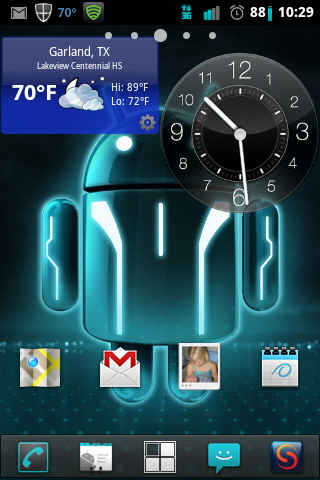
This ROM still going great for me:D - also liking the c~oo~l 3Dicon wallpaper - love the way it changed the phone dialing pad and colors overall. Couple questions:

1) In case wanted to change where it says Network (within phone, status): is there way we could go in and manually change or input to say Metro?

2) My current mod version is: CyanogenMod-7.2-LG...09082011, is it necessary to update to 09092011?

Thanks again :) Playfulgod.
look for /data/eri.xml
 
Is there a file somewhere I can edit to fix the "Power Button Hangs Up Call" option? I unchecked it at Settings -> Accessibility -> (Cancel) Power Button Ends Call but it still hangs up the call. I also tried wiping everything and re-flashing the ROM with no luck. I know the screen goes out while your talking, using the handset but not while your on Bluetooth... at least not immediately. I tend to answer the phone, switch to BT, lock the phone and put the phone in my pocket... I've hung up on quiet a few calls "locking" the screen... lol
 
This is so awesome, im a newbie! Ive managed to get everything done correct.

The only issue im having is, if i have wifi enabled i can't make phone calls. It says that Internet Account has not been setup! and i dont have any accounts.

Is there anyway to disable that? and be able to make phonecalls while WIFI is enabled.

Thank you!
 
I was trying to play with the adb wireless app. I pushed the big button like it says to do, and then granted it the super user authority. I then goto my command line window in Windows. I make sure I'm in the correct path (I haven't bothered to put it into the path so I just cd into the correct path). I get the message saying daemon not running starting it on port 5037 and started successfully, but then it comes back with error unable to connect to the ip i put in. I double checked it several times to make sure I had typed in the correct IP and I had. The first time I typed it in I had put the :5555 at the end of the IP like it told me to type in, but the error came back as IP:5555:5555 so I just typed the IP in and the error came back just as IP:5555. Still unable to connect though. Any thoughts or ideas?
 
I asked this once, in an earlier post, but it probably got missed, 'cause I never saw a reply about it: Is there a way to set the screen shot option, in the long press of the power button, to take jpg's instead of png's? I know it's possible to converts png to jpg but I'd rather not go through the hassle of doing that. For instance, imageshack requires jpg's and a few other formats, but not png.
 
I asked this once, in an earlier post, but it probably got missed, 'cause I never saw a reply about it: Is there a way to set the screen shot option, in the long press of the power button, to take jpg's instead of png's? I know it's possible to converts png to jpg but I'd rather not go through the hassle of doing that. For instance, imageshack requires jpg's and a few other formats, but not png.
use photobucket and u wont have to convert em etc ;) png is a better format and allows use of transparency ;)
But I'll have to look to see if the format can be changed.
 
when I flashed this (after clearing cache and dalvik cache) it just stays at the droid guy with the circle arrow, gets stuck and keeps repeating "droid" every so often, any idea?

edit:

forget it, I had to do the wipe data/factory reset option as well.
 
when I flashed this (after clearing cache and dalvik cache) it just stays at the droid guy with the circle arrow, gets stuck and keeps repeating "droid" every so often, any idea?

edit:

forget it, I had to do the wipe data/factory reset option as well.


So you were able to get it to boot? That's good.
 
yeah, and it's a pretty nice rom, some problems with setcpu and a few other apps not running, but nothing major.

I think trying to install CWM over joneidys custom recovery results in a semi-brick though, at least thats what happened to me, took me hours to fix. Just figured it would be interesting to point out.
 
yeah, and it's a pretty nice rom, some problems with setcpu and a few other apps not running, but nothing major.

I think trying to install CWM over joneidys custom recovery results in a semi-brick though, at least thats what happened to me, took me hours to fix. Just figured it would be interesting to point out.


I was able to put CWM recovery over GNM's recovery with no problems. I also was able to go back to the GNM recovery with no problem. I just used the flash image GUI app. I'm not sure how well it all plays with joneidy's recovery though.
 
maybe I just got unlucky somewhere, either way I've been meaning to ask, is there anyway to remove the "roaming indicator off" thing? it was asked earlier but it got no replies.
 
use photobucket and u wont have to convert em etc ;) png is a better format and allows use of transparency ;)

But I'll have to look to see if the format can be changed.


Ok, so I signed up with photobucket. Now I see if I can post a screen shot.
screenshot-1316273374838-1.png


Edit: Well, very good. Thanks for pointing out photobucket.
 
DaniellieeE;3201153]Have been using this ROM for about 3 days and I'm really liking it so far. I was only able to test MMS by sending myself a photo and it came thru. The only thing sort of not working exactly right is my status bar tweaking, where even if I add more buttons they won't show or allow for status bar scroll. But if I reboot it'll show added button but no scrolling. No big deal for me, may be something in settings?? Yesterday thought my data3G was not working but worked as soon as I rebooted. Overall this ROM is working very very nice and smooth.

Thank you!! I will see if mine acts the same way with the status n if so try to find a fix for it. And umm no a diff recovery wont have any affect on the main OS ;)

^^^^ sorry meant to write status bar scroll and buttons -now working so thanks for fixing
 
Back
Top Bottom