• After 15+ years, we've made a big change: Android Forums is now Early Bird Club. Learn more here.

2.1 OTA link!

The warning is simply a secure certificate warning. If you remove the "s" from https://, the warning will go away. It has nothing to do with the file, and everything to do with the URL.

Kind of like turning off your burglar alarm?

I like that s right where it is, thank you; it's quite informative, for one little letter in a URL. ;)
 
Hey guys, I went an logged into his account on the HTC Community website. It lists his phone S/N then under that it says model #: DESIRE#C-R1 . Don't know if that means anything??

The "desire" designation has been in earlier official updates.
 
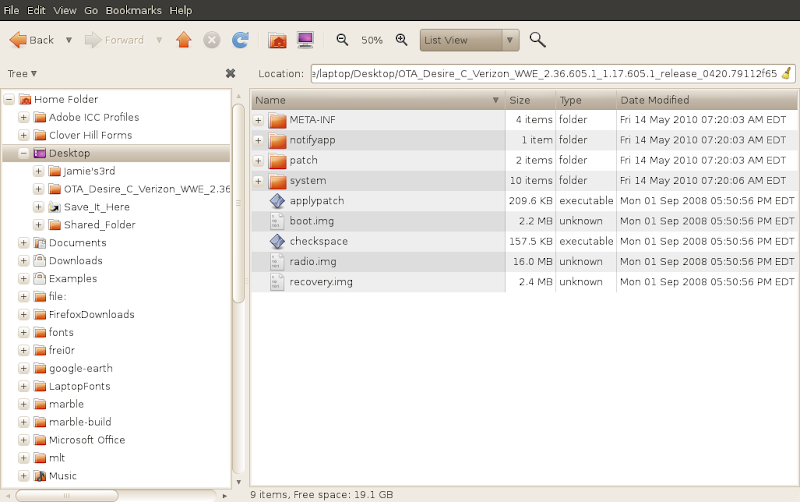
I'm on my Linux computer [makes me a little cavalier]. I clicked through the "untrusted" warning and downloaded the file. Yeah. Called OTA for Verizon Desire? Unzipped the archive...looking inside...here's a screenshot of contents:
screenshot.png
 
The "desire" designation has been in earlier official updates.

I googled it, and read that the Eris was originally named the Desire, they renamed it to Eris and went ahead and named the Desire the Desire. Confusing as to why they would do such a thing, but hey....guess that explains why the "desire" in the updates.
 
I'm on my Linux computer [makes me a little cavalier]. I clicked through the "untrusted" warning and downloaded the file. Yeah. Called OTA for Verizon Desire? Unzipped the archive...looking inside...here's a screenshot of contents:
screenshot.png

Good job.
 
I'm running safari on a mac and nothing popped up about a suspicious site, I tried it with Google Chrome and Firefox and still nothing. I downloaded but I'm waiting for someone to try it.
 
I googled it, and read that the Eris was originally named the Desire, they renamed it to Eris and went ahead and named the Desire the Desire. Confusing as to why they would do such a thing, but hey....guess that explains why the "desire" in the updates.

So if you reverse the spelling of deSIRE you get ..... ;)
 
Kind of like turning off your burglar alarm?

I like that s right where it is, thank you; it's quite informative, for one little letter in a URL. ;)


Not really.
Chances are, the security certificate was purchased for google.com and not "android.clients.google.com". Just a name mismatch in the security certificate.

It's clearly a URL FROM Google, it's not like its a phishing site or something screwy like that. The file is completely safe. Whether or not it's the right one, I don't know. But it's not going to hurt you.

I've been a web developer for 10 years. I've done my share of e-commerce sites, dealing with certs and the like. I know that page when I see it.

:D

That being said, no one is twisting your arm to download the file... just don't discourage others from trying it because you think it's a bad url, when it's not.
 
I'm on my Linux computer [makes me a little cavalier]. I clicked through the "untrusted" warning and downloaded the file. Yeah. Called OTA for Verizon Desire? Unzipped the archive...looking inside...here's a screenshot of contents:
screenshot.png

yeah i saw this too with the files from 2008, i went a lil deeper and found some more zip folders in the system or somewhere in there that had march 2010 dates on them. i donno im about to try it.. gonna rename file because it wont work with the boot mode as the current file name.
 
I've been a web developer for 10 years. I've done my share of e-commerce sites, dealing with certs and the like. I know that page when I see it.

That being said, no one is twisting your arm to download the file... just don't discourage others from trying it because you think it's a bad url, when it's not.
Yes, I completely agree. It's not like you're supplying credit card info to the site and have to worry about security/encryption.

That said, the "warning" you get from an expired or wrong cross-referenced certificate is VERY different than what you get from a dangerous or malicious site that Firefox or Chrome protect you with.
 
just don't discourage others from trying it because you think it's a bad url, when it's not.

I whole heartedly discourage anybody from going to that site and downloading anything from it because my browser displays a (low level) warning.

It is better to be patient and wait for a change in that warning, over the long haul, than to poke around sites like that; been there, done that.
 
That said, the "warning" you get from an expired or wrong cross-referenced certificate is VERY different than what you get from a dangerous or malicious site that Firefox or Chrome protect you with.


That's correct. If I open the link in Firefox, I get "This Connection is untrusted".
Then if I look in the technical details, it explains just what I have:

android.clients.google.com uses an invalid security certificate.
The certificate is only valid for the following names:
*.google.com , google.com
(Error code: ssl_error_bad_cert_domain)
 
I whole heartedly discourage anybody from going to that site and downloading anything from it because my browser displays a (low level) warning.

It is better to be patient and wait for a change in that warning, over the long haul, than to poke around sites like that; been there, done that.

I downloaded it had absolutely no warnings popup, went through the files and there was nothing suspicious at all, except that the dates on ALL the files was "September 1st 2008". :confused:
 
I saw the "(Error code: ssl_error_bad_cert_domain)" when I first checked it, arothrock.

I stay in the zone I'm in without fail, though. It has served me well, even after discovering a site was "safe" via viewing source code, etc, I've had a machine compromised.

Thus my strictness on it.
 
Back
Top Bottom