
Install the app
How to install the app on iOS
Follow along with the video below to see how to install our site as a web app on your home screen.
Note: This feature may not be available in some browsers.
-
After 15+ years, we've made a big change: Android Forums is now Early Bird Club. Learn more here.
You are using an out of date browser. It may not display this or other websites correctly.
You should upgrade or use an alternative browser.
You should upgrade or use an alternative browser.
Root 2.37 Downgrade Issues
- Thread starter CdTDroiD
- Start date
-
- Tags
- htc desire hd

CuBz
Android Expert
Either works
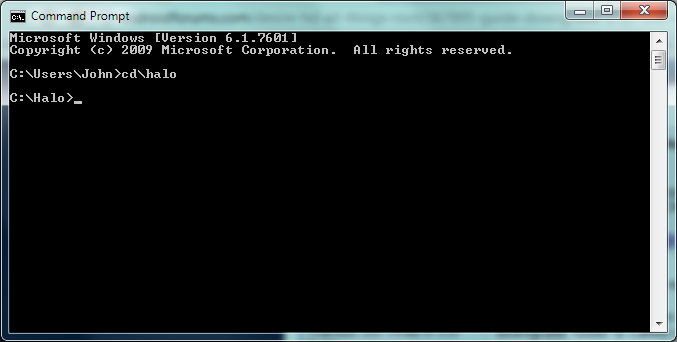
Really? Sorry I assumed it didn't because it didn't work for me lol

your right, I can type in downgrade folder,
but still doesn't work..
every time I type the command, there is always answer by
"error: device not found"
I am confusing..
Do you have HTC Sync installed? Is and is your phone's connection type set to charge only and is USB Debugging switched on.
Really? Sorry I assumed it didn't because it didn't work for me lol
No probs. It won't work if the folder you want to navigate to is on a different drive.
Downgrade guide for 2.42.415.1 or below will be online later tonight

CuBz
Android Expert
Do you have HTC Sync installed? Is and is your phone's connection type set to charge only and is USB Debugging switched on.
No probs. It won't work if the folder you want to navigate to is on a different drive.
Yes i ave HTC Sync installed, and have my phone set to charge only with Debugging enabled, also it is on C: drive
EDIT: O nvm it does work, I had made a spelling mistake, that's why it didn't work haha
Yes i ave HTC Sync installed, and have my phone set to charge only with Debugging enabled, also it is on C: drive
EDIT: O nvm it does work, I had made a spelling mistake, that's why it didn't work haha
Hehe, those questions were directed at assisting bluwind with his issues anyway. I'd written them under his quoted post.

CuBz
Android Expert
Hehe, those questions were directed at assisting bluwind with his issues anyway. I'd written them under his quoted post.
Just ignore me lmao I'm really tired right now so I'm getting confused
CuBz
Android Expert
uupss.. my mistakes..
i dont have an HTC sync,
actually this is the first time I have HTC phone
please help me with my problem, where I can find HTC sync??
and I want to know, this HTC sync installed on my phone or my PC??
Download HTC Sync from here...
HTC Desire HD - Application - HTC Sync for all HTC Android Phones & HTC Smart
Download HTC Sync from here...
HTC Desire HD - Application - HTC Sync for all HTC Android Phones & HTC Smart
thanks..
you n Mr. presidente such a big help..
steven_cws
Lurker
-after entered "adb push misc_version /data/local/tmp"
i'm getting "adb server is out of date. killing....*daemon started successfully*494kb/s..."
-is this correct? but i dun get $ sign instead of # at the end.
-USB debugging on, usb charge only, Windows XP with HTC sync installed.
(but i'm not able to run HxD hex editor on your computer by right-clicking it and clicking 'Run as Administrator', on my pc only shows "Run as" and no Administrator account created)
-the rest i have fully followed the step...in Step 4 Bootloader keep on saying "no image or wrong image" but at the end updated successfully now is Softbank 2.37.762.2 CL47853
What's going wrong? Can somebody help me? Thanks a lot.
i'm getting "adb server is out of date. killing....*daemon started successfully*494kb/s..."
-is this correct? but i dun get $ sign instead of # at the end.
-USB debugging on, usb charge only, Windows XP with HTC sync installed.
(but i'm not able to run HxD hex editor on your computer by right-clicking it and clicking 'Run as Administrator', on my pc only shows "Run as" and no Administrator account created)
-the rest i have fully followed the step...in Step 4 Bootloader keep on saying "no image or wrong image" but at the end updated successfully now is Softbank 2.37.762.2 CL47853
What's going wrong? Can somebody help me? Thanks a lot.
Hi Friend,
I need your help. I have followed your steps until step 8 and there was no any issues. In step no 9 -Open up CMD and go to Downgrade folder, execute commands:I did the same which you mentioned above. When I execute the 1st command,It says " adb" is not recognized as an internal or external command, operable program or batch file. please refer the screen shoot too.
please help on this issue.
thanks in advance.
I need your help. I have followed your steps until step 8 and there was no any issues. In step no 9 -Open up CMD and go to Downgrade folder, execute commands:I did the same which you mentioned above. When I execute the 1st command,It says " adb" is not recognized as an internal or external command, operable program or batch file. please refer the screen shoot too.
please help on this issue.
thanks in advance.
Attachments

Hi Friend,
I need your help. I have followed your steps until step 8 and there was no any issues. In step no 9 -Open up CMD and go to Downgrade folder, execute commands:I did the same which you mentioned above. When I execute the 1st command,It says " adb" is not recognized as an internal or external command, operable program or batch file. please refer the screen shoot too.
please help on this issue.
thanks in advance.
i made the mistake. The downgrade folder was inside the another folder. thats y the command hasn't executed. I made it finally. now i have 1.32 software no.
thanks for your great job.
CuBz
Android Expert
-after entered "adb push misc_version /data/local/tmp"
i'm getting "adb server is out of date. killing....*daemon started successfully*494kb/s..."
is this correct?
Yes that is correct, it's just restarting
but i dun get $ sign instead of # at the end.
If you get a '#' then you're doing it right
-USB debugging on, usb charge only, Windows XP with HTC sync installed.
(but i'm not able to run HxD hex editor on your computer by right-clicking it and clicking 'Run as Administrator', on my pc only shows "Run as" and no Administrator account created)
Just run as normal, the 'Run as Administrator' is for W7 & Vista only
-the rest i have fully followed the step...in Step 4 Bootloader keep on saying "no image or wrong image" but at the end updated successfully now is Softbank 2.37.762.2 CL47853
Also correct, it will search for some other files and say that it cannot find it (no image or wrong image) don't worry about it
What's going wrong? Can somebody help me? Thanks a lot.
All answers in the quote above
steven_cws
Lurker
Sorry CuBz,
Actually i'd been getting $ and not #, it's not temproot right...
and i did not proceed when i get $...i heard will get brick...
not sure what is going wrong...
Actually i'd been getting $ and not #, it's not temproot right...
and i did not proceed when i get $...i heard will get brick...
not sure what is going wrong...
CuBz
Android Expert
Sorry CuBz,
Actually i'd been getting $ and not #, it's not temproot right...
and i did not proceed when i get $...i heard will get brick...
not sure what is going wrong...
Which ROM do you currently have?
steven_cws
Lurker
you mean my android version?
2.37.762.2 CL47853 release-keys
before this i've 2.37.702 if not mistaken
2.37.762.2 CL47853 release-keys
before this i've 2.37.702 if not mistaken
CuBz
Android Expert
you mean my android version?
2.37.762.2 CL47853 release-keys
before this i've 2.37.702 if not mistaken
Re download the downgrade tools and extract the downgrade folder onto the root of your C drive
steven_cws
Lurker
Re download the downgrade tools and extract the downgrade folder onto the root of your C drive
thanks
...will try now...before that may i know do i need to run
htc sync on pc before i start the cmd to key in
those commands again?
usb (charge only mode) + usb debugging on + htc sync on?
steven_cws
Lurker
Got that # finally...last part
C:\>adb shell /data/local/tmp/misc_version -s 1.31.405.6
--set_version set. VERSION will be changed to: 1.31.405.6
Patching and backing up partition 17...
Error opening input file.
This is normal?
C:\>adb shell /data/local/tmp/misc_version -s 1.31.405.6
--set_version set. VERSION will be changed to: 1.31.405.6
Patching and backing up partition 17...
Error opening input file.
This is normal?
CuBz
Android Expert
Got that # finally...last part
C:\>adb shell /data/local/tmp/misc_version -s 1.31.405.6
--set_version set. VERSION will be changed to: 1.31.405.6
Patching and backing up partition 17...
Error opening input file.
This is normal?
It is all quite a tricky procedure. Best thing to try now is to do a factory reset on your phone (You will still remain on firmware 2.37.762.2), reset your computer, then continue from step 8. I would recommend putting the downgrade folder on the root of your C drive

berocksr
Member
Hey cubz ,
You said that you missed a few things in this guide yes ?
What have you missed where can I find the updated guide?
And after I do this I just follow the other guide on how to root handset yes ?
I'm going to do it this weekend so I will confirm after I do. Just making sure everything is in order before I start cheers !
You said that you missed a few things in this guide yes ?
What have you missed where can I find the updated guide?
And after I do this I just follow the other guide on how to root handset yes ?
I'm going to do it this weekend so I will confirm after I do. Just making sure everything is in order before I start cheers !
CuBz
Android Expert
Hey cubz ,
You said that you missed a few things in this guide yes ?
What have you missed where can I find the updated guide?
And after I do this I just follow the other guide on how to root handset yes ?
I'm going to do it this weekend so I will confirm after I do. Just making sure everything is in order before I start cheers !
Guide can be found here...
http://androidforums.com/desire-hd-...-downgrade-2-37-1-32-405-6-100-confirmed.html
Yes, follow other guides to root the handset
flyingmoose
Lurker
Hi Guys,
I have HTCDHD firmware 2.37.861.8 and I keep getting the Invalid CID when I boot. I have re-done Hxd 10 times trying both mmc1 and mmcd Cids and no luck. Do you think my firmware is not downgradeable. I have also tried other guides to make a gold card and they all work up untill the bootloader boot...If anyone else has dowgraded this firmware I would love to get some help....
I have HTCDHD firmware 2.37.861.8 and I keep getting the Invalid CID when I boot. I have re-done Hxd 10 times trying both mmc1 and mmcd Cids and no luck. Do you think my firmware is not downgradeable. I have also tried other guides to make a gold card and they all work up untill the bootloader boot...If anyone else has dowgraded this firmware I would love to get some help....
CuBz
Android Expert
Hi Guys,
I have HTCDHD firmware 2.37.861.8 and I keep getting the Invalid CID when I boot. I have re-done Hxd 10 times trying both mmc1 and mmcd Cids and no luck. Do you think my firmware is not downgradeable. I have also tried other guides to make a gold card and they all work up untill the bootloader boot...If anyone else has dowgraded this firmware I would love to get some help....
Very sorry to inform you but your firmware is not downgradable at the moment. It sucks I know
A lot of people are working on it and trying to find a way, including myself