

• After 15+ years, we've made a big change: Android Forums is now Early Bird Club. Learn more here.

Root [ADB] Android Commander

Fuzzy13

Extreme Android User
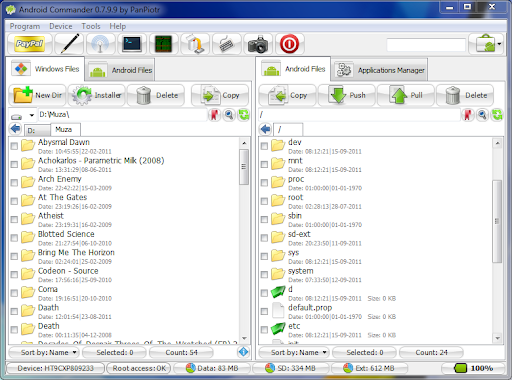
Here is a stand alone ADB program for Windows. Instead of pushing and pulling files on your phone you do it remotely on your computer through this program.

Plug in your phone through USB and turn it on Internet Connection.

You must be hard rooted in order for the program to recognize the root. You can still use the program if your NOT rooted but you wont be able to do certain tasks.

Great program for themers who want to push a framework.res file quickly. You've been editing the file on your computer so there's no need to pull up cmd or terminal to be able to push the file.

You can reboot, reboot recovery, reboot fast, etc.... all within commander. This is a great tool.

Android Commander
1.PNG


Remember to always make a backup before you make any changes to your phone.

Also AC does everything that Root Explorer does except it's on your local machine instead of your phone. Much easier to naivage and use IMO. :D

Enjoy :D :D :D
 
i'm sure this has been posted before and i'm sure a lot of people on here know about this program. But i wanted to bring it back up again for all the "new" people here because i think this is an amazing program that does it's job and does it well.

I never really got much into the push/pull method of transferring files until this weekend. I've been trying to implement the "stock" lock screen into ick-gse. I didn't think it would be nearly as bad as it was but i finally got everything working right and it's all because of this program.

Basically this program allows you to control your system files from your computer instead of your phone. Thus making it easier to transfer files that are more than likely on your pc to begin with and doing so all in one place. I also learned that push/pull is much easier than creating a zip, transferring it to your sd, booting into recovery, installing it and then rebooting only to find it isn't right. That shit got old quick but that's all i knew. I didn't know about the push/pull method really and what i could do with it.

So that's why i'm sharing this even though i'm sure it's been brought up a million times before, i've never noticed anything about it in my short time here though. By doing so, maybe someone can learn this method of transferring and switching out system files instead of the other way. And using this program makes it so much easier.

android commander

1.png


another reason why i'm sharing this is because i've learned a wealth of knowledge this weekend just by editing the lock screen for that theme. I learned what files are in the framework.res, systemui, rescapp..., etc.....and what each apk does and it's purpose it serves in the operation of the phone. I feel very privledged to have learned everything i have this weekend from which i feel like i've gained a much greater insight as to how a phone works and the different ways of modding it.


***(like i said i'm sure it's been posted before but being that i personally haven't seen anything about in my time i here, i felt i should post it up again for the newer people that might not know about it. So please keep your negative "repost" comments to yourself. I've gained a huge wealth of knowledge and i want others to do the same)***

nice job bro !!!!!!!!!
 
I had to hard root my phone, to use some features with this. but its alllllllllllot better then using adb to push data. I love it :) good find man :)
 
I had to hard root my phone, to use some features with this. but its alllllllllllot better then using adb to push data. I love it :) good find man :)


You are welcome sir. Makes life a lot easier having everything to control your phone on your PC doesn't it?
 
Yeah I just went back to ZVD and was trying to push and pull and I noticed it said I WASNT rooted. Hmmmmmm. Interesting.
 
Gotcha. Looking into it.

I am not sure why when we root our phones it doesnt hard root, Ive emailed a few people with zero replies, I aint on much anymore I work 2 jobs now, and my gf, may be preggers, which isnt a planned thing. so im shitting bricks
 
I am not sure why when we root our phones it doesnt hard root, Ive emailed a few people with zero replies, I aint on much anymore I work 2 jobs now, and my gf, may be preggers, which isnt a planned thing. so im shitting bricks

Best of luck to you. Question.. What's the difference between hard root and regular root? :confused:

Sent from my LG-MS910
 
Best of luck to you. Question.. What's the difference between hard root and regular root? :confused:

Sent from my LG-MS910


Hard root is when you have full access to system files. Soft root is rooted but your access is limited.

When a custom ROM is made the root is usually recognized as hard rooted. Only when you have a stock ROM with maybe a flashed kernel will you be soft rooted from which the kernel can be changed to make it hard rooted. Or the phone itself can be changed. I tried the process and I couldn't ever get it to work when my phone was coming up as soft rooted on LD-LG with the plague kernel but then PlayfulGod changed the kernel so that it would read hard rooted.
 
Back
Top Bottom
