• After 15+ years, we've made a big change: Android Forums is now Early Bird Club. Learn more here.

Android 2.2 [Froyo] Bugs and Questions - Post em Here

Re: Swype problems after installing 2.2

The 2.1 beta does not work. You have to uninstall it, as well as the installer, go back to the beta email you got previously and do the install process again. It will recognize the new OS on your phone and install the correct version. Works great. Make sure you uninstall the old stuff first!

No need to remove the installer, just remove Swype and run the installer again. I did it yesterday...
 
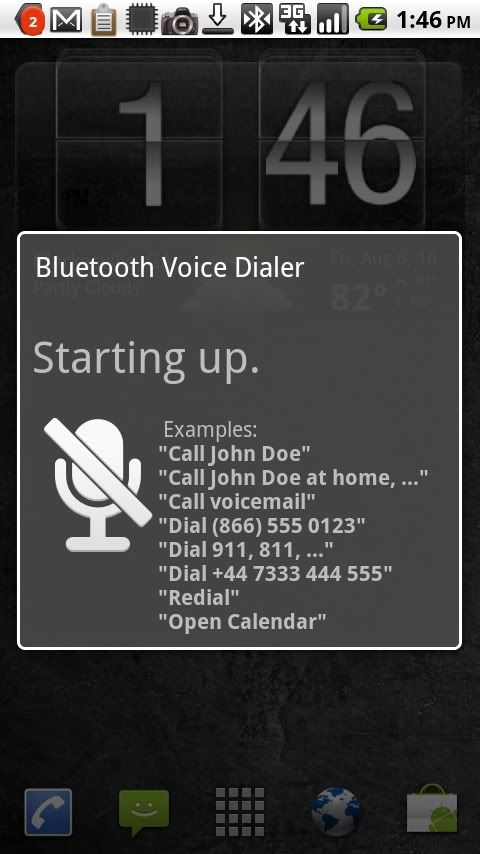
Bluetooth hands-free dialing???

I thought this was supposed to be in Android 2.2. If it's there I can't find it on my Droid install. Has anybody found this and used it?
 
I'm now up and running with FRG22 version.

It's been working well for about 2 days now.

One thing I noticed is that when I go to Markets-> Downloads, I do not see all the applications which are installed on the phone.

When I use Astro, I can see all the installed applications.

For me, USB tethering did not work for a XP PC.
 
Bluetooth hands-free dialing???

I thought this was supposed to be in Android 2.2. If it's there I can't find it on my Droid install. Has anybody found this and used it?

It works, just connect your Bluetooth, and it works just as it does on any other phone.. press the power button once and it says please say a command.
 
It works, just connect your Bluetooth, and it works just as it does on any other phone.. press the power button once and it says please say a command.

+1

It recognizes speech best when there is no other noise around. In the car with the AC blowing on high it got 6 out of 7 numbers wrong when I said Dial xxx-xxx-xxxx . Turned it down and it recognized all 7! YMMV.
 
It works, just connect your Bluetooth, and it works just as it does on any other phone.. press the power button once and it says please say a command.


Alas, not for me. I'm using a Jawbone BT which works fine in all other respects, but pushing the power button (which does work to pick up or disconnect a call) does nothing.
 
I'm now up and running with FRG22 version.

It's been working well for about 2 days now.

One thing I noticed is that when I go to Markets-> Downloads, I do not see all the applications which are installed on the phone.

When I use Astro, I can see all the installed applications.

For me, USB tethering did not work for a XP PC.


How/where did you get FRG22? Are you rooted or can non-rooted FRG01B install it?
 
Alas, not for me. I'm using a Jawbone BT which works fine in all other respects, but pushing the power button (which does work to pick up or disconnect a call) does nothing.


operator head space- pressing wrong button :rolleyes:

thanks for the confirmation that its there
 
Works fine for me...
febda9e5.jpg
 
Hey,

Extreme data usage *SOLVED*
Facebook for HTC Sense is doing all the downloading.
It has some bug and it updates the calendar all the time.

So switch off sync for it or remove the account completely, that should bring data usage to normal levels.
Some say uninstalling and reinstalling the account also helps

Here is the thread that helped me:
http://androidforums.com/htc-evo-4g/103811-what-my-phone-downloading.html#post1325294

So that is what my phone was downloading last night? Now I am a little sad. I had my hope that it was downloading Froyo Update 2! What a big disapointment.
 
Anyone else having text messages just play random MP3s from the sdcard. I have gone in and verified all of my notifications and for some reason the same song will play every now and then when I get a text. I will get three or four texts in a row with the right notification then this other one. Its ok but its the full song so it takes forever if i can't get to my phone.
 
Also don't like how even after I use the browser and clear cache, history, and cookies when I'm done, I open browser back up and it reopens the last page and refreshes it. Even after force closing the browser or rebooting it does this.

i noticed this as well. it's very annoying! has anyone figured out how to stop this and have it go back to the homepage when the browser is restarted?
 
i just downloaded the 10.1 flash player without market had to check the box to allow downloads from places other than market but it WORKED!! just rechecked the box after download and works


thanks to everyone that helped on my other topics
 
You Are Now Rooted! This Voids Your Warrenty!

I can always regress back to 2.0.1 and uninstall SP Recovery. I don't think that this is a big deal..

Anyway, FRG22 is working great for me so far. No issues to report other than what I had reported earlier.

3G & WiFi are stable, flash works fine, Browser is definitely speedier, I get great speed test results, USB tether works fine (though I get directed to VZW portal and can not browse), other things like Maps, Phone, Email work as expected. I like it so far..
 
Hi all,

I have been a frequent reader but this is my first post. I installed the 2.2 update and things have been running great. I noticed that the Wifi icon in the notification area does not "fill in" like it used to. It looks as if I have no Wifi signal even though in Wifi setting if I click on my wireless network it shows Signal Strength: Excellent. In Wifi Analyzer my AP shows between -40 and -50 db. That's pretty damn good. Just curious if anyone else has noticed this?

Thanks for the great site and the great info and the early FroYo! :)

Crazymick
I noticed this also after going to frg01. The wifi signal meter in the notification bar shows no signal strength and the wireless option in the settings menu says poor signal. This is a non-rooted phone, just the stock build.

I ran Wifi Analyzer and it shows my wifi signal as cycling on and off. It will spike to a good signal, 60db, then immediately go to no signal, then back to full strength, over and over. I can see other wifi networks with Analyzer and most are poor strength but consistent, just varying slightly over time.

I've rebooted everything including my phone and router, shut off my laptop, switched the router from mixed N,G,B mode to just N then just G, stood next to the router while rebooting the phone, switched the router channel. Nothing has seemed to help. Speed Analyzer shows my download speed as normal, 2.4Mbps on a 3Mbps line.

I'm thinking it may be the router but I haven't tried connecting to another network to test. Is this normal for the Droid to cycle or ping the network every few seconds or should I see a more consistent signal from my router?

Everything else with the frg01 upgrade seems fine. Battery life is about the same or maybe a little better, no other issues I've seen.

Someone mentioned the alarm app being gone and only accessible through the clock app. I had an alarm shortcut on my home screen prior to the upgrade and it is still there and works, takes me right to the alarm settings. But I can't see how to add it now either through the clock app. Just fyi.

 
I noticed this also after going to frg01. The wifi signal meter in the notification bar shows no signal strength and the wireless option in the settings menu says poor signal. This is a non-rooted phone, just the stock build.

I ran Wifi Analyzer and it shows my wifi signal as cycling on and off. It will spike to a good signal, 60db, then immediately go to no signal, then back to full strength, over and over. I can see other wifi networks with Analyzer and most are poor strength but consistent, just varying slightly over time.

I've rebooted everything including my phone and router, shut off my laptop, switched the router from mixed N,G,B mode to just N then just G, stood next to the router while rebooting the phone, switched the router channel. Nothing has seemed to help. Speed Analyzer shows my download speed as normal, 2.4Mbps on a 3Mbps line.

I'm thinking it may be the router but I haven't tried connecting to another network to test. Is this normal for the Droid to cycle or ping the network every few seconds or should I see a more consistent signal from my router?

Everything else with the frg01 upgrade seems fine. Battery life is about the same or maybe a little better, no other issues I've seen.

Someone mentioned the alarm app being gone and only accessible through the clock app. I had an alarm shortcut on my home screen prior to the upgrade and it is still there and works, takes me right to the alarm settings. But I can't see how to add it now either through the clock app. Just fyi.


I had more or less similar symptoms. In my case, removing 'tasker', 'quick settings' followed by a reboot, resolved it..
 
Ok, I updated to 2.2 when the first update became available, and I eventually got it to work correctly after a few tries.

I don't really have any connection issues or WiFi issues, but every time I try to access my camera, my phone locks up and reboots. The reboot only takes 15-20 seconds, but I have never been able to access the camera since the upgrade.

I'm not sure if it is the update, or something that I did during the update. Any suggestions? Thanks in advance...
 
I haven't had a problem with the camera but zooming in on photos with multi-touch in the gallery has been wonky for me. It still zooms but it sort of slides off to random places instead of staying centered on wherever you are trying to zoom. I also have it lock up on boot sometimes. Once it does start it is fine other than the gallery zoom. I did a fresh install after the update hoping it would stop it from occasionally locking up on boot but it didn't fix that.
 
I'm now up and running with FRG22 version.

It's been working well for about 2 days now.

One thing I noticed is that when I go to Markets-> Downloads, I do not see all the applications which are installed on the phone.

When I use Astro, I can see all the installed applications.

For me, USB tethering did not work for a XP PC.

Known issue - I believe it is because some applications have not made themselves 2.2-aware - IOW, they say they can be installed on Cupcake, Donut, and Eclair, with no future proofing, so when you enter the Market with 2.2 all of a sudden the app disappears b/c it is not specifically slated to work on 2.2, even if it works flawlessly on it.

Hey,

Extreme data usage *SOLVED*
Facebook for HTC Sense is doing all the downloading.
It has some bug and it updates the calendar all the time.

So switch off sync for it or remove the account completely, that should bring data usage to normal levels.
Some say uninstalling and reinstalling the account also helps

Here is the thread that helped me:
http://androidforums.com/htc-evo-4g/103811-what-my-phone-downloading.html#post1325294

FB updated to fix this is already out in the market.

So that is what my phone was downloading last night? Now I am a little sad. I had my hope that it was downloading Froyo Update 2! What a big disapointment.

FB updated to fix this is already out in the market.

Anyone else having text messages just play random MP3s from the sdcard. I have gone in and verified all of my notifications and for some reason the same song will play every now and then when I get a text. I will get three or four texts in a row with the right notification then this other one. Its ok but its the full song so it takes forever if i can't get to my phone.

Have you by chance set that person to use a special ringtone?

I can always regress back to 2.0.1 and uninstall SP Recovery. I don't think that this is a big deal..

Anyway, FRG22 is working great for me so far. No issues to report other than what I had reported earlier.

3G & WiFi are stable, flash works fine, Browser is definitely speedier, I get great speed test results, USB tether works fine (though I get directed to VZW portal and can not browse), other things like Maps, Phone, Email work as expected. I like it so far..

22 rocks. Audio quality has been restored, and the kernel being OC'd to 800 makes the phone snappier than the 2.1 builds. Lots of little enhancements (a few for the not so good, but for the most part, mostly for the good) make this the best update ever in terms of the DROID. Hopefully by the end of next week most people will be loving it.

Ok, I updated to 2.2 when the first update became available, and I eventually got it to work correctly after a few tries.

I don't really have any connection issues or WiFi issues, but every time I try to access my camera, my phone locks up and reboots. The reboot only takes 15-20 seconds, but I have never been able to access the camera since the upgrade.

I'm not sure if it is the update, or something that I did during the update. Any suggestions? Thanks in advance...

That is weird - and perhaps a good reason to manually get the 2.2 (FRG22) and run that update. It will fix it. No camera issues here.
 
Back
Top Bottom