
• After 15+ years, we've made a big change: Android Forums is now Early Bird Club. Learn more here.

Help Battery Issue? HARD RESET

I've had 2hrs set in default (GSM) mode and I have 0% time with no signal. Then I set it for CDMA mode and after 90 minutes still had 0% time with no signal. All these "tricks" are as worthless as the penis enlargement pills they advertise in email spam.

I agree....I'm stil waiting for those pills to work!
 
Does the hard reset delete all data? If not how do you perform the hard reset?

It deletes everything on your Evo, but doesn't touch your SD card so any photos or app data you have on your SD card will be fine. It just resets it to the factory settings, so it'll be set up like it was when you first bought the phone.

To perform a hard reset:
Settings--> Privacy--> Factory data reset
 
brought my phone to sprint, they did the hard reset, now i have 12 hours 20 min unplugged and at 70% battery...

yesterday the phone died after 4 hours and 6 min with running ATK then killing it in the applications manager...highly recommend the hard reset, no problems at all so far and only dropped 20 % within in the first 2 hours of work after being off the charger all night

my awake time before the reset was VERY close to the up time...this is a problem as the phone thinks its always on, now this is not the case at all.
 
Did the hard reset yesterday and I'm at about 40% battery life left after 15 hours. Before my phone was dead after 5-6 of barely using it.
 
Did the hard reset yesterday and I'm at about 40% battery life left after 15 hours. Before my phone was dead after 5-6 of barely using it.

Well now after using it with no issues for 12 hours it's starting to wig out again.

Doing this thing I posted yesterday

http://androidforums.com/support-tr...essages-wont-scroll-up-snaps-back-newest.html

and the 3G things are going crazy.

download.jpg
 
YOU DON'T NEED A HARD RESET EVEN. I CAN CONFIRM, ALL I DID WAS THIS:

press HOME, and bring up the dialer. Dial *#*#4636#*#* (Do not press "Call"). After a second, it should bring up the "Testing" menu.

Go into Phone Information, press MENU, and tap "select radio band." You should experience a Force Close, don't panic, this was supposed to happen. Scrolling down shows that the preferred network type is GSM auto (prl).

What this means is that even though you are connected to a CDMA network, your phone is trying to find a GSM network, preventing the radio from sleeping, and causing excessive battery drain.

Remedy this by tapping GSM auto (prl), and changing it to CDMA auto (prl).


Now your done, your TWS should drop dramatically, and you should experience much better battery life!
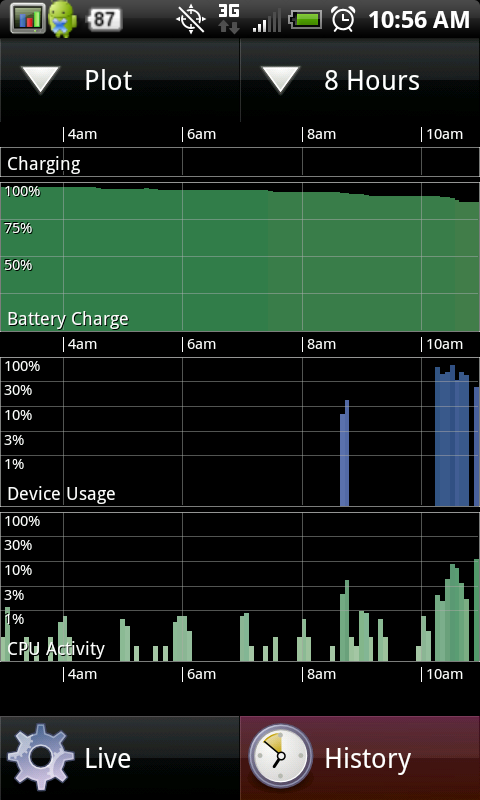

THE RESULTS SPEAK FOR ITSELF:
discharge.png


***NOW, WE JUST NEED TO GET THIS TO STICK AFTER A PHONE REBOOT!***
 
Mine was already set to CDMA auto (prl) when I checked the other day. I think that patch from HTC might have updated it.
 
Correct me if I am wrong. The time without service is truly the time without service. In other words if your signal is low where you are then the battery is going to be used more ie mine is 35% and my signal is poor. So the GSM to CDMA idea may not be the answer.
 
I'm not doing the hard reset, as my battery life is not horrendous. 14 hours on normal usage.

But, I did try the CDMA trick, though my percentage was 0, it couldn't hurt to try it. I do agree, that it's useless to search for something Sprint doesn't have.
 
YOU DON'T NEED A HARD RESET EVEN. I CAN CONFIRM, ALL I DID WAS THIS:

***NOW, WE JUST NEED TO GET THIS TO STICK AFTER A PHONE REBOOT!***

With all due respect, I didn't have to mess with the GSM/CDMA settings to solve for the battery life problems I was experiencing. I just did the hard reset while the phone was charged/still hooked up to the charger and it fixed everything. I did, however, go in and check my network settings and saw it was already on CDMA, which I don't think was false considering my Time without signal was only around 6%, which would easily account for my underground subway commute.

I don't think it's a good idea to have people switch this until they check their Time Without Signal after having their phones on for a few hours.
 
I've had nothing short of awesome battery life since doing the GSM/CDMA trick. This seriously needs to be patched by HTC/Sprint and they could make all battery life caveats that are all over the internet go away and the EVO would stand dominant over iphone4
 
This is all very good information and not sure if it will help me that much given that in my office I have very poor signal so I am probably hosed anyway you look at it but I did the GSM/CDMA trick so we will see how well that works. I am a bit hesitant to do a hard reset. I have two questions though:
1.) From my understanding all of my photos and apps will not go away as they are on the SD card, but will all of my contacts and settings be affected?
2.) This is a bit of a noobie question but hey I have only had android for a week now... where do I go/how do I to check my "time without service"?
 
This is all very good information and not sure if it will help me that much given that in my office I have very poor signal so I am probably hosed anyway you look at it but I did the GSM/CDMA trick so we will see how well that works. I am a bit hesitant to do a hard reset. I have two questions though:
1.) From my understanding all of my photos and apps will not go away as they are on the SD card, but will all of my contacts and settings be affected?
2.) This is a bit of a noobie question but hey I have only had android for a week now... where do I go/how do I to check my "time without service"?

1) true about pictures and video and yes all settings vanish.. but really, don't you want more battery life?? update your contacts in gmail and then when you load gmail after the hard reset.. voila all contacts there
2) menu>settings>about phone>battery>battery use>cell standby
note:i do not even have time without signal listed because of this trick...

do the hard reset.. its worth it..
 
The only time I ever received this message was when I accidentally enabled the hotspot feature. The message stopped appearing after I turned off the hotspot.

it happend a couple of times.. basically i couldnt get on 3g (i turned on 4g and connected to it no problem, then turn off 4g and bam, the message again)

i called the Sprint Cust Serv about it and the person i spoke with was surprised that i was able to get on 3g after the message appeared (because apparently it fixed itself since i was able to get on a few minutes later)... he told me to periodically update the "profile" to stop it from happening again
 
i have not found that with my wifi but i have noticed i get this error message....
3ba0aa78.png

This happened to my Eco and my wives hero yesterday. The sprint rep walked me through the process of fixing it, i am not really sure why they both had the same problem at the same time
 
Two things have given me 12-15hr battery to 26+ battery life.. the CDMA fix and turning off and logging out of Google Talk. I don't use the service so I don't miss it - but dam it must be chatty as all get out.

I am not shi@#$ting you in saying this is the best smartphone battery life I've had on a phone. Only my e-mail only blackberries last longer (much longer no less).
 
Well I can go about 10 hours on a charge before I start getting nervous and toss it back on a charger. Thing is I usually have a charging option with me. I have a portable batter charger and a car charger.

I've been monitoring threads as well as my battery performance. I'm honestly not complaining. The phone rocks and if I have to alter some of the ways I use the phone, like less syncing with social networks or email, then so be it.

I went in and performed the GSM to CDMA change this evening and it does seem like the battery is leveling off. I'm going to attempt the 'charge', turn off - charge, turn on - charge...trick though in the morning just to see.
 

Attachments

  • snap20100611_225342.jpg
    snap20100611_225342.jpg
    112.2 KB · Views: 176
Turned off the GSM yesterday night and so far my time without signal is 0%. This seems to be a great fix. We'll see how it does during my 9-5 today!
 
my battery life is fine. i did notice the battery meter has been incorrect. i let the phone run down the battery until it shut off and then charged it up while it was off. i did this the first day or 2 i had the phone.

i noticed while playing with the phone that powering down and then back up that my battery meter would raise significantly. so that prompted me to run the battery all the way down.

someone in another thread said that he talked to htc and was told charge the phone until the light goes green. leave the charger on and power down the phone. you should see the charger light go amber. let it charge to green then power it back up and then back down. the light should go amber again. keep repeating this until the powered off amber light only stays lit for about 1-2 minutes. the first couple of times it may take an additional 20 minutes or so of charge.

i did this last night and it definitely took more charge when powering down. took me about 6-8 tries to get the amber light to only stay lit for 1-2 minutes. i'll have to see if it improves battery life.
 
Back
Top Bottom