
Install the app
How to install the app on iOS
Follow along with the video below to see how to install our site as a web app on your home screen.
Note: This feature may not be available in some browsers.
-
After 15+ years, we've made a big change: Android Forums is now Early Bird Club. Learn more here.
You are using an out of date browser. It may not display this or other websites correctly.
You should upgrade or use an alternative browser.
You should upgrade or use an alternative browser.

Rxpert83
Dr. Feelgood
My battery has been horrible. I have gotten 3-4 hours each, after about 4 charges. I have it on airplane mode right now because my contract is not up until next month. I use it mostly to surf with chrome and play candy crush. Does this mean I have a bad battery?
3-4 hours of screen on time or standby time

Hook
Ever since DU... ;-)
My battery just did something odd. At 2:23 my battery dropped to 20%, but when I unlocked my phone at 2:58 it was at 21%. First time it's happened to me. Anyone else experience this?
These battery %s are approximations and it is not unusual to have it jump back up a notch when your screen is off for a while. For all intents and purposes, at this level of accuracy, 20 = 21.
LoyalServant
Android Expert
I have it setup to sync every hour, and according to betterbatterystats that's all its doing.
Did you have it syncing more frequently?
Nope, defaults.
on IMAP it's every 15.
Overnight it failed and it took my battery from just about full charge to 10%.
The culprit was the email app.
That's when I went searching and found that thread.
I know a lot of people use IMAP and Exchange so I figured I would put that in here for those that get bitten.
I just did a data clear of the email app and set everything back up.
I have been removing the account and re-adding it to get my email during the day but at least I was not killing the battery.

I am trying to think about what might have changed.. since it just started last night because I set my work email up within an hour of getting the phone and had no issue with it.
Now... it's a battery killer

3-4 hours of screen on time or standby time
4 hours screen time
I got mine yesterday with a charge of 75%.
It should last a day of moderate to heavy usage, however the battery wont be set until it is charged 3-5 times.
Why do you say this as I thought lithium batteries do not have a memory like the Ni Cads do ??

Lona808
Well-Known Member
Why do you say this as I thought lithium batteries do not have a memory like the Ni Cads do ??
They don't. They actually don't like to be completely drained, which is why phones shut down before it happens. When your phone is dead, the battery isn't completely drained, just enough to stay idle. If you let your phone sit while dead, the battery will slowly drain and if you let it fully deplete there is a high chance it will never charge again. Good battery health is to charge your phone when its around 10% until its at 100% and then take it off asap. Every couple weeks or so let it die and then charge it to 100% while off. This will help your battery last and your phone continue to operate swiftly.

Don't let it die on purpose. Otherwise, completely agree.

jhawkkw
Chinchillin'
Unlike others the Google Play Services on my N5 is using up the bulk of my battery!
Is there any way to disable it or turn it down?
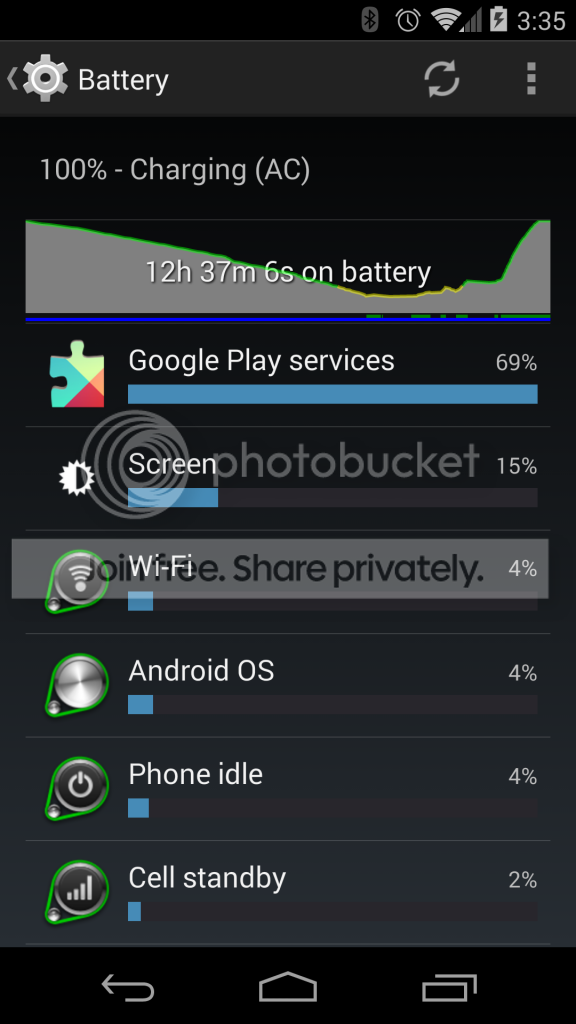
Thanks
I got hit by that today as well. Generally rebooting the device kills the service.
jhawkkw
Chinchillin'
Thanks jhawkkw.
You're right.
I just rebooted and it disappeared!
Man I thought Android is far better than Windows which needs rebooting to speed up the OS!LOL!
Next time I notice this I'll reboot!
Cheers
Normally just force stopping it would be enough, but we don't get the option to do so in the app manager.
Unlike others the Google Play Services on my N5 is using up the bulk of my battery!
Is there any way to disable it or turn it down?
Thanks
I got hit by that today as well. Generally rebooting the device kills the service.
I was also hit by this Google Play Services battery drain - turning off Location services has completely eradicated the problem. The location settings even showed high battery usage from Google Play services. Yesterday it was using 60%+ of my battery.

Today, Google Play services doesn't even appear in my battery usage
 and I have a noticeable improvement in battery.
Last Night I rooted and installed the nitrous rom. This morning I unplugged at 6am. I've done some email, some amazon, bbm, browsing and lots of tethering. And this is where I'm at. I think it's pretty good.
Well I was unable to upload the file, but it said 51%
I finally got the picture working
Attachments


jhawkkw
Chinchillin'
Maybe I don't use my phone as much as some but right now I'm at 22hrs at 76% battery. Someone tell me how to do a screen shot and I will share.
Hold Vol down + power for about 2-3 seconds


ArmageddonX
Android Expert


Omar Days
Android Expert
Well today
11h34 on Battery
46% remaining
2h30 Screen on
Not complaining
Was just about to post literally the same thing
11h55
40% remaining
4h16m screen
this is my first day of real heavy useage for me. So happy about the battery.
On light useage I'm charging every 2 days. Unbelievable, especially coming from my last phone that died after 6 hours light useage.
Good battery health is to charge your phone when its around 10% until its at 100% and then take it off asap. Every couple weeks or so let it die and then charge it to 100% while off. This will help your battery last and your phone continue to operate swiftly.
is this true? every night my phone is only around 40% with my daily use... do I need to star just streaming youtube videos or heavy games to drop the battery? I never charge over night but in the morning usually from 30-40% to 100% and take off charger right away.
very seldom is my phone under 30% though
Hook
Ever since DU... ;-)
They don't. They actually don't like to be completely drained, which is why phones shut down before it happens. When your phone is dead, the battery isn't completely drained, just enough to stay idle. If you let your phone sit while dead, the battery will slowly drain and if you let it fully deplete there is a high chance it will never charge again. Good battery health is to charge your phone when its around 10% until its at 100% and then take it off asap. Every couple weeks or so let it die and then charge it to 100% while off. This will help your battery last and your phone continue to operate swiftly.
is this true? every night my phone is only around 40% with my daily use... do I need to star just streaming youtube videos or heavy games to drop the battery? I never charge over night but in the morning usually from 30-40% to 100% and take off charger right away.
very seldom is my phone under 30% though
I would disagree both with letting the battery drain to 10% (unless you have no choice) and with taking it off the charger asap at 100%. In general, Li-Ions, from my understanding, are fine with top-offs and actually do better with them and they have a protection circuit that works just fine.
Frequetly Asked Questions on How to Charge Batteries
I have always set my handhelds to charge overnight on my bedside whether they were at 30% or 90% and have never had battery performance be reduced by doing that.