
Install the app
How to install the app on iOS
Follow along with the video below to see how to install our site as a web app on your home screen.
Note: This feature may not be available in some browsers.
-
After 15+ years, we've made a big change: Android Forums is now Early Bird Club. Learn more here.
You are using an out of date browser. It may not display this or other websites correctly.
You should upgrade or use an alternative browser.
You should upgrade or use an alternative browser.
Root [Boost Mobile] [Root][Recovery]Ultimate warp drive!
- Thread starter Snake X
- Start date
-
- Tags
- zte warp (n860)
when it comes to the little green android it says waiting for devices i am using windows 7 64 bit
Second that
Hey Guys;
Thanks for all the hard work that you have put in to make this a reality! I just had one question can I use Rom Manager or is that a bad Idea? I did install it and when you click on "download rom" it says you have to install clockworkmod recovery installed before continuing. Is it a bad idea to install from Rom Manager!
Thanks for all the hard work that you have put in to make this a reality! I just had one question can I use Rom Manager or is that a bad Idea? I did install it and when you click on "download rom" it says you have to install clockworkmod recovery installed before continuing. Is it a bad idea to install from Rom Manager!

Woodstock77
Android Enthusiast
Rom manager is a bad idea. The ZTE Warp is not supported by it. That app bricks more phones than your local recycling center.Hey Guys;
Thanks for all the hard work that you have put in to make this a reality! I just had one question can I use Rom Manager or is that a bad Idea? I did install it and when you click on "download rom" it says you have to install clockworkmod recovery installed before continuing. Is it a bad idea to install from Rom Manager!
Rom manager is a bad idea. The ZTE Warp is not supported by it. That app bricks more phones than your local recycling center.
LOL ok...Thanks


Woodstock77
Android Enthusiast
ZTE Warp Recovery Installer V2.zip For beta 2
Woodstock77
Android Enthusiast
Yes but people have said how to install your drivers many times. When the phone reboots to the green android go to device manager and look for the device with an error indication then right click it and choose update drivers. Then choose have windows find the correct driver for you. Good luck.Is any else having problems with windows 7 64 bit

Lateralus138
Member
I'm not sure what I'm doing wrong... I was able to boot into cwm recovery mode and not really sure what to select... Can you help me please? I reset it back to factory data again and when I go back in everything is back to factory, but there still isn't my notification bar and going into some settings causes it to force close.

QuietPsycho
Lurker
I'm having trouble getting CWM installed, but I have the ZTE drivers installed.
I run the oneclick install and I get errors. Here is a screenshot of the issues I'm having.

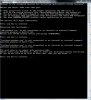
I run the oneclick install and I get errors. Here is a screenshot of the issues I'm having.
Woodstock77
Android Enthusiast
I'm having trouble getting CWM installed, but I have the ZTE drivers installed.
I run the oneclick install and I get errors. Here is a screenshot of the issues I'm having.
View attachment 27763
Try this one.
QuietPsycho
Lurker
That one worked, ThanksTry this one.

So When I run it, I get the boot loader, and then nothing more happens. I tried to update the drivers but it wouldn't let me. I downloaded the drivers you posted, Installed the drivers that came with my phone, AND tried to get windows to automatically find the drivers but nothing happened.
Could I get some help please? I'm not sure what I'm doing wrong at this point.
Could I get some help please? I'm not sure what I'm doing wrong at this point.
D
Deleted User
Guest
I'm having the same issues. Why exactly do the drivers need to be updated? Sorry. I like everyone came from the prevail, and it was easy because of odin. Is there some way a program could be created to flash images? I'm a noon so school me
I'm having the same issues. Why exactly do the drivers need to be updated? Sorry. I like everyone came from the prevail, and it was easy because of odin. Is there some way a program could be created to flash images? I'm a noon so school me
Wow. Proof read your posts bro. Anyway, I got it to work last night. When you plug the phone in and run it, windows gives you an error message telling you about the drivers. Click it, and it should give you a dialoge box telling you what driver is having trouble, and your options. There should be some blue text in that box that says something along the lines of "change the setting of how windows handles drivers" or something like that. Click that and set it so that windows always uses windows update to find the drivers. One I clicked that, it found the drivers in a minute or so, then everything was smooth sailing.
D
Deleted User
Guest
Oh sorry, didn't realize that the phone corrected noob. Anyways I'm on XP, windows update is setup to check for drivers. Which i confirmed through control panel. Anyway the attitude was unnecessary. That is the exact kind of thing that would push someone away from asking for help.

antihero.drako
Newbie
ok, i give up, when it gets to the point of updating the android drivers, i have tried everything posted above, ever update posted and every variation of anything mentioned and cant get it... not my first rooted phone either..... stumped. 
antihero.drako
Newbie
the main issue at the moment is that it will not find the correct android drivers after it gets to bootload screen. in the device manager it shows the yellow ? next to android, drivers wont update, cant roll back cuz it says none installed, tried all variations and different ways to auto update and manual update of the drivers, included the ones posted. if i try to continue, it fails to load recovery.img....... the issue is the drivers, adb recognizes the device, just wont go further...
Woodstock77
Android Enthusiast
When that happens and your about ready to throw your Warp in a trash can try a different usb port. Trust me mine didnt like the front ports and had to plug it into the back.the main issue at the moment is that it will not find the correct android drivers after it gets to bootload screen. in the device manager it shows the yellow ? next to android, drivers wont update, cant roll back cuz it says none installed, tried all variations and different ways to auto update and manual update of the drivers, included the ones posted. if i try to continue, it fails to load recovery.img....... the issue is the drivers, adb recognizes the device, just wont go further...
antihero.drako
Newbie
tried both front and rear usb ports, also rebooted computer after drivers were installed, tried installing usb drivers when it goes to bootload screen, and nothin. also reinstalled adb too, just as a second measure. but when it recognizes the phone as an android instead of a composite ( once it goes to bootload screen, happy green android), windows cannot find drivers for it, tried to manually install, didnt help. only had the phone 3 days, love it, want to make more of it.