• After 15+ years, we've made a big change: Android Forums is now Early Bird Club. Learn more here.

Root Changing the Clunky Red Multiple Notification Number Icon in Apex 1.4.0

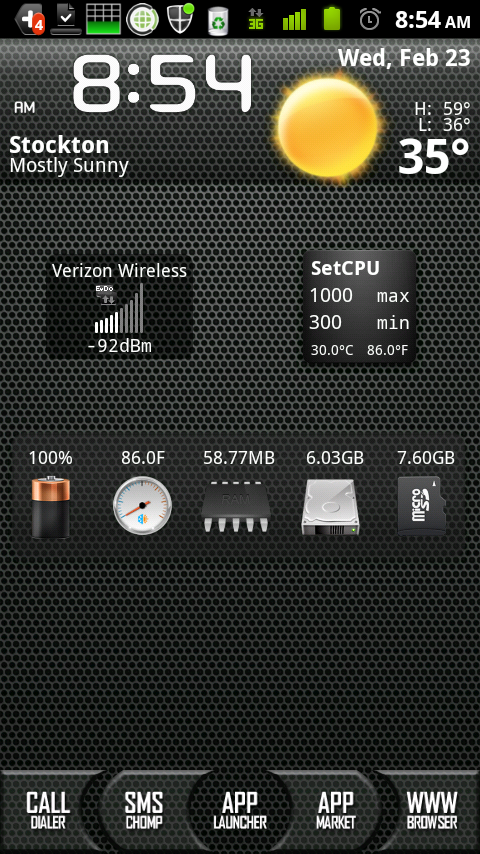
I was updated several apps and the multiple notification red number thing showed up in the notification bar.

snap20110219_133205.png


I think it's pretty ugly and clunky looking. It definitely doesn't fit in with the rest of Apex.

How do I change this? Anyone have a fix for this? :confused:

My phone is running Apex 1.4.0 with LauncherPro.
 
I was updated several apps and the multiple notification red number thing showed up in the notification bar.

snap20110219_133205.png


I think it's pretty ugly and clunky looking. It definitely doesn't fit in with the rest of Apex.

How do I change this? Anyone have a fix for this? :confused:
i think if your using launcher pro or adw its in the settings for it ,,,a count ,,,like if i missed 3 calls there would be the same thing ,,,,check in your launcher settings
 
i think if your using launcher pro or adw its in the settings for it ,,,a count ,,,like if i missed 3 calls there would be the same thing ,,,,check in your launcher settings

I just went through all of the LauncherPro settings and there isn't anything there regarding that function. :(
 
I've only noticed this with the facebook application, but seeing as even with notifications turned on the app still wont notify me, I haven't had to deal with the ugliness.
 
I forgot to mention that I made a zip you can apply that will change the overlay png for you.

If you made any changes to the framework through the toolbox, you will have to re-apply them because this is a stock framework (with the exception of the overlay png change of course) in the zip file.

Let me know if you want it.
 
I forgot to mention that I made a zip you can apply that will change the overlay png for you.

If you made any changes to the framework through the toolbox, you will have to re-apply them because this is a stock framework (with the exception of the overlay png change of course) in the zip file.

Let me know if you want it.

Yes may I please have it :)
Thank you so much!!!
 
Nice, glad it's working out for you guys; I might change the overlay dot blue instead of red for me. I think it would look better in blue, but that's just me :D
 
Nice, glad it's working out for you guys; I might change the overlay dot blue instead of red for me. I think it would look better in blue, but that's just me :D

If you can do the green color that is used in the rest of the notification bar that might be cool too. :)
 
If you can do the green color that is used in the rest of the notification bar that might be cool too. :)

I was doing blue because I don't run ApeX, I'm running Fission 2.6.1 and green doesn't go well with it. If I get a chance I will do a green one for ApeX.

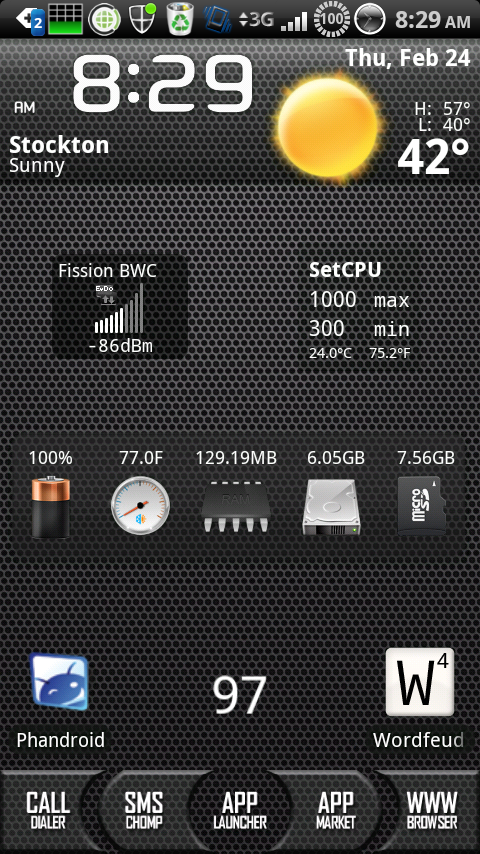
Here's mine now on Fission; the blue overlay isn't as elliptical as the red one, and it also looks bigger because I am using a smaller background image than the one used in ApeX (you know that triangle shaped image with the "+" sign in it) :D

snap20110224_082939.png
 
Nice, glad it's working out for you guys; I might change the overlay dot blue instead of red for me. I think it would look better in blue, but that's just me :D

Thanks for this man... I actually just changed it using NinjaMorph. But I agree, either a blue or green one would match better with the rest of the notification bar.
 
Back
Top Bottom